
Advancement Info: Bigger Advancements Screen + Progress Tracker (Fabric 26.3)
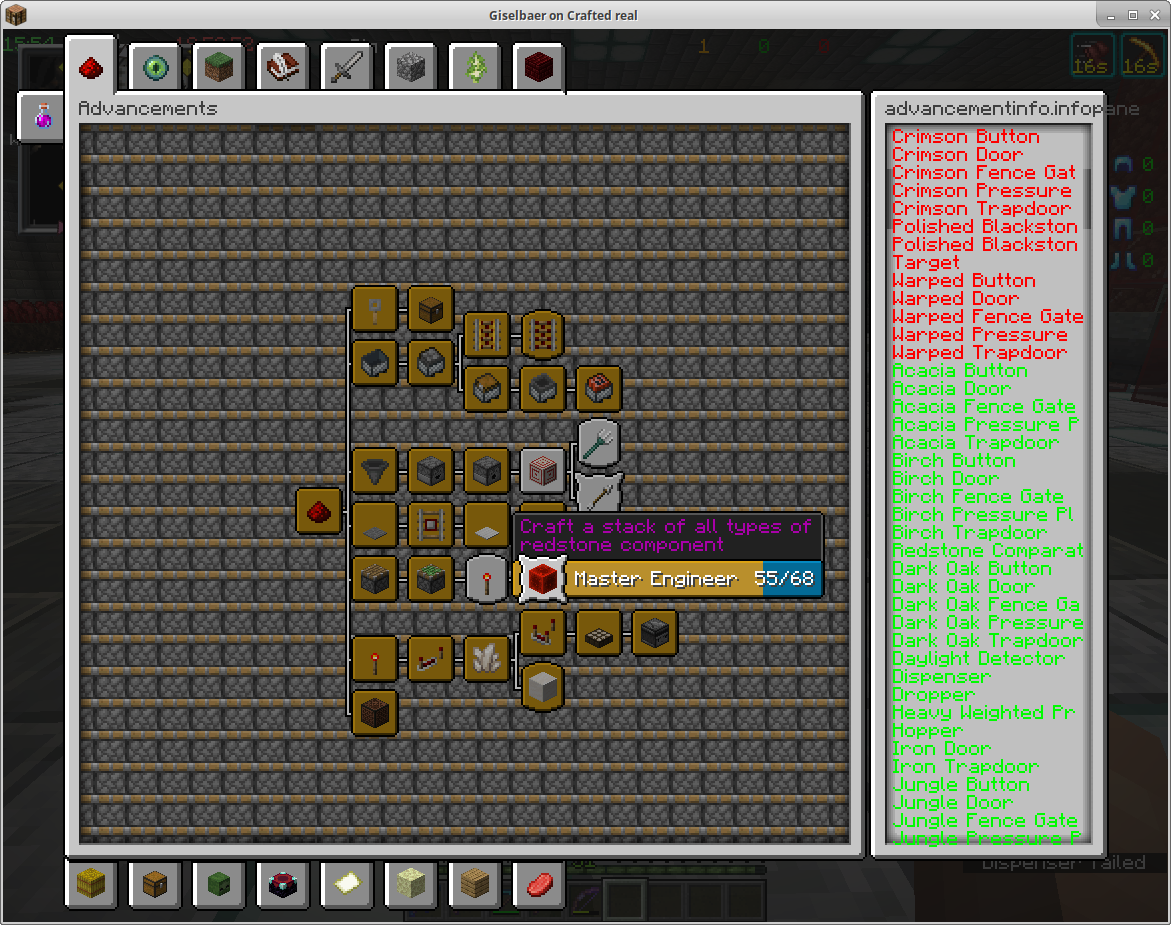
Finally see what you're missing. Advancement Info makes the advancements screen fill your whole window and adds a side panel listing exactly which requirements you've completed and which are left. Every biome for Adventuring Time, every food for A Balanced Diet, every mob for Monsters Hunted.
✅ Updated for Minecraft 26.3 on Fabric. The broken/overlapping screen from earlier versions is fixed.
🏆 Features
- Full-size advancement window: uses most of your screen instead of a tiny box, great at high GUI scale
- Requirement checklist: hover any advancement to see every criterion, green for done and red for missing
- Click to pin an advancement's checklist and scroll through it
- Search box: find advancements by name
- Show hidden advancements (optional)
- Configurable margins, panel width and colors (Cloth Config / Mod Menu)
🎯 Perfect for
Completionists, "All Advancements" runs and speedrun practice, and hunting down that last biome.
📦 Requirements
Fabric Loader, Fabric API and Cloth Config. Mod Menu is optional. Client only.
🙏 Credits
A continuation of Advancement Info by Guntram, maintained for modern Minecraft.

More from UltimateGamerMC
- Better Ping - see exact ping in milliseconds
- Chat Bubbles - chat floating above players' heads
- Bulk Villager Trading - auto-restock villager trades
- Interactic Updated - item physics and right-click pickup
- Borderless Mining Revived - borderless fullscreen
- Extra Mobs - mob texture variants
How to Install Advancement Info (Mod)
Advancement Info by UltimateGamerMC is verified for Fabric across Minecraft versions 1.21.10, 1.21.11, 1.21.9, 26.1.1, 26.3 (latest release: 26.3-fabric-1.4.0, file size: 45 KB). Follow the steps below to install it safely from ModCraft.tv:
- Click the Download button above and select your Minecraft version (1.21.10, 1.21.11, 1.21.9, 26.1.1, 26.3) and platform (Fabric).
- Make sure you have the compatible loader or environment installed for Fabric.
- Move the downloaded Advancement Info file into your Minecraft
.minecraft/modsfolder and launch the game.
All Versions
+ Add Version

- Updated for Minecraft 26.3
- Fixed the advancement window being drawn as overlapping broken pieces (#8)
- Fixed the requirement side panel not showing (#10)
- 26.1.1
- 1.21.11
- initial release


