
Description
Gallery
Changelog
Versions

What is Bewisclient?
Bewisclient is a Minecraft fabric mod which adds a ton of features. It can be added to all modpacks. Right Shift to open the Menu!
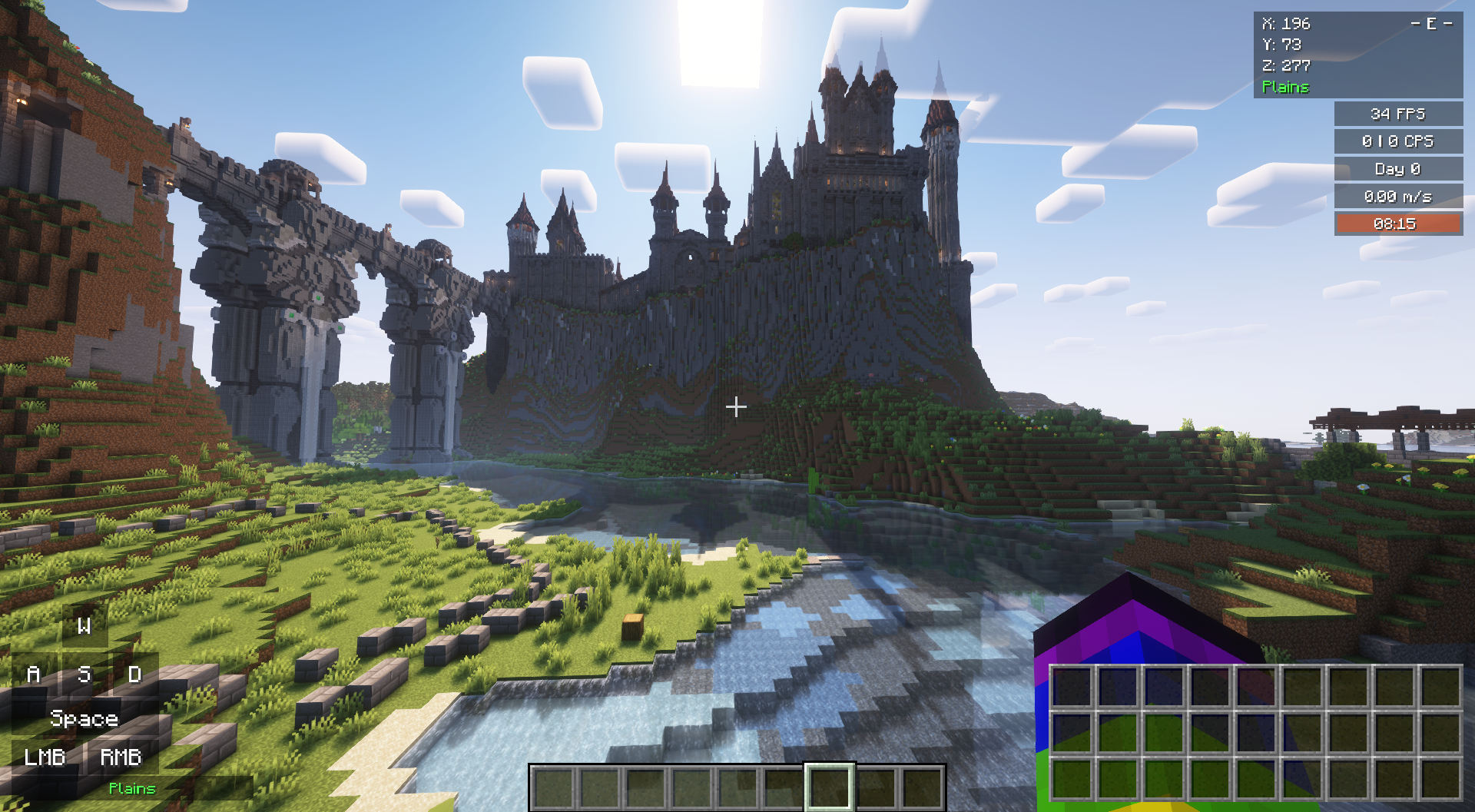
An important part of Bewisclient are widgets, which preset much information directly on your screen. These widgets are highly customizable to match your style and needs!
Other quality of life features are the following:
- Zoom
- Disable Pumpkin Overlay
- Fullbright
- Held Item Info
- Fire Height
- Shulker Box Tooltip
All Features
In Game Enhancements
- Fullbright
- Custom Block Border Color
- Custom Entity hit Color
- Held Item Info
- Zoom
- Disable Pumpkin Overlay
- No Fog (Lava, Water, Powder Snow, Nether)
- Scoreboard Scale
- Shulker Box Tooltip
- Perspective
- Fire Height
- Panorama Background Changer
- Pack Downloader from Modrinth
Widgets
- FPS Widget
- CPS Widget
- Armor Widget
- Coordinates Widget
- Biome Widget
- Day Widget
- Daytime Widget
- Ping Widget
- Key Widget
- Inventory Widget
- Speed Widget
- Tiwyla Widget (This is what you're looking at)
- Custom Widget
- Server IP Widget
Other Features
- Cosmetics
- Screenshot List
- Contact Screen
Not yet available in the newest Version
- Custom Crosshair (Beta)
- Different Profiles
- Mod menu
Trailer
Credit
Ideas:
- Shulker Box Tooltip
- Fullbright
- Mod Menu
- Badlion Client
- Lunar Client
- Held Item Info
- BetterF3 ...and many more
Used for gallery images:
- Iris shaders
- Complementary reimagined
- The Foelworn Stronghold + Senaburg Tributary
How to Install Bewisclient (Mod)
Bewisclient by Bewis09 is verified for Fabric across Minecraft versions 1.19.4, 1.20, 1.20-pre1, 1.20.1, 1.20.4, 1.20.6, 1.21, 1.21.1 (latest release: 3.3.1-26.1, file size: 7.4 MB). Follow the steps below to install it safely from ModCraft.tv:
- Click the Download button above and select your Minecraft version (1.19.4, 1.20, 1.20-pre1, 1.20.1, 1.20.4, 1.20.6, 1.21, 1.21.1) and platform (Fabric).
- Make sure you have the compatible loader or environment installed for Fabric.
- Move the downloaded Bewisclient file into your Minecraft
.minecraft/modsfolder and launch the game.
All Versions
+ Add Version| Name | Game version | Platforms | Published | Downloads | Actions |
|---|---|---|---|---|---|
| 1mo ago | 1 | ||||
| 1mo ago | 1 | ||||
| 1mo ago | 1 | ||||
| 5mo ago | 1 | ||||
| 7mo ago | 1 | ||||
| 7mo ago | 1 | ||||
| 7mo ago | 1 | ||||
| 7mo ago | 1 | ||||
| 7mo ago | 1 | ||||
| 7mo ago | 1 | ||||
| 7mo ago | 1 | ||||
| 9mo ago | 1 | ||||
| 9mo ago | 1 | ||||
| 9mo ago | 1 | ||||
| 9mo ago | 1 | ||||
| 9mo ago | 1 | ||||
| 9mo ago | 1 | ||||
| 9mo ago | 1 | ||||
| 9mo ago | 1 | ||||
| 9mo ago | 1 | ||||
| last yr. | 1 | ||||
| last yr. | 1 | ||||
| last yr. | 1 | ||||
| last yr. | 1 | ||||
| last yr. | 1 | ||||
| last yr. | 1 | ||||
| last yr. | 1 | ||||
| last yr. | 1 | ||||
| last yr. | 1 | ||||
| last yr. | 1 | ||||
| last yr. | 1 | ||||
| last yr. | 1 | ||||
| last yr. | 1 | ||||
| last yr. | 1 | ||||
| last yr. | 1 | ||||
| last yr. | 1 | ||||
| last yr. | 1 | ||||
| last yr. | 1 | ||||
| last yr. | 1 | ||||
| last yr. | 1 | ||||
| last yr. | 1 | ||||
| last yr. | 1 | ||||
| last yr. | 1 | ||||
| last yr. | 1 | ||||
| last yr. | 1 | ||||
| last yr. | 1 | ||||
| last yr. | 1 | ||||
| last yr. | 1 | ||||
| last yr. | 1 | ||||
| last yr. | 1 | ||||
| last yr. | 1 | ||||
| last yr. | 1 | ||||
| last yr. | 1 | ||||
| last yr. | 1 | ||||
| last yr. | 1 | ||||
| last yr. | 1 | ||||
| last yr. | 1 | ||||
| last yr. | 1 | ||||
| last yr. | 1 | ||||
| last yr. | 1 | ||||
| last yr. | 1 | ||||
| last yr. | 1 | ||||
| last yr. | 1 | ||||
| last yr. | 1 | ||||
| last yr. | 1 | ||||
| last yr. | 1 | ||||
| last yr. | 1 | ||||
| last yr. | 1 | ||||
| last yr. | 1 | ||||
| last yr. | 1 | ||||
| last yr. | 1 | ||||
| last yr. | 1 | ||||
| last yr. | 1 | ||||
| last yr. | 1 | ||||
| last yr. | 1 | ||||
| last yr. | 1 | ||||
| last yr. | 1 | ||||
| last yr. | 1 | ||||
| last yr. | 1 | ||||
| last yr. | 1 | ||||
| last yr. | 1 | ||||
| last yr. | 1 | ||||
| last yr. | 1 | ||||
| last yr. | 1 | ||||
| last yr. | 1 | ||||
| last yr. | 1 | ||||
| last yr. | 1 | ||||
| last yr. | 1 |


[3.3-beta.1-26.2] Bewisclient 3.3-beta.1-26.2
by Bewis09 on Jun 16, 2026
Download
### Additions
Fixed Bugs
- Added Minecrafty Options Menu
- Added Online Mode (Multiplayer Cosmetics)
- Added TNT Timer
Fixed Bugs
[3.2-1.21.1] Bewisclient 3.2-1.21.1
by Bewis09 on Apr 03, 2026
Download
### Additions
### Changes
- Armor Widget
- Pack Adder
- Allows you to download packs from modrinth
- Panorama
- Allows you to create panorama screenshots and set them in the title screen
- Quick Settings
- Allows you to set settings that you need frequently to be shown direktly when you open the settings menu
- Notifications
- Notify you
### Changes
- Don't know didn't track them
- Bug fixes (hopefully)
[3.2-1.21.4] Bewisclient 3.2-1.21.4
by Bewis09 on Apr 03, 2026
Download
### Additions
### Changes
- Armor Widget
- Pack Adder
- Allows you to download packs from modrinth
- Panorama
- Allows you to create panorama screenshots and set them in the title screen
- Quick Settings
- Allows you to set settings that you need frequently to be shown direktly when you open the settings menu
- Notifications
- Notify you
### Changes
- Don't know didn't track them
- Bug fixes (hopefully)
[3.2-1.21.5] Bewisclient 3.2-1.21.5
by Bewis09 on Apr 03, 2026
Download
### Additions
### Changes
- Armor Widget
- Pack Adder
- Allows you to download packs from modrinth
- Panorama
- Allows you to create panorama screenshots and set them in the title screen
- Quick Settings
- Allows you to set settings that you need frequently to be shown direktly when you open the settings menu
- Notifications
- Notify you
### Changes
- Don't know didn't track them
- Bug fixes (hopefully)
[3.2-1.21.8] Bewisclient 3.2-1.21.8
by Bewis09 on Apr 03, 2026
Download
### Additions
### Changes
- Armor Widget
- Pack Adder
- Allows you to download packs from modrinth
- Panorama
- Allows you to create panorama screenshots and set them in the title screen
- Quick Settings
- Allows you to set settings that you need frequently to be shown direktly when you open the settings menu
- Notifications
- Notify you
### Changes
- Don't know didn't track them
- Bug fixes (hopefully)
[3.2-1.21.10] Bewisclient 3.2-1.21.10
by Bewis09 on Apr 03, 2026
Download
### Additions
### Changes
- Armor Widget
- Pack Adder
- Allows you to download packs from modrinth
- Panorama
- Allows you to create panorama screenshots and set them in the title screen
- Quick Settings
- Allows you to set settings that you need frequently to be shown direktly when you open the settings menu
- Notifications
- Notify you
### Changes
- Don't know didn't track them
- Bug fixes (hopefully)
[3.2-1.21.11] Bewisclient 3.2-1.21.11
by Bewis09 on Apr 03, 2026
Download
### Additions
### Changes
- Armor Widget
- Pack Adder
- Allows you to download packs from modrinth
- Panorama
- Allows you to create panorama screenshots and set them in the title screen
- Quick Settings
- Allows you to set settings that you need frequently to be shown direktly when you open the settings menu
- Notifications
- Notify you
### Changes
- Don't know didn't track them
- Bug fixes (hopefully)
[3.2-26.1] Bewisclient 3.2-26.1
by Bewis09 on Apr 03, 2026
Download
### Additions
### Changes
- Armor Widget
- Pack Adder
- Allows you to download packs from modrinth
- Panorama
- Allows you to create panorama screenshots and set them in the title screen
- Quick Settings
- Allows you to set settings that you need frequently to be shown direktly when you open the settings menu
- Notifications
- Notify you
### Changes
- Don't know didn't track them
- Bug fixes (hopefully)
[3.1.3-1.21.5] Bewisclient 3.1.3-1.21.5
by Bewis09 on Jan 18, 2026
Download
### Changes
- Fixed a bug where the widgets wouldn't hide when the hud was hidden
[3.1.3-1.21.4] Bewisclient 3.1.3-1.21.4
by Bewis09 on Jan 18, 2026
Download
### Changes
- Fixed a bug where the widgets wouldn't hide when the hud was hidden
[3.1.3-1.21.1] Bewisclient 3.1.3-1.21.1
by Bewis09 on Jan 18, 2026
Download
### Changes
- Fixed a bug where the widgets wouldn't hide when the hud was hidden
[3.1.2-1.21.1] Bewisclient 3.1.2-1.21.1
by Bewis09 on Jan 18, 2026
Download
### Changes
- Changed Licence to the Bewisclient 1.0 International Public Licence (BIPL)
- Added Pack Adder as Experimental Feature
- Fixed some bugs
[3.1.2-1.21.4] Bewisclient 3.1.2-1.21.4
by Bewis09 on Jan 18, 2026
Download
### Changes
- Changed Licence to the Bewisclient 1.0 International Public Licence (BIPL)
- Added Pack Adder as Experimental Feature
- Fixed some bugs
[3.1.2-1.21.5] Bewisclient 3.1.2-1.21.5
by Bewis09 on Jan 18, 2026
Download
### Changes
- Changed Licence to the Bewisclient 1.0 International Public Licence (BIPL)
- Added Pack Adder as Experimental Feature
- Fixed some bugs
[3.1.2-1.21.8] Bewisclient 3.1.2-1.21.8
by Bewis09 on Jan 18, 2026
Download
### Changes
- Changed Licence to the Bewisclient 1.0 International Public Licence (BIPL)
- Added Pack Adder as Experimental Feature
- Fixed some bugs


