
ContainerSearcher
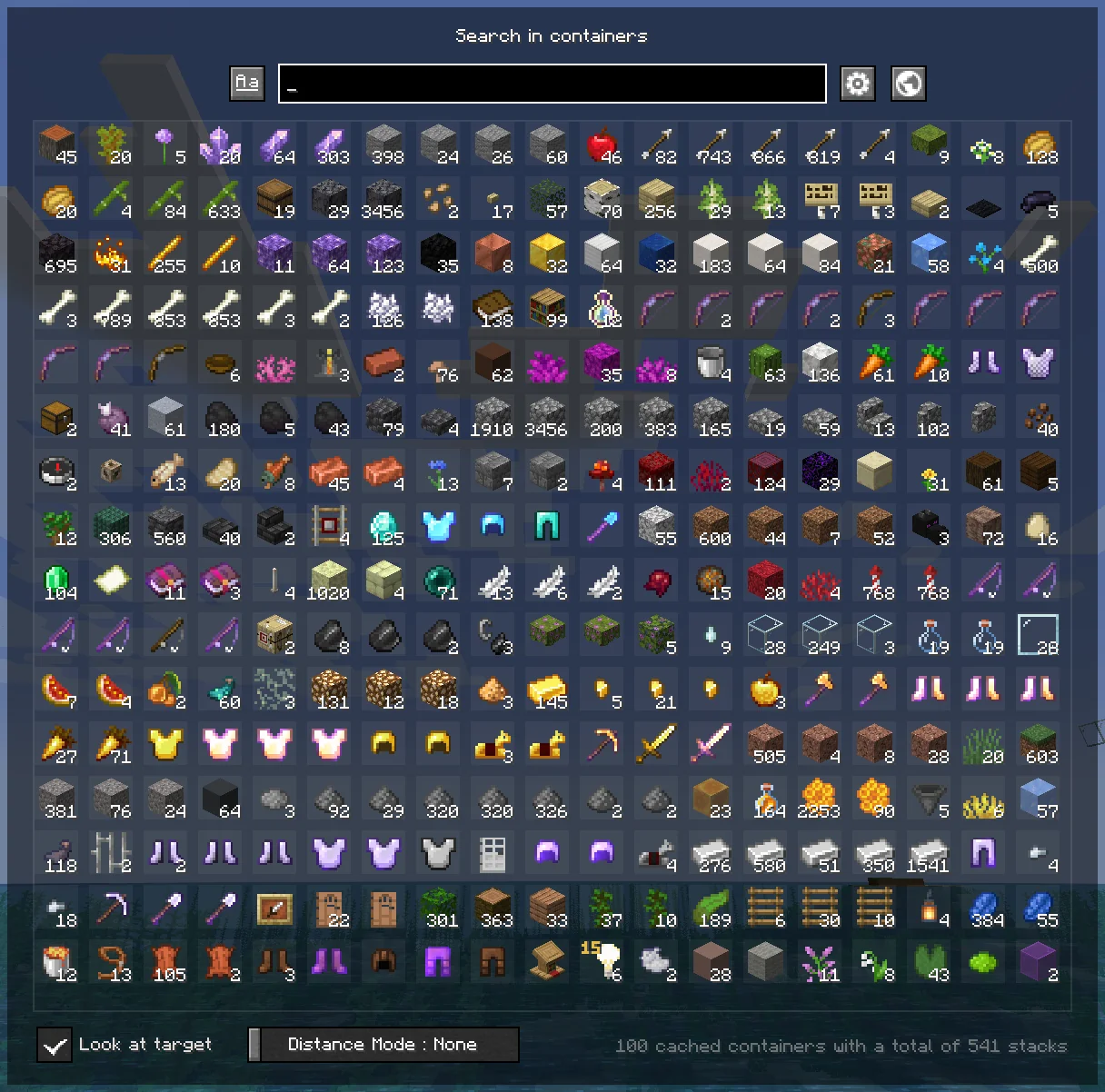
Caches opened containers and allows you to search through them via an in-game menu.
When you open a chest, its contents are saved to a file.
Using a keybind (NUMPAD 5 by default, can be changed in your keybindings) you can open a menu that shows the contents of all chests opened while you had this mod, allowing you to search for items with different sorting modes.
Clicking on an item will highlight the container it's in, draw a particle trail, and make you look in the direction of that container; if you're close enough, the container will open directly.
Once inside the container, the items you clicked on will be highlighted.
You can also configure a keybind to search for a hovered item in your inventory in nearby containers, as the Extra Utilities mod does.
👉🏻 Requires Fabric API and Cloth Config.
Mod menu is recommended to configure the mod.
FREQUENTLY ASKED QUESTIONS
How do I change the mod's keybindings?
You can find them in your normal Minecraft keybindings, look for the Container Searcher section, usually under the Miscellaneous section.
You will find two configurable keybindings, one to open the search menu as mentioned above, and another to search for the hovered stack in nearby containers.
ISSUES
⚠ DO NOT ASK (OR CREATE ISSUES) FOR UPDATES, UPDATES WILL COME WHENEVER I HAVE TIME ⚠
You would like to report an issue about this mod? refer to the Issue Tracker and please be concise, unique, and constructive.
You like what I do? Consider supporting me on my Patreon so I can continue to make and update Minecraft mods like this!
All Versions
+ Add Version
- 1.21.11
- Focused container's outline can now be customized
- 1.21.10
- added back support for custom model data
- cache file format changed, but should be compatible without changes
Made for 1.21.8, but seems to be working in 1.21.6.
- Support for custom model data dropped to solve the crash issue, it needs to be rethought
- 1.21.3
⚠ 1.21.4 is partially supported ⚠ Will crash if you click the search bar or if you play on a server that has items with custom model data.
Sorry for the late update, I hardly have time to update my mods these days.
- improved scroll container and scroll bar
- better item slots
- better item slot's tooltip
- world options gui update
- better config
- improved scroll container and scroll bar
- better item slots
- better item slot's tooltip
- world options gui update
- better config
- added support for Minecraft Realms
- updated codebase to Minecraft 1.20.1 (still supports 1.20)
- optimized Search Menu for better performance
- added dimension filter in the search menu
- moved the container statistic to the world options' menu instead
- added Streamer mode (hides container location)
- you can now configure the minimum block blink amount
- removed the hard-coded strings for translations
- lot of code refactor
- updated to 1.20.x
- changed container outline render phase, should be better
- better handling of stacks in the search menu with better scaling of the stack count when it exceeds four digits
- updated to minecraft 1.19.3
- dear mojang, it's not 1.20 already stop doing such big changes in code
- see version 0.1.7 for 1.19-1.19.2 for changelog
- added a scrollbar to the Search Menu!
- better searching for the Search Menu
- removed the keybind for search held item in near containers in favor of only keeping the search hovered inventory stack in near containers
- added an option to delete the cache of a singleplayer world automatically when the world is deleted
- added a maximum interaction time to avoid caching content in a wrong container
- added a config migration system for later
- changed the rendering method for the outline box around a highlighted container to try supporting optifine with shaders
- double chests should now be better handled, and will choose the position of the last interacted chest
- optimized some UI elements of the Search Menu and made the tooltip hover above (or under) the element and not on the element
Took 13 hours 56 minutes
- Updated to Minecraft 1.19.2
- Containers now caches if they are full
- Added an option to ignore full containers when using Quick Search Near
- Stacks with a count above 999 will have its count reduced in size (to look forward for damage bar being smaller)
- Search bar will now be smaller if it can't fit in the menu's width
- Slots size will be smaller if the window is small
- Fixed tooltip rendering (background of other slots rendering on top)
- Changed some internal code (better performance)


