
EaseGUI is a client-side mod that adds smooth, dynamic entry animations to Minecraft screens and interfaces!

Animated Elements
Background Blur • Minecraft Logo • Buttons • Text Labels • Scrollable Lists • Containers
Fabric Requirements


Customization
The mod offers customization options for every element category. You can configure animations globally for all screens or fine-tune them individually for specific menus to suit your taste.
Configuration parameters explained
- Animation [ON/OFF] — Toggles animations for the selected element category.
- Duration — Controls how long the animation lasts (in milliseconds).
- Offset [X/Y] — Sets the starting position of the element relative to its final layout position.
- Initial Scale [X/Y] — Controls the scale of the element at the beginning of the animation.
- Initial Alpha — Adjusts the starting opacity (transparency) of the element.
- Cascade Delay — The time delay between animating consecutive elements of the same type (creates a beautiful staggered entry effect).
- Cascade Order — The direction of the staggered sequence.
- Pivot Point — The anchor point used for scaling transformations (e.g., scaling from the center, top-left, etc.).
- Easing (Interpolation) — The mathematical curve that defines the acceleration profile and overall feel of the animation.

By default, a clean and simplified global animation preset is applied. However, you can craft unique transitions for each screen or disable them entirely where they aren't needed.
Compatibility & Known Issues
🟩 Resource Packs: Full Compatibility
The mod is fully compatible with any custom resource packs.
Tip: If your resource pack includes a custom Main Menu logo and you prefer to use it instead of the animated EaseGUI version, simply change the "Logo Type" setting to "Whole Text" in the mod configuration.
🟨 Highly Intrusive UI Mods
The main compatibility risks come from mods that heavily overhaul vanilla interfaces, completely rewrite their base rendering logic, or hard-code rigid element positions.
If you encounter rendering issues with a specific screen, you can easily tweak or completely disable the animation for that individual screen in the config menu while keeping smooth transitions across the rest of the game.
All Versions
+ Add Version| Name | Game version | Platforms | Published | Downloads | Actions |
|---|---|---|---|---|---|
| 1d ago | 1 | ||||
| 1d ago | 1 | ||||
| 1d ago | 1 | ||||
| 1d ago | 1 | ||||
| 1d ago | 1 | ||||
| 1d ago | 1 | ||||
| 1d ago | 1 | ||||
| 1d ago | 1 | ||||
| 1d ago | 1 | ||||
| 1d ago | 1 | ||||
| 1d ago | 1 | ||||
| 1d ago | 1 | ||||
| 1d ago | 1 | ||||
| 1d ago | 1 | ||||
| 1d ago | 1 | ||||
| 1d ago | 1 | ||||
| 1d ago | 1 | ||||
| 1d ago | 1 | ||||
| 1d ago | 1 | ||||
| 1d ago | 1 | ||||
| 1d ago | 1 | ||||
| 1d ago | 1 | ||||
| 1d ago | 1 | ||||
| 1d ago | 1 | ||||
| 1d ago | 1 | ||||
| 1d ago | 1 | ||||
| 1d ago | 1 | ||||
| 1d ago | 1 | ||||
| 1d ago | 1 | ||||
| 1d ago | 1 | ||||
| 1d ago | 1 | ||||
| 1d ago | 1 | ||||
| 1d ago | 1 | ||||
| 1d ago | 1 | ||||
| 1d ago | 1 | ||||
| 1d ago | 1 | ||||
| 1d ago | 1 | ||||
| 1d ago | 1 | ||||
| 1d ago | 1 | ||||
| 1d ago | 1 |


### Improvements
- Added a dedicated preview when configuring animations for container screens
- Added a "Animation disabled globally" warning in the animation profile editor, which is displayed if all EaseGUI animations have been disabled globally
- Added text truncation for text that does not fit on a single line (with a high GUI Scale) on the main configuration screen
- Added tooltips to the profile settings screen
- Screen titles on the main configuration screen are now shorter and more appropriate
- Improved the animation system for more stable operation
### Changes
- [Fabric] Added a warning about incompatibility with Vulkan Mod in
fabric.mod.json
### Fixes
- Copyright text on the main menu screen no longer animates
- Container animations no longer repeat when switching from one container screen to another. This fix may not work on some servers that implement their interfaces through container screens using complex technical methods
### Improvements
- Added a dedicated preview when configuring animations for container screens
- Added a "Animation disabled globally" warning in the animation profile editor, which is displayed if all EaseGUI animations have been disabled globally
- Added text truncation for text that does not fit on a single line (with a high GUI Scale) on the main configuration screen
- Added tooltips to the profile settings screen
- Screen titles on the main configuration screen are now shorter and more appropriate
- Improved the animation system for more stable operation
### Changes
- [Fabric] Added a warning about incompatibility with Vulkan Mod in
fabric.mod.json
### Fixes
- Copyright text on the main menu screen no longer animates
- Container animations no longer repeat when switching from one container screen to another. This fix may not work on some servers that implement their interfaces through container screens using complex technical methods
- Updated to Minecraft 26.3!
- Updated to Minecraft 26.3!
- A full backport of the release version 1.0.0 from 26.2!**
- A full backport of the release version 1.0.0 from 26.2!**
- Release Version!**
### Improvements
- Added a dedicated preview when configuring animations for container screens
- Added a "Animation disabled globally" warning in the animation profile editor, which is displayed if all EaseGUI animations have been disabled globally
- Added text truncation for text that does not fit on a single line (with a high GUI Scale) on the main configuration screen
- Added tooltips to the profile settings screen
- Screen titles on the main configuration screen are now shorter and more appropriate
- Improved the animation system for more stable operation
### Fixes
- Buttons inside book screens (
PageButton) no longer animate. The book title input field on the book signing screen no longer animates either - Copyright text on the main menu screen no longer animates
- Container animations no longer repeat when switching from one container screen to another. This fix may not work on some servers that implement their interfaces through container screens using complex technical methods
- Release Version!**
### Improvements
- Added a dedicated preview when configuring animations for container screens
- Added a "Animation disabled globally" warning in the animation profile editor, which is displayed if all EaseGUI animations have been disabled globally
- Added text truncation for text that does not fit on a single line (with a high GUI Scale) on the main configuration screen
- Added tooltips to the profile settings screen
- Screen titles on the main configuration screen are now shorter and more appropriate
- Improved the animation system for more stable operation
### Fixes
- Buttons inside book screens (
PageButton) no longer animate. The book title input field on the book signing screen no longer animates either - Copyright text on the main menu screen no longer animates
- Container animations no longer repeat when switching from one container screen to another. This fix may not work on some servers that implement their interfaces through container screens using complex technical methods
- Fixed a "Can only blur once per frame" crash that occurred when EaseGUI attempted to apply background blur to an already blurred background (specifically, to screens of other mods that also use vanilla background blur) - [#7](https://github.com/Weyne1/EaseGUI/issues/7)
- Fixed a "Can only blur once per frame" crash that occurred when EaseGUI attempted to apply background blur to an already blurred background (specifically, to screens of other mods that also use vanilla background blur) - [#7](https://github.com/Weyne1/EaseGUI/issues/7)
- Fixed a "Can only blur once per frame" crash that occurred when EaseGUI attempted to apply background blur to an already blurred background (specifically, to screens of other mods that also use vanilla background blur) - [#7](https://github.com/Weyne1/EaseGUI/issues/7)
- Fixed a "Can only blur once per frame" crash that occurred when EaseGUI attempted to apply background blur to an already blurred background (specifically, to screens of other mods that also use vanilla background blur) - [#7](https://github.com/Weyne1/EaseGUI/issues/7)
- Major Quality-of-Life Update**
### Revamped Configuration Screen
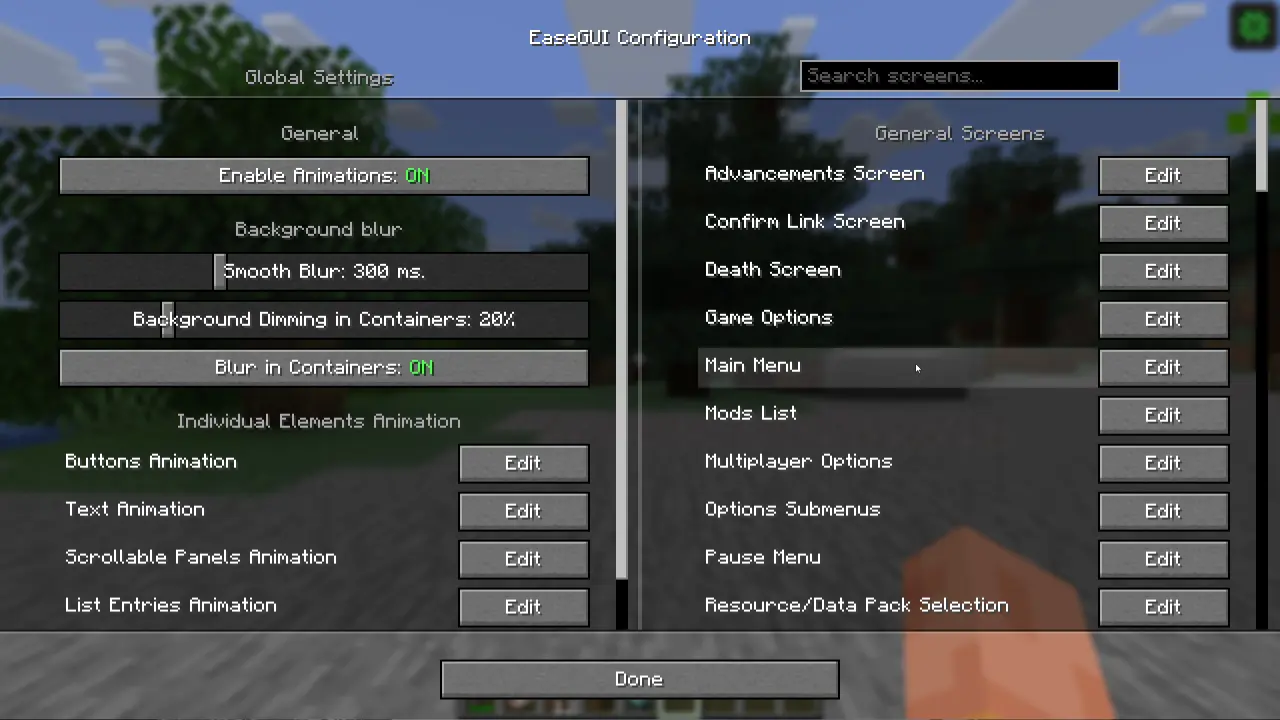
- Added a "Blur Duration" slider for easily fine-tuning smooth blur
- Added a "Background Dimming in Containers" slider (default value: 20%; vanilla value: 75%)
- Replaced wide individual screen settings buttons with new rows that are easier to navigate and feature a subtle hover animation
- Added a quick search bar for screens! Furthermore, the screen list now remembers and restores both your scroll position and search query when returning from sub-config menus
### Updated Data Storage Format
Schema version has been updated to 3. Key changes:
- All keys and their values are now written in
snake_case - Animation profile properties have been renamed for consistency:
offset->initial_offsetstartScale->initial_scalestartAlpha->initial_alpha
> ⚠️ **Important note on config migration**
>
> Config files will migrate to the new schema version automatically upon launch, preserving your existing settings. However, **backward compatibility is not supported** (older mod versions cannot read the new schema). It is highly recommended to back up your config file if you plan to downgrade and wish to keep your custom settings.
### Improved Background Blur & Dimming
- Fixed missing smooth background animation in the Creative Inventory screen
- Fixed redundant background dim animations when switching to a screen (which was unlisted or disabled in the config) if the previous screen was already blurred and dimmed
- Background animation now applies to all in-game screens
### Added New Screen Animated by Default
- Open Link confirmation screen
### Other Fixes & Improvements
- The Creeper face is back on the letter 'A' in the logo! ~~*Don't ask where it went...*~~
- Major Quality-of-Life Update**
### Revamped Configuration Screen

- Added a "Blur Duration" slider for easily fine-tuning smooth blur
- Added a "Background Dimming in Containers" slider (default value: 20%; vanilla value: 75%)
- Replaced wide individual screen settings buttons with new rows that are easier to navigate and feature a subtle hover animation
- Added a quick search bar for screens! Furthermore, the screen list now remembers and restores both your scroll position and search query when returning from sub-config menus
### Updated Data Storage Format
Schema version has been updated to 3. Key changes:
- All keys and their values are now written in
snake_case - Animation profile properties have been renamed for consistency:
offset->initial_offsetstartScale->initial_scalestartAlpha->initial_alpha
> ⚠️ **Important note on config migration**
>
> Config files will migrate to the new schema version automatically upon launch, preserving your existing settings. However, **backward compatibility is not supported** (older mod versions cannot read the new schema). It is highly recommended to back up your config file if you plan to downgrade and wish to keep your custom settings.
### Improved Background Blur & Dimming
- Fixed missing smooth background animation in the Creative Inventory screen
- Fixed redundant background dim animations when switching to a screen (which was unlisted or disabled in the config) if the previous screen was already blurred and dimmed
- Background animation now applies to all in-game screens
### Added New Screen Animated by Default
- Open Link confirmation screen
### Other Fixes & Improvements
- The Creeper face is back on the letter 'A' in the logo! ~~*Don't ask where it went...*~~
- Major Quality-of-Life Update**
### Revamped Configuration Screen

- Added a "Blur Duration" slider for easily fine-tuning smooth blur
- Added a "Background Dimming in Containers" slider (default value: 20%; vanilla value: 75%)
- Replaced wide individual screen settings buttons with new rows that are easier to navigate and feature a subtle hover animation
- Added a quick search bar for screens! Furthermore, the screen list now remembers and restores both your scroll position and search query when returning from sub-config menus
### Updated Data Storage Format
Schema version has been updated to 3. Key changes:
- All keys and their values are now written in
snake_case - Animation profile properties have been renamed for consistency:
offset->initial_offsetstartScale->initial_scalestartAlpha->initial_alpha
> ⚠️ **Important note on config migration**
>
> Config files will migrate to the new schema version automatically upon launch, preserving your existing settings. However, **backward compatibility is not supported** (older mod versions cannot read the new schema). It is highly recommended to back up your config file if you plan to downgrade and wish to keep your custom settings.
### Improved Background Blur & Dimming
- Fixed missing smooth background animation in the Creative Inventory screen
- Fixed redundant background dim animations when switching to a screen (which was unlisted or disabled in the config) if the previous screen was already blurred and dimmed
- Background animation now applies to all in-game screens
### Added New Screens Animated by Default
- Open Link confirmation screen
- Book signing screen
### Other Fixes & Improvements
- The Creeper face is back on the letter 'A' in the logo! ~~*Don't ask where it went...*~~
- Major Quality-of-Life Update**
### Revamped Configuration Screen

- Added a "Blur Duration" slider for easily fine-tuning smooth blur
- Added a "Background Dimming in Containers" slider (default value: 20%; vanilla value: 75%)
- Replaced wide individual screen settings buttons with new rows that are easier to navigate and feature a subtle hover animation
- Added a quick search bar for screens! Furthermore, the screen list now remembers and restores both your scroll position and search query when returning from sub-config menus
### Updated Data Storage Format
Schema version has been updated to 3. Key changes:
- All keys and their values are now written in
snake_case - Animation profile properties have been renamed for consistency:
offset->initial_offsetstartScale->initial_scalestartAlpha->initial_alpha
> ⚠️ **Important note on config migration**
>
> Config files will migrate to the new schema version automatically upon launch, preserving your existing settings. However, **backward compatibility is not supported** (older mod versions cannot read the new schema). It is highly recommended to back up your config file if you plan to downgrade and wish to keep your custom settings.
### Improved Background Blur & Dimming
- Fixed missing smooth background animation in the Creative Inventory screen
- Fixed redundant background dim animations when switching to a screen (which was unlisted or disabled in the config) if the previous screen was already blurred and dimmed
- Background animation now applies to all in-game screens
### Added New Screens Animated by Default
- Open Link confirmation screen
- Book signing screen
### Other Fixes & Improvements
- The Creeper face is back on the letter 'A' in the logo! ~~*Don't ask where it went...*~~
- Major Quality-of-Life Update**
### Revamped Configuration Screen

- Added a "Blur Duration" slider for easily fine-tuning smooth blur
- Added a "Background Dimming in Containers" slider (default value: 20%; vanilla value: 75%)
- Replaced wide individual screen settings buttons with new rows that are easier to navigate and feature a subtle hover animation
- Added a quick search bar for screens! Furthermore, the screen list now remembers and restores both your scroll position and search query when returning from sub-config menus
### Updated Data Storage Format
Schema version has been updated to 3. Key changes:
- All keys and their values are now written in
snake_case - Animation profile properties have been renamed for consistency:
offset->initial_offsetstartScale->initial_scalestartAlpha->initial_alpha
> ⚠️ **Important note on config migration**
>
> Config files will migrate to the new schema version automatically upon launch, preserving your existing settings. However, **backward compatibility is not supported** (older mod versions cannot read the new schema). It is highly recommended to back up your config file if you plan to downgrade and wish to keep your custom settings.
### Improved Background Blur & Dimming
- Fixed missing smooth background animation in the Creative Inventory screen
- Fixed redundant background dim animations when switching to a screen (which was unlisted or disabled in the config) if the previous screen was already blurred and dimmed
- Background animation now applies to all in-game screens
### Added New Screens Animated by Default
- World Options screen
- Open Link confirmation screen
- Book signing screen
### Other Fixes & Improvements
- Fixed redundant alpha modifications during animations, which previously caused some element textures (particularly buttons) to render with uneven opacity across different areas
- The Creeper face is back on the letter 'A' in the logo! ~~*Don't ask where it went...*~~
- Major Quality-of-Life Update**
### Revamped Configuration Screen

- Added a "Blur Duration" slider for easily fine-tuning smooth blur
- Added a "Background Dimming in Containers" slider (default value: 20%; vanilla value: 75%)
- Replaced wide individual screen settings buttons with new rows that are easier to navigate and feature a subtle hover animation
- Added a quick search bar for screens! Furthermore, the screen list now remembers and restores both your scroll position and search query when returning from sub-config menus
### Updated Data Storage Format
Schema version has been updated to 3. Key changes:
- All keys and their values are now written in
snake_case - Animation profile properties have been renamed for consistency:
offset->initial_offsetstartScale->initial_scalestartAlpha->initial_alpha
> ⚠️ **Important note on config migration**
>
> Config files will migrate to the new schema version automatically upon launch, preserving your existing settings. However, **backward compatibility is not supported** (older mod versions cannot read the new schema). It is highly recommended to back up your config file if you plan to downgrade and wish to keep your custom settings.
### Improved Background Blur & Dimming
- Fixed missing smooth background animation in the Creative Inventory screen
- Fixed redundant background dim animations when switching to a screen (which was unlisted or disabled in the config) if the previous screen was already blurred and dimmed
- Background animation now applies to all in-game screens
### Added New Screens Animated by Default
- World Options screen
- Open Link confirmation screen
- Book signing screen
### Other Fixes & Improvements
- Fixed redundant alpha modifications during animations, which previously caused some element textures (particularly buttons) to render with uneven opacity across different areas
- The Creeper face is back on the letter 'A' in the logo! ~~*Don't ask where it went...*~~
- Backport for version 1.20.1!**
### Features
- Implemented a custom smooth background blur effect (since the game itself only added blur in 1.21)
- Backport for version 1.20.1!**
### Features
- Implemented a custom smooth background blur effect (since the game itself only added blur in 1.21)
### What's new
- Added the ability to disable all EaseGUI animations with a single button in the UI config
### Fixes & Improvements:
- Fixed an issue where container animation overrides couldn't be disabled in the config UI
- Fixed alpha flickering when using complex animation curves (EASE_OUT_ELASTIC, EASE_OUT_BACK)
- Improved scale animation handling for complex animation curves
- Fixed missing alpha animation for 3D GUI elements (player skins, armor stands, etc.)
- Fixed missing alpha animation for text widget backgrounds
### What's new
- Added the ability to disable all EaseGUI animations with a single button in the UI config
### Fixes & Improvements:
- Fixed an issue where container animation overrides couldn't be disabled in the config UI
- Fixed alpha flickering when using complex animation curves (EASE_OUT_ELASTIC, EASE_OUT_BACK)
- Improved scale animation handling for complex animation curves
- Fixed missing alpha animation for 3D GUI elements (player skins, armor stands, etc.)
- Fixed missing alpha animation for text widget backgrounds
Technical update to align with new versions with minor improvements
### What's new
- Added the ability to disable all EaseGUI animations with a single button in the UI config
### Compatibility
- Implemented compatibility with the What Are They Up To (WATUT) mod
- Fixed incorrect rendering of the creative inventory with the EMI mod if the EMI overlay is disabled in its config
### UI Config Improvements
- The "Other Containers" button in the screen menu has been moved to the end of the category, regardless of the language setting
- Selecting any container screen from the list now immediately opens the animation profile editor for that container
- The button for overriding container animations for non-container screens has been removed as unnecessary
### Fixes
- Fixed alpha flickering when using complex animation curves (EASE_OUT_ELASTIC, EASE_OUT_BACK)
Technical update to align with new versions with minor improvements
### What's new
- Added the ability to disable all EaseGUI animations with a single button in the UI config
### Compatibility
- Implemented compatibility with the What Are They Up To (WATUT) mod
- Fixed incorrect rendering of the creative inventory with the EMI mod if the EMI overlay is disabled in its config
### UI Config Improvements
- The "Other Containers" button in the screen menu has been moved to the end of the category, regardless of the language setting
- Selecting any container screen from the list now immediately opens the animation profile editor for that container
- The button for overriding container animations for non-container screens has been removed as unnecessary
### Fixes
- Fixed alpha flickering when using complex animation curves (EASE_OUT_ELASTIC, EASE_OUT_BACK)
- Mod updated for Minecraft 26.2!**\
### Fixes & Improvements:
- Fixed an issue where container animation overrides couldn't be disabled in the config UI
- Fixed alpha flickering when using complex animation curves (EASE_OUT_ELASTIC, EASE_OUT_BACK)
- Improved scale animation handling for complex animation curves
- Fixed missing alpha animation for 3D GUI elements (player skins, armor stands, etc.)
- Fixed missing alpha animation for text widget backgrounds
- Mod updated for Minecraft 26.2!**\
### Fixes & Improvements:
- Fixed an issue where container animation overrides couldn't be disabled in the config UI
- Fixed alpha flickering when using complex animation curves (EASE_OUT_ELASTIC, EASE_OUT_BACK)
- Improved scale animation handling for complex animation curves
- Fixed missing alpha animation for 3D GUI elements (player skins, armor stands, etc.)
- Fixed missing alpha animation for text widget backgrounds
### UI Config Improvements
- The "Other Containers" button in the screen menu has been moved to the end of the category, regardless of the language setting.
- Selecting any container screen from the list now immediately opens the animation profile editor for that container.
- The button for overriding container animations for non-container screens has been removed as unnecessary.
### Compatibility
- Added compatibility with the Simple Menu mod. It is now possible to change the logo and edition textures using Simple Menu.
### Fixes
- Fixed a bug involving background blur in containers that broke UI element layering when switching to certain other screens (e.g., when opening the Ponder menu from the Create mod).
### UI Config Improvements
- The "Other Containers" button in the screen menu has been moved to the end of the category, regardless of the language setting.
- Selecting any container screen from the list now immediately opens the animation profile editor for that container.
- The button for overriding container animations for non-container screens has been removed as unnecessary.
### Compatibility
- Added compatibility with the Simple Menu mod. It is now possible to change the logo and edition textures using Simple Menu.
### Fixes
- Fixed a bug involving background blur in containers that broke UI element layering when switching to certain other screens (e.g., when opening the Ponder menu from the Create mod).
### Compatibility
- Added compatibility with the Simple Menu mod. It is now possible to change the logo and edition textures using Simple Menu.
### Fixes
- Fixed a bug involving background blur in containers that broke UI element layering when switching to certain other screens (e.g., when opening the Ponder menu from the Create mod).
### Compatibility
- Added compatibility with the Simple Menu mod. It is now possible to change the logo and edition textures using Simple Menu.
### Fixes
- Fixed a bug involving background blur in containers that broke UI element layering when switching to certain other screens (e.g., when opening the Ponder menu from the Create mod).


![[ETF] Entity Texture Features](uploads/icons/thumbs/etf-entity-texture-features_2cd5af9c_thumb.jpg)