
EzShops – The Ultimate Minecraft Shop Plugin
EzShops is the all-in-one shop solution for Minecraft servers, offering advanced shop menus, dynamic pricing, sign trading, player marketplaces, and seamless API integrations. Designed for Paper, Purpur, Spigot, and Bukkit (1.7–26.1+), EzShops empowers server owners to deliver a polished, feature-rich economy experience with minimal setup.
Check our latest project: PvPIndex


- Requires Vault & compatible economy plugin
- Dynamic pricing engine & persistent market state
- ShopPriceService API for plugin integration
- Full documentation: EzShops Docs
Note: Vault and an economy plugin are required for currency transactions.
Join our Discord for support & community
⭐ Why this shop plugin?
- Modern Shop Menus: Intuitive GUIs with category icons, quantity selectors, bulk buy/sell, and customizable lore.
- Dynamic Pricing: Prices automatically adjust based on player activity, with persistent state across restarts.
- Rotating Specials: Schedule daily or timed specials with weighted or random rotations, no manual recoding needed.
- Sign Shop Integration: Create buy/sell signs that mirror menu prices and formats, perfect for towns and markets.
- Player Shops: Let players run their own chest shops with secure, branded signs, automatic stock management, and smart item labels — sign names automatically show potion effects and enchantment details.
- Stock Market System: Enable real-time, demand-driven pricing for select items, with admin controls and persistent overrides.
- Instant Config Reload: Use
/shop reloadto update all configs and menus live, no server restart required. - Sell boosts: Option for sell boosts through integration with our EzBoost plugin - see the EzBoost integration docs.
- API Ready: Integrate with other plugins or custom features using the robust ShopPriceService API.


⚡ Key features of EzShops
- Easy Setup: Auto-generates default configs, categories, and layouts on first run.
- Flexible Customization: Edit categories, item prices, menu layouts, and sign formats to match your server’s branding.
- Advanced Permissions: Fine-tune access for shop, stock market, sign creation, and player shop management.
- Localization: Multi-language support, just set your preferred language in
config.yml. - Performance Optimized: Designed for large servers with async operations and caching.
🛒 Powerful Shop & Stock Market Commands
/shop– Open the shop GUI or browse all items./shop buy <item> [amount]– Buy items directly from chat./shop sell <item> [amount]– Sell items directly from chat./sellhand,/sellinventory– Quick-sell items or entire inventories./price <material>– Check live buy/sell prices./shop reload– Reload all configs instantly./shopadmin reseed [mode]– Restore missing bundled category defaults (all modes or one mode) without overwriting existing files./stock buy <item> <amount>– Buy stock market items at the current price./stock sell <item> <amount>– Sell your stock market items./stock overview– View all stock market items and their current prices./stockadmin– Full admin controls for the stock market.
See the full command list and permissions.
🛠️ Configuration & Customization
- Categories & Items: Organize your shop with unlimited categories and custom item settings.
- Dynamic Pricing: Enable per-item or global dynamic pricing for a living, player-driven economy.
- Rotations: Schedule daily specials or timed offers with easy YAML config.
- Sign Shops: Mirror menu offers on signs, perfect for player towns and spawn markets.
- Player Shops: Empower your community to create secure, automated chest shops.
- Localization: Support for English, Spanish, Dutch, Chinese, and more.
Full setup and config details: Configuration Guide - including shop items, menu layout, and localization.
🪧 Sign Shops & Player Shops


📦 API & Plugin Integration
- ShopPriceService API: Query prices, execute transactions, and integrate with other plugins.
- Stock Market API: Real-time price updates, player holdings, and admin controls.
- Ready for EzAuction & EzEconomy: Out-of-the-box integration with other EzPlugins.
🚀 Get Started in Minutes
- Install Vault and an economy plugin.
- Drop
EzShops.jarinto yourplugins/folder. - Restart your server to auto-generate configs.
- Edit
shop.ymland category files to customize your shop. - Grant permissions to your staff and players as needed.
Deliver a next-level shop experience on your Minecraft server with EzShops!
Looking for more? Try EzAuction and EzEconomy for a complete economy suite!


How to Install EzShops (Plugin)
EzShops by Shadow48402 is verified for Bukkit, Folia, Paper, Purpur, Spigot across Minecraft versions 1.10, 1.10.1, 1.10.2, 1.11, 1.11.1, 1.11.2, 1.12, 1.12.1 (latest release: 2.5.9, file size: 4.0 MB). Follow the steps below to install it safely from ModCraft.tv:
- Click the Download button above and select your Minecraft version (1.10, 1.10.1, 1.10.2, 1.11, 1.11.1, 1.11.2, 1.12, 1.12.1) and platform (Bukkit, Folia, Paper, Purpur, Spigot).
- Make sure you have the compatible loader or environment installed for Bukkit, Folia, Paper, Purpur, Spigot.
- Move the downloaded EzShops file into your Minecraft
.minecraft/pluginsfolder and launch the game.
All Versions
+ Add Version| Name | Game version | Platforms | Published | Downloads | Actions |
|---|---|---|---|---|---|
| 2mo ago | 19 | ||||
| 2mo ago | 9 | ||||
| 2mo ago | 6 | ||||
| 2mo ago | 5 | ||||
| 2mo ago | 4 | ||||
| 2mo ago | 3 | ||||
| 2mo ago | 3 | ||||
| 2mo ago | 2 | ||||
| 2mo ago | 2 | ||||
| 2mo ago | 2 | ||||
| 2mo ago | 2 | ||||
| 2mo ago | 2 | ||||
| 2mo ago | 1 | ||||
| 2mo ago | 1 | ||||
| 2mo ago | 1 | ||||
| 2mo ago | 1 | ||||
| 2mo ago | 1 | ||||
| 2mo ago | 1 | ||||
| 2mo ago | 1 | ||||
| 2mo ago | 1 | ||||
| 2mo ago | 1 | ||||
| 2mo ago | 1 | ||||
| 2mo ago | 1 | ||||
| 2mo ago | 1 | ||||
| 2mo ago | 1 | ||||
| 2mo ago | 1 | ||||
| 2mo ago | 1 | ||||
| 2mo ago | 1 | ||||
| 2mo ago | 1 | ||||
| 2mo ago | 1 |


### Added
- Manual category default reseed command** — added
/shopadmin reseed [mode]to restore missing bundled category defaults on demand without overwriting existing files. Omittingmodereseeds all bundled modes; providing a mode (e.g.prison,smp) reseeds only that mode.
### Changed
- Bootstrap architecture cleanup** — startup and shutdown orchestration now lives in the
bootstrappackage (EzShopsBootstrap), whileEzShopsPluginis reduced to a thin lifecycle entry point (onEnable/onDisabledelegation). - Runtime component access moved to registry** — component/debug/reseed accessors are now provided by
EzShopsRegistry, removing lifecycle/state getters fromEzShopsPlugin.
### Fixed
- Default category file persistence across restarts** — bundled category defaults are now seeded per mode directory (
shop/{mode}/categories/*.yml) and are no longer recreated automatically for existing mode directories when server owners intentionally delete them. - Mode support for default seeding** — bundled shop resource discovery now works across available packaged modes (including future bundled modes), rather than relying on prison-only default category handling.
### Fixed
- Config persistence after reloads** —
/shop reloadnow reloadsconfig.ymlfrom disk before refreshing pricing/features, and setup GUI toggles now reload config before saving. This prevents stale in-memory values from being written back over server-owner edits. - Shop category parser resilience** — category parsing now isolates failures per category so one malformed entry can no longer break loading of the category set.
- Duplicate-material shop entries** — when multiple items intentionally share the same material (for example splash potion variants), pricing keys are now resolved per-item to prevent collisions that could cause broken/empty category behavior.
- List-style
on-buy/on-sellhooks now execute** — command hook parsing now accepts both list syntax (on-buy: - "cmd") and nested syntax (on-buy.commands) for compatibility with the documented format, preventing silent no-op purchases foritem-type: COMMANDentries.
Through time we've made the stock market more stable, by doing this the documentation got outdated and configuration options that existed before got phased out. This version there was focus on updating the documentation and adding back options that got phased out in a more stable way.
### Added
- Configurable stock price-engine parameters** -
volatility-min,volatility-max,demand-multiplier,min-price, andupdate-intervalare now realconfig.ymloptions under thestock:section. The plugin reads them on startup and applies them to the price engine. All defaults match the previously hardcoded values so existing behaviour is preserved.
### Fixed
- Incorrect stock-market configuration documented** -
docs/configuration/main-settings.mdanddocs/shops/pricing/stock-market.mdpreviously documented a non-existentstock-market:config block. Both pages now document the realstock:section (enabled,cooldown-millis,blocked,overrides,categories). Price-engine parameters (volatility-min,volatility-max,demand-multiplier,min-price,update-interval) are now implemented as real config options (see Unreleased → Added). /sellcommand missing from documentation** - the Quick Sell GUI command (/sell) is now documented in the Commands reference with its behavior and permission node./shopadmincommand missing from documentation** -/shopadmin [browse|market]is now documented under Admin Commands including both the player-shops and team-market views./teamshop marketsubcommand missing from documentation** - the team P2P market subcommand is now documented in Commands, the TeamsAPI integration page, and the tab-completion list for/teamshop.- Missing permission nodes in documentation** - the following nodes were present in
plugin.ymlbut absent from the Permissions reference; they are now documented: ezshops.shop.admin(open/shopadminGUI)ezshops.teamshop.market(access team P2P market)ezshops.pricing.admin.set,ezshops.pricing.admin.disable,ezshops.pricing.admin.list(granular pricing-admin nodes)
### Fixed
on-sellcommands not executing foritem-type: COMMANDitems** —sell()no longer checks or removes physical items from the player's inventory when the item's delivery type isCOMMAND. Previously the transaction exited early with "insufficient items" because the player had no material to hand over, preventing sell commands from running at all.on-sell execute-asoverridden byon-buy execute-as** —ShopPricingManagernow tracksexecute-asindependently for theon-buyandon-sellblocks. Previously a single shared flag meant that settingon-buy: execute-as: playerwould silently overrideon-sell: execute-as: console, causing sell commands to run as the player instead of the console.
### Added
- Code coverage reporting** — JaCoCo is now configured in the Maven build (
jacoco-maven-plugin 0.8.12). Coverage reports (jacoco.xml) are generated on everymvn testrun and uploaded to Codecov by the CI workflow for both unit-test and feature-test jobs.
### Fixed
- Quick Sell GUI "Nothing to sell" after shift-click** —
handleConfirmnow calls a newShopTransactionService.sellDirect()method that skips the player-inventory item count/removal steps. Previously, shift-clicking items into the GUI moved them out of the player's inventory, so the oldsell()path found zero items and reported nothing to sell. - Quick Sell GUI shows "Nothing to sell" when sell fails after shift-click** —
handleConfirmnow distinguishes between a genuinely empty GUI and a GUI that has items but whosesellDirectcall failed (e.g. economy down, dynamic price driven to $0.00 by a previous sale, rotation expired). The actual failure reason is shown to the player instead of the misleading "No items to sell." message. Items that failed to sell remain in the GUI so the player can retry. - Quick Sell GUI rejects rotation items even when directly sellable** —
sellDirectandisSellableboth applied a rotation-visibility check that belongs only in the main shop menu. The Quick Sell GUI is designed to accept any item with a configured sell price; rotation restrictions are now only enforced insell(), which is the path used when a player types/sellor/sellhand. - Legacy
shop.ymlitem keys not found when using lowercase material names** —loadLegacyEntriesnow normalises every price key toMaterial.name()(e.g.BIRCH_LOG) before registering it in the price map. Previously, a config entry written asbirch_log:was stored under the lowercase key, sogetPrice(Material.BIRCH_LOG)could not find it, silently treating the item as unpriced.
### Added
- Stripped log variants in the wood category** — all 9 stripped log types (
STRIPPED_OAK_LOG,STRIPPED_SPRUCE_LOG,STRIPPED_BIRCH_LOG,STRIPPED_JUNGLE_LOG,STRIPPED_ACACIA_LOG,STRIPPED_DARK_OAK_LOG,STRIPPED_MANGROVE_LOG,STRIPPED_PALE_OAK_LOG,STRIPPED_CHERRY_LOG) are now included in the defaultwood.ymlconfig so players can sell stripped logs with/sellhandand the Quick Sell GUI out of the box. - Wood (all-bark) block variants in the wood category** — all 9 wood block types (
OAK_WOOD,SPRUCE_WOOD,BIRCH_WOOD,JUNGLE_WOOD,ACACIA_WOOD,DARK_OAK_WOOD,MANGROVE_WOOD,PALE_OAK_WOOD,CHERRY_WOOD) are now included. Previously, attempting to/sellhanda "Birch Wood" block (as opposed to a "Birch Log") would return "That item is not configured in the shop." - Plank variants in the building category** — all 9 plank types (
OAK_PLANKS,SPRUCE_PLANKS,BIRCH_PLANKS,JUNGLE_PLANKS,ACACIA_PLANKS,DARK_OAK_PLANKS,MANGROVE_PLANKS,PALE_OAK_PLANKS,CHERRY_PLANKS) are now included in the defaultbuilding.ymlconfig.
### Fixed
- TeamTreasury transaction safety** —
depositnow refunds the player's Vault balance if the YAML save fails, preventing money from being lost on a failed write.withdrawdebits the treasury *before* paying the player so a failed save aborts the operation without creating currency from nothing. - TeamStockManager negative-amount guard** —
removeTeamStocknow returnsfalseimmediately whenamount <= 0, preventing invalid stock mutations.
### Fixed
- TeamsAPI optional integration** —
NoClassDefFoundErrorno longer crashes plugin startup when TeamsAPI is absent from the classpath. The availability check is now wrapped in aNoClassDefFoundErrorcatch block so the integration degrades gracefully whether the JAR is missing entirely or the plugin is simply not loaded.
### Added
- Folia support** — EzShops now runs on Folia servers. All scheduler calls are routed through a new
SchedulerAdapterthat transparently delegates toGlobalRegionScheduler/AsyncScheduleron Folia and toBukkitScheduleron Paper/Spigot/Bukkit. Thefolia-supported: trueflag has been added toplugin.yml.
### Changed
- EzBoost engine improvement** — reflective access to EzBoost's price-multiplier API is now cached after the first lookup.
Class.forName,getMethod, andgetPluginare no longer called on every transaction; instead, resolvedMethodreferences are reused for the lifetime of the server.
> 🌙 Automated nightly beta build from
main (May 11, 2026).>
> Built from [
b711ac3](https://github.com/ez-plugins/EzShops/commit/b711ac36875f0fc3c8f89c0793a0dfd418880e2d)This version we focussed on adding **Team Shops**, a full team-based economy layer built on top of [TeamsAPI](https://modrinth.com/plugin/teams-api). Teams get their own market, shared treasury, stock pool, and role-based pricing, all accessible through a new
/teamshop command.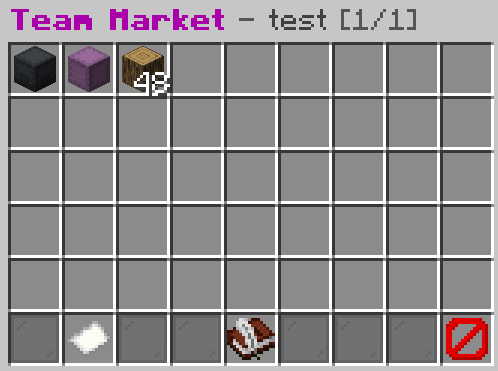
### Added
- TeamsAPI integration** — EzShops now integrates with [TeamsAPI](https://modrinth.com/plugin/teams-api) as a soft dependency; all features degrade gracefully when TeamsAPI is absent.
- Role-based sell multipliers** — MEMBER, ADMIN and OWNER each receive a configurable sell price bonus when selling to the shop (
teams-integration.sell-multiplierinconfig.yml). - Role-based buy discounts** — MEMBER, ADMIN and OWNER each receive a configurable buy price reduction when purchasing from the shop (
teams-integration.buy-discountinconfig.yml). - Team treasury** — a shared balance funded automatically by a configurable percentage of every sell transaction (
teams-integration.treasury-split). Members can deposit and withdraw funds through the treasury GUI. - Shared team stock** — stock quantities are pooled per team; all members draw from and contribute to the same pool (
teams-integration.shared-stock). /teamshopcommand** — opens the team shop dashboard showing team info, current multipliers and quick links./teamshop treasury— opens the team treasury GUI (deposit / withdraw; requiresezshops.teamshop.treasury.withdraw)./teamshop stocks— browse all items your team currently has in stock.- Permissions**:
ezshops.teamshop(default: true) — access the team shop dashboard.ezshops.teamshop.treasury.withdraw(default: true) — withdraw from the team treasury.ezshops.teamshop.admin(default: op) — administrative team stock commands.- Automatic data cleanup** — team stock and treasury data are deleted automatically when a team is disbanded via the
TeamDeleteEvent.
- fix: solve configuration override in https://github.com/ez-plugins/EzShops/pull/55
- Fixed issue: Bukkit's
getMinecraftVersion() >= 14failed because of new26.1version format
- Replaced hardcoded back-button config with configurable GUI button in https://github.com/ez-plugins/EzShops/pull/49
- Added
/sellquick sell GUI in https://github.com/ez-plugins/EzShops/pull/51

- Removed sell portal from default shop in https://github.com/ez-plugins/EzShops/pull/52
- Full Changelog**: https://github.com/ez-plugins/EzShops/compare/2.3.1...2.4.0
- Added Github Packages publish CI: [https://github.com/ez-plugins/EzShops/packages/2933718](https://github.com/ez-plugins/EzShops/packages/2933718)
/pricingadmin command- Added new
/pricingadmincommand for managing the shop prices - Added
/pricingadmin set <item> <price>subcommand withezshops.pricing.admin.setpermission for setting the price of an item in the shop - Added
/pricingadmin reset <item>subcommand withezshops.pricing.admin.resetpermission for resetting the dynamic pricing of an item in the shop - Added
/pricingadmin resetallsubcommand withezshops.pricing.admin.resetallpermission for resetting all dynamic prices of the shop
## New
/shop <category> subcommand- Added
/shop <category>subcommand to open category GUIs directly - Added missing configurable messages
## What's Changed
- Refactor monolithic configuration documentation into sections by @stefkotidis-prog in https://github.com/ez-plugins/EzShops/pull/39
- Shop API builder tools by @ez-plugins in https://github.com/ez-plugins/EzShops/pull/36
- Category gui subcommand by @ez-plugins in https://github.com/ez-plugins/EzShops/pull/42
- docs: add pricingadmin command docs and permissions by @ez-plugins in https://github.com/ez-plugins/EzShops/pull/45
## New Contributors
- @stefkotidis-prog made their first contribution in https://github.com/ez-plugins/EzShops/pull/39
- Full Changelog**: https://github.com/ez-plugins/EzShops/compare/2.2.3...2.3.0


