
Description
Gallery
Changelog
Versions
GraphWaypoints adds a powerful waypoint system to enhance your navigation in Minecraft. Mark important locations, track them across all dimensions, and share coordinates with ease. It’s a simple and effective tool for any explorer.
🛠️ Features
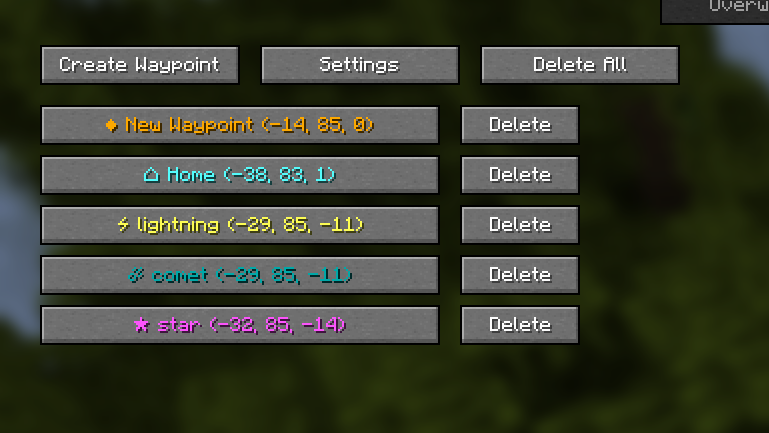
- Waypoint Management: Create, customize (name, color), and organize waypoints for all dimensions through an intuitive interface.
- Compass Navigation: A compass bar at the top of your screen displays all active waypoints for easy tracking over long distances.
- Hotkeys & Sharing: Use configurable hotkeys to open the waypoint manager (default:
B) or toggle their visibility if they get in the way (default:K). You can also instantly share coordinates with a button or a server command (/c).
📸 Screenshots
Waypoints in Action

Waypoint Manager

📋 Installation
- Install Fabric and Fabric API.
- Place the
graph_waypoints.jarfile in yourmodsfolder. - Launch Minecraft and configure hotkeys in the Controls menu (default:
Bfor manager,Kto toggle visibility). - For servers: Install on the server to enable the
/ccommand.
🔧 Compatibility
- Minecraft Version: 1.21.x 26.1.x
- Mod Loader: Fabric
- Dependencies: Fabric API
How to Install GraphWaypoints (Mod)
GraphWaypoints by iGraphik is verified for Fabric across Minecraft versions 1.21, 1.21.1, 1.21.10, 1.21.11, 1.21.2, 1.21.3, 1.21.4, 1.21.5 (latest release: 1.0.7, file size: 80 KB). Follow the steps below to install it safely from ModCraft.tv:
- Click the Download button above and select your Minecraft version (1.21, 1.21.1, 1.21.10, 1.21.11, 1.21.2, 1.21.3, 1.21.4, 1.21.5) and platform (Fabric).
- Make sure you have the compatible loader or environment installed for Fabric.
- Move the downloaded GraphWaypoints file into your Minecraft
.minecraft/modsfolder and launch the game.
All Versions
+ Add Version| Name | Game version | Platforms | Published | Downloads | Actions |
|---|---|---|---|---|---|
| 4mo ago | 1 | ||||
| 5mo ago | 1 | ||||
| 6mo ago | 1 | ||||
| 9mo ago | 1 | ||||
| 9mo ago | 1 | ||||
| 9mo ago | 1 | ||||
| 9mo ago | 1 | ||||
| 9mo ago | 1 | ||||
| 9mo ago | 1 | ||||
| 9mo ago | 1 | ||||
| 9mo ago | 1 | ||||
| 9mo ago | 1 | ||||
| 9mo ago | 1 | ||||
| 9mo ago | 1 | ||||
| 10mo ago | 1 | ||||
| 11mo ago | 1 | ||||
| 11mo ago | 1 | ||||
| 11mo ago | 1 | ||||
| last yr. | 1 | ||||
| last yr. | 1 | ||||
| last yr. | 1 | ||||
| last yr. | 1 | ||||
| last yr. | 1 | ||||
| last yr. | 1 | ||||
| last yr. | 1 | ||||
| last yr. | 1 | ||||
| last yr. | 1 | ||||
| last yr. | 1 | ||||
| last yr. | 1 | ||||
| last yr. | 1 | ||||
| last yr. | 1 | ||||
| last yr. | 1 | ||||
| last yr. | 1 |


[1.0.7] GraphWaypoints 1.0.7
by iGraphik on May 15, 2026
Download
### **Changes:**
- Reworked** waypoint color picker (hue + brightness)
- Added** per-waypoint visibility toggle
- Added** separate transparency control for text outline
- Added** smart distance display (shows in km when > 1000 m)
- Fixed** work with **servers**
[1.0.6] GraphWaypoints
by iGraphik on Jan 15, 2026
Download
New language (Polish)
More tips in the menu
Custom icons
Change display quality and outline
Option to remove brackets
More tips in the menu
Custom icons
Change display quality and outline
Option to remove brackets
[1.0.5] GraphWaypoints
by iGraphik on Jul 02, 2025
Download
## A new version has been released
- Background blur has been removed from the menu
- A rendering switch message is displayed above the control panel
- The stroke thickness of waypoints has been reduced
[1.0.4] GraphWaypoints
by iGraphik on May 01, 2025
Download
Bug fixes
[1.0.3] GraphWaypoints
by iGraphik on Apr 22, 2025
Download
- Bug fixes
- The settings error has been fixed (it is still recommended to delete the old settings file.json in the config/graph_waypoints folder)
- The share coordinates button has been redesigned
- Fixed for 1.21.4 that by default you had to press
Pto open the menu, now it'sB
[1.0.3] GraphWaypoints
by iGraphik on Apr 22, 2025
Download
- Bug fixes
- The settings error has been fixed (it is still recommended to delete the old settings file.json in the config/graph_waypoints folder)
- The share coordinates button has been redesigned
[1.0.2] GraphWaypoints
by iGraphik on Apr 21, 2025
Download
- Waypoints move smoother on the screen
- Added many settings for the compass and normal mode
- Changed the location of the icon in normal mode
- Added smooth hiding of waypoints near and far
[1.0.1] GraphWaypoints
by iGraphik on Apr 17, 2025
Download
- The standard
⬛icon has been replaced with♦ - Now the buttons have the same color and icon as the waypoint.
- The size limit is now
100% - The speed of the compass appearance/disappearance is now independent of the number of fps.
- The icon in standard mode is now displayed exactly below the text without displacement.
- added new icons
⚡,☄
[1.0.0] GraphWaypoints
by iGraphik on Apr 11, 2025
Download
Initial release with waypoint management


