

🇺🇸
InventoryBinds adds fully customizable bind buttons directly to your inventory and container screens — one click runs a command, opens a suggestion, or sends a chat message, without leaving the screen.
Action types
Every bind runs one of three action types:
- Command — instantly sends the command to the server.
- Suggestion — inserts the command into chat for manual send/edit.
- Chat message — sends plain text to chat.
Multi-command binds
A single bind can chain several commands in order, each with its own delay (in milliseconds) before it fires. The first command runs immediately; the rest are queued and dispatched on time — perfect for combos that need a pause between steps.
Per-bind customization
- Name shown in the tooltip.
- Action text (command / suggestion / chat).
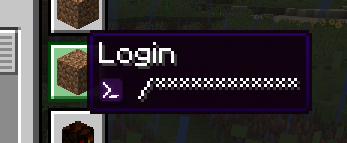
- Hide command text — the tooltip shows a mask instead of the real command.
- Server scope — limit a bind to a specific server or keep it global.
- Icon (see below).
- Position — drag binds anywhere around the inventory, with optional grid snapping.
Icons
Supported icon sources:
- Minecraft item ID — for example
minecraft:diamond_sword. - Item ID + custom model data via
::— for examplenamespace:item::123ornamespace:item::model_name(works with bothrange_dispatchandselectresource-pack models). - Player heads — pick from the built-in Heads tab, or paste a
skull:<texture>id. - Direct image URL (HTTP/HTTPS) — fetched and cached automatically (hashed by URL).
- Item in hand — open the editor while holding any item (a player head, a custom-model-data item, or a plain one) and a new bind is created instantly, already wearing that exact item's icon.
A built-in icon picker mirrors the creative inventory: one tab per creative category, a curated Heads tab, live search, and a smooth scrollbar.
Bind editor
- Open it from the dedicated button in your inventory.
- Left-click + drag to move a bind; hold S to toggle grid snapping.
- Right-click an empty spot to create a new bind there.
- Backspace / Delete removes the selected bind.
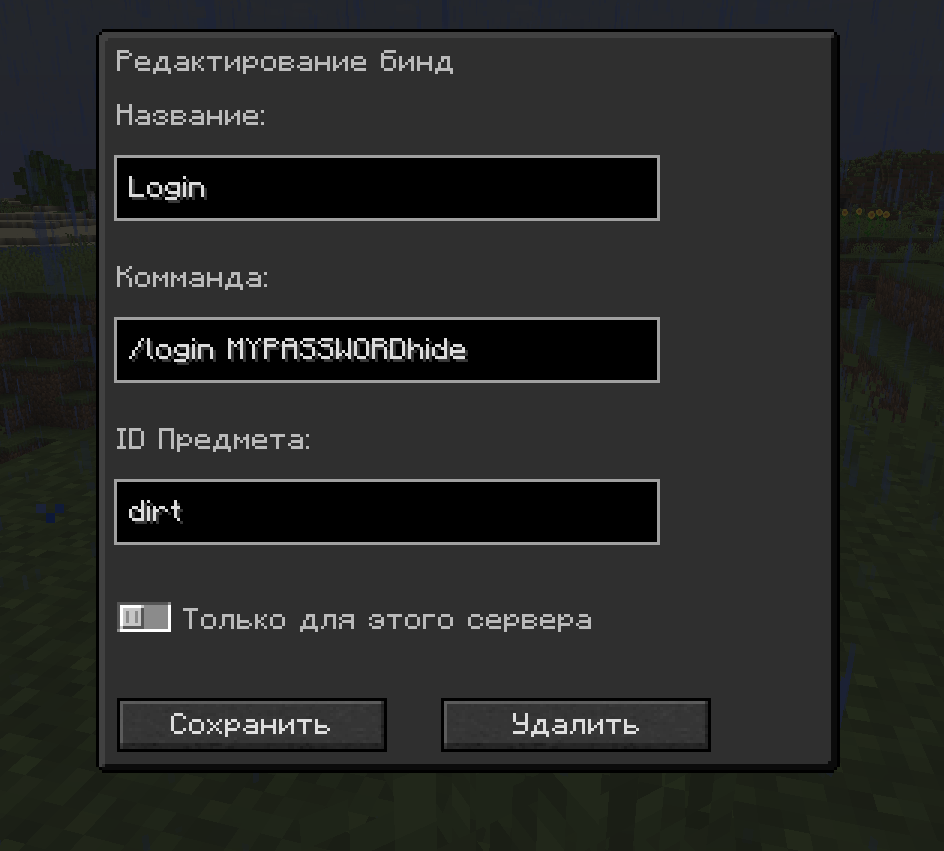
- Edit panel with multi-command rows, delays, icon picker, action type dropdown, hide toggle, and Save / Delete.
Profiles
Create, save, switch and delete named bind profiles, so different servers or playstyles keep their own sets of binds.
Mod settings
- Visible Binds — show or hide all binds at once.
- Bind Editor button — enable/disable the editor button in the inventory.
- Hide Status Effects — keep the inventory clean of the potion-effect panel.
- Hide Recipe Book Button — hide the vanilla recipe-book toggle so binds aren't blocked.
- Hide Binds in Creative (on by default) — automatically hide binds while you're in creative mode.
🇷🇺
InventoryBinds добавляет полностью настраиваемые кнопки-бинды прямо в инвентарь и любые окна-контейнеры — один клик выполняет команду, подставляет её в чат или отправляет сообщение, не выходя из экрана.
Типы действий
Каждый бинд выполняет одно из трёх действий:
- Команда — мгновенно отправляет команду на сервер.
- Подстановка — вставляет команду в чат для ручной отправки/правки.
- Сообщение в чат — отправляет обычный текст в чат.
Мульти-команды
Один бинд может выполнять несколько команд по очереди, у каждой — своя задержка (в миллисекундах) перед запуском. Первая команда срабатывает сразу, остальные ставятся в очередь и отправляются вовремя — удобно для комбинаций, где между шагами нужна пауза.
Настройка каждого бинда
- Название в подсказке.
- Текст действия (команда / подстановка / чат).
- Скрытие текста команды — в подсказке вместо реальной команды показывается маска.
- Привязка к серверу — ограничить бинд конкретным сервером или оставить глобальным.
- Иконка (см. ниже).
- Позиция — перетаскивай бинды вокруг инвентаря, с опциональной привязкой к сетке.
Иконки
Поддерживаемые источники иконок:
- ID предмета Minecraft — например
minecraft:diamond_sword. - ID предмета + custom model data через
::— напримерnamespace:item::123илиnamespace:item::model_name(работает и сrange_dispatch, и сselectмоделями ресурспаков). - Головы игроков — выбери из встроенной вкладки «Головы» или вставь id вида
skull:<текстура>. - Прямая ссылка на изображение (HTTP/HTTPS) — загружается и кэшируется автоматически (по хэшу URL).
- Предмет в руке — открой редактор, держа любой предмет (голову, предмет с custom model data или обычный), и сразу создастся новый бинд с иконкой именно этого предмета.
Встроенный выбор иконки повторяет креативный инвентарь: вкладка на каждую креатив-категорию, отдельная вкладка «Головы», живой поиск и плавный скроллбар.
Редактор биндов
- Открывается отдельной кнопкой в инвентаре.
- ЛКМ + перетаскивание — перемещение бинда; клавиша S переключает привязку к сетке.
- ПКМ по пустому месту — создать новый бинд там.
- Backspace / Delete — удалить выбранный бинд.
- Панель редактирования: строки мульти-команд, задержки, выбор иконки, выпадающий список типа действия, тумблер скрытия и кнопки Сохранить / Удалить.
Профили
Создавай, сохраняй, переключай и удаляй именованные профили биндов — для разных серверов и стилей игры свои наборы.
Настройки мода
- Отображать бинды — показать или скрыть все бинды сразу.
- Кнопка редактора — включить/выключить кнопку редактора в инвентаре.
- Скрыть статус-эффекты — убрать панель эффектов из инвентаря.
- Скрыть кнопку рецептов — прячет ванильную кнопку книги рецептов, чтобы она не перекрывала бинды.
- Скрывать бинды в креативе (включено по умолчанию) — автоматически прячет бинды в режиме креатива.


How to Install InventoryBinds (Mod)
InventoryBinds by _PrometheuZ_ is verified for Fabric, Forge, Neoforge across Minecraft versions 1.20.1, 1.20.2, 1.20.3, 1.20.4, 1.20.6, 1.21, 1.21.1, 1.21.10 (latest release: 4.2+26.3, file size: 130 KB). Follow the steps below to install it safely from ModCraft.tv:
- Click the Download button above and select your Minecraft version (1.20.1, 1.20.2, 1.20.3, 1.20.4, 1.20.6, 1.21, 1.21.1, 1.21.10) and platform (Fabric, Forge, Neoforge).
- Make sure you have the compatible loader or environment installed for Fabric, Forge, Neoforge.
- Move the downloaded InventoryBinds file into your Minecraft
.minecraft/modsfolder and launch the game.
All Versions
+ Add Version| Name | Game version | Platforms | Published | Downloads | Actions |
|---|---|---|---|---|---|
| 10d ago | 1 | ||||
| 10d ago | 1 | ||||
| 4mo ago | 1 | ||||
| 4mo ago | 1 | ||||
| 4mo ago | 1 | ||||
| 4mo ago | 1 | ||||
| 8mo ago | 1 | ||||
| 8mo ago | 1 | ||||
| 8mo ago | 1 | ||||
| 8mo ago | 1 | ||||
| 8mo ago | 1 | ||||
| 8mo ago | 1 | ||||
| 9mo ago | 1 | ||||
| 11mo ago | 1 | ||||
| 11mo ago | 1 | ||||
| last yr. | 1 | ||||
| last yr. | 1 | ||||
| last yr. | 1 | ||||
| last yr. | 1 | ||||
| last yr. | 1 | ||||
| last yr. | 1 | ||||
| last yr. | 1 | ||||
| last yr. | 1 | ||||
| last yr. | 1 | ||||
| last yr. | 1 | ||||
| last yr. | 1 | ||||
| last yr. | 1 | ||||
| last yr. | 1 | ||||
| last yr. | 1 | ||||
| last yr. | 1 | ||||
| last yr. | 1 | ||||
| last yr. | 1 | ||||
| last yr. | 1 | ||||
| last yr. | 1 | ||||
| last yr. | 1 | ||||
| last yr. | 1 | ||||
| last yr. | 1 | ||||
| last yr. | 1 | ||||
| last yr. | 1 | ||||
| last yr. | 1 |


- Bug fixes FPS drops when selecting icons with a large number of mods
- Support for adding a bind with a mod item in hand
- Bug fixes FPS drops when selecting icons with a large number of mods
- Support for adding a bind with a mod item in hand
- Bug fixes FPS drops when selecting icons with a large number of mods
- Support for adding a bind with a mod item in hand

ModSettings screen
(opens by right-clicking on a new bind button)

- Fixed minor bugs in the interface for creating/editing binds
- Additional resource pack (FlatUI)
<iframe width="560" height="315" src="https://www.youtube-nocookie.com/embed/t0t3xlW2O2o" title="YouTube video player" frameborder="0" allow="accelerometer; autoplay; clipboard-write; encrypted-media; gyroscope; picture-in-picture; web-share" allowfullscreen></iframe>
- A command content hiding option has been added to the bind creation/editing screen (no longer necessary to specify ‘hide’ at the end of the line).”
- A new option to change the order of binds has been added - LMB + Alt moves up, RMB + Alt moves down (may not work on the first try due to hidden server-side binds).
- An option to copy the item ID has been added; if you are creating a bind with an item in the cursor, its ID will automatically be pasted into the creation screen.
- Custom icons have been returned via the link.
- Support for hiding command descriptions in the bind has been added; please add 'hide' at the end of the command when creating or editing.
- Added support for button textures via url link (use imggur)
- fixed display in creative mode
- added settings for the disable button, adding new binds and editing binds.
- "bind_editor_enabled":"true"
- "new_bind_button_enabled":"true"
- Added support for button textures via url link (use imggur)
- fixed display in creative mode
- added settings for the disable button, adding new binds and editing binds.
- "bind_editor_enabled":"true"
- "new_bind_button_enabled":"true"
- Added support for button textures via url link (use imggur)
- fixed display in creative mode
- added settings for the disable button, adding new binds and editing binds.
- "bind_editor_enabled":"true"
- "new_bind_button_enabled":"true"
- Added support for button textures via url link (use imggur)
- fixed display in creative mode
- added settings for the disable button, adding new binds and editing binds.
- "bind_editor_enabled":"true"
- "new_bind_button_enabled":"true"
- Fabric loader version downgraded to 0.16.0
- Fixed a bug with displaying when there are more than 12 of them


