
 Iris & Oculus Search


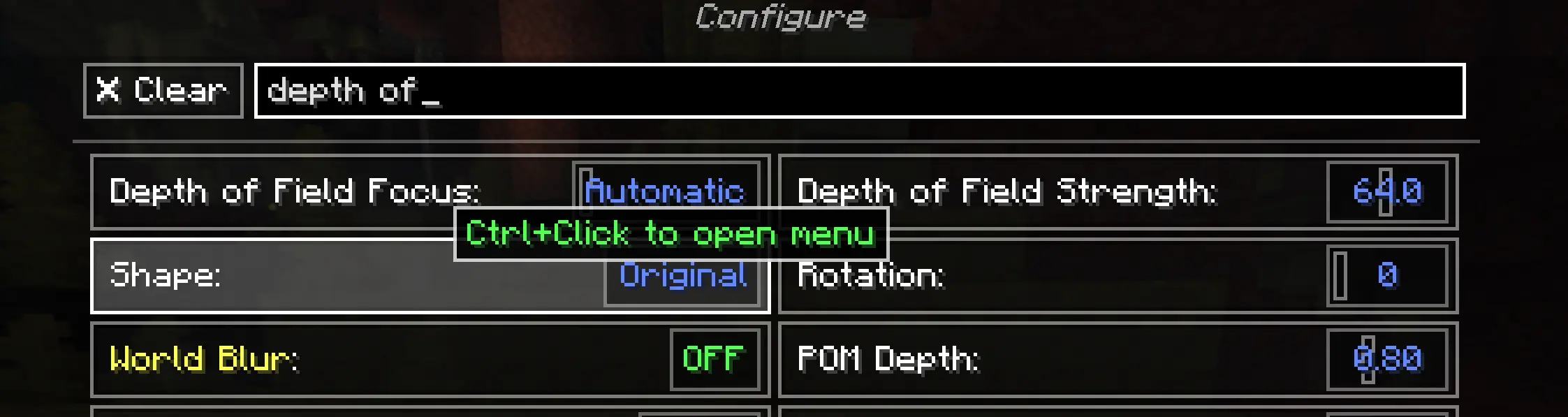
A quality-of-life mod that adds a functional search bar directly into the Iris or Oculus shader settings screen, allowing you to find specific shader options instantly.
🔍 Why use this mod?
Tired of clicking through endless pages and sub-menus to find a specific toggle like waving foliage or bloom?
Iris & Oculus Search embeds a search bar right into the shader options GUI. Type what you need, and the menu dynamically filters down to the matching settings. It fully supports Iris on Fabric or NeoForge, as well as Oculus on Forge!
Features
- Search Shader Settings or Search Shader Packs seamlessly in the GUI
- In-GUI Search Bar: Adds a seamlessly integrated text input field directly inside the shader pack options menu and the shaderpack selection screen
- Translation Support: Search in your selected language (if supported by the shader). The mod itself is also translatable. Contribute on Crowdin.
- No Setup Needed: Works completely out of the box with zero configuration files to edit.
- Loader Compatibility: Supports Iris on Fabric and NeoForge, as well as Oculus on Forge.
- Version Support: Compatible from 1.20.1+ up to the latest Minecraft versions.
⚠️ NOTE: This mod requires either Iris or Oculus to be installed as a hard dependency. It will not function without one of them present.
Links
- Support SpacEagle17 on Patreon or Kofi
- Contact: https://euphoriapatches.com/contact
- Discord: https://www.euphoriapatches.com/discord
- Source code of Iris & Oculus Search on GitHub
Sponsored by Ember Host
Looking for an affordable and reliable Minecraft server host? Ember Host offers incredible value and top-tier support!
Click the banner or use code EUPHORIA at checkout for 10% off your first purchase. Plus, 70% of your purchase supports Iris & Oculus Search!

How to Install Iris & Oculus Search (Mod)
Iris & Oculus Search by SpacEagle17 is verified for Fabric, Forge, Neoforge, Quilt across Minecraft versions 1.20, 1.20.1, 1.20.2, 1.20.2-pre1, 1.20.2-pre2, 1.20.2-pre3, 1.20.2-pre4, 1.20.2-rc1 (latest release: 1.8.3-fabric, file size: 239 KB). Follow the steps below to install it safely from ModCraft.tv:
- Click the Download button above and select your Minecraft version (1.20, 1.20.1, 1.20.2, 1.20.2-pre1, 1.20.2-pre2, 1.20.2-pre3, 1.20.2-pre4, 1.20.2-rc1) and platform (Fabric, Forge, Neoforge, Quilt).
- Make sure you have the compatible loader or environment installed for Fabric, Forge, Neoforge, Quilt.
- Move the downloaded Iris & Oculus Search file into your Minecraft
.minecraft/modsfolder and launch the game.
All Versions
+ Add Version| Name | Game version | Platforms | Published | Downloads | Actions |
|---|---|---|---|---|---|
| 2mo ago | 95 | ||||
| 2mo ago | 48 | ||||
| 2mo ago | 32 | ||||
| 2mo ago | 24 | ||||
| 2mo ago | 19 | ||||
| 2mo ago | 16 | ||||
| 2mo ago | 14 | ||||
| 2mo ago | 12 | ||||
| 2mo ago | 11 | ||||
| 2mo ago | 10 | ||||
| 2mo ago | 9 | ||||
| 2mo ago | 8 | ||||
| 2mo ago | 7 | ||||
| 2mo ago | 7 | ||||
| 2mo ago | 6 | ||||
| 2mo ago | 6 | ||||
| 2mo ago | 6 | ||||
| 2mo ago | 5 | ||||
| 2mo ago | 5 | ||||
| 2mo ago | 5 | ||||
| 2mo ago | 5 | ||||
| 2mo ago | 4 | ||||
| 2mo ago | 4 | ||||
| 2mo ago | 4 | ||||
| 2mo ago | 4 | ||||
| 2mo ago | 4 | ||||
| 2mo ago | 4 | ||||
| 2mo ago | 3 | ||||
| 2mo ago | 3 | ||||
| 2mo ago | 3 | ||||
| 2mo ago | 3 | ||||
| 2mo ago | 3 | ||||
| 2mo ago | 3 | ||||
| 2mo ago | 3 | ||||
| 2mo ago | 3 | ||||
| 2mo ago | 3 | ||||
| 2mo ago | 3 | ||||
| 2mo ago | 3 | ||||
| 2mo ago | 2 | ||||
| 2mo ago | 2 | ||||
| 2mo ago | 2 | ||||
| 2mo ago | 2 | ||||
| 2mo ago | 2 | ||||
| 2mo ago | 2 | ||||
| 2mo ago | 2 | ||||
| 2mo ago | 2 | ||||
| 2mo ago | 2 | ||||
| 2mo ago | 2 | ||||
| 2mo ago | 2 | ||||
| 2mo ago | 2 | ||||
| 2mo ago | 2 | ||||
| 2mo ago | 2 | ||||
| 2mo ago | 2 | ||||
| 2mo ago | 2 | ||||
| 2mo ago | 2 | ||||
| 2mo ago | 2 | ||||
| 2mo ago | 2 | ||||
| 2mo ago | 2 | ||||
| 2mo ago | 2 | ||||
| 2mo ago | 2 |


## Changes:
- UX Improvement: Option search results now use a single column when there are only a few results, improving overal readability and reducing clutter. This is based on window height and GUI scale
- Updated several languages thanks to amazing contributors! Contributions are very welcome! [Translations on Crowdin](https://crowdin.com/profile/spaceagle17)
## Changes:
- UX Improvement: Option search results now use a single column when there are only a few results, improving overal readability and reducing clutter. This is based on window height and GUI scale
- Updated several languages thanks to amazing contributors! Contributions are very welcome! [Translations on Crowdin](https://crowdin.com/profile/spaceagle17)

## Changes:
- UX Improvement: Option search results now use a single column when there are only a few results, improving overal readability and reducing clutter. This is based on window height and GUI scale
- Updated several languages thanks to amazing contributors! Contributions are very welcome! [Translations on Crowdin](https://crowdin.com/profile/spaceagle17)

## Changes:
- Improved UX by making typos from synonyms no longer contribute to the search results, it cluttered the results.
- Updated several languages thanks to amazing contributors! Contributions are very welcome! [Translations on Crowdin](https://crowdin.com/profile/spaceagle17)

## Changes:
- Improved UX by making typos from synonyms no longer contribute to the search results, it cluttered the results.
- Updated several languages thanks to amazing contributors! Contributions are very welcome! [Translations on Crowdin](https://crowdin.com/profile/spaceagle17)

## Changes:
- Improved UX by making typos from synonyms no longer contribute to the search results, it cluttered the results.
- Updated several languages thanks to amazing contributors! Contributions are very welcome! [Translations on Crowdin](https://crowdin.com/profile/spaceagle17)

## Changes:
- Added Minecraft 26.3 Support
- Updated several languages thanks to amazing contributors! Contributions are very welcome! [Translations on Crowdin](https://crowdin.com/profile/spaceagle17)

## Changes:
- Added Minecraft 26.3 Support
- Updated several languages thanks to amazing contributors! Contributions are very welcome! [Translations on Crowdin](https://crowdin.com/profile/spaceagle17)

## Changes:
- Added Minecraft 26.3 Support
- Updated several languages thanks to amazing contributors! Contributions are very welcome! [Translations on Crowdin](https://crowdin.com/profile/spaceagle17)

## Changes:
- Added Ctrl+Click on a search result to jump straight to that option's own menu.
- Updated several languages thanks to amazing contributors! Contributions are very welcome! [Translations on Crowdin](https://crowdin.com/profile/spaceagle17)

## Changes:
- Added Ctrl+Click on a search result to jump straight to that option's own menu.
- Updated several languages thanks to amazing contributors! Contributions are very welcome! [Translations on Crowdin](https://crowdin.com/profile/spaceagle17)

## Changes:
- Added Ctrl+Click on a search result to jump straight to that option's own menu.
- Updated several languages thanks to amazing contributors! Contributions are very welcome! [Translations on Crowdin](https://crowdin.com/profile/spaceagle17)

## Changes:
- Added user facing tooltips to inform the user about the new features from 1.7.0 when hovering over the Clear button. Please translate them over at [Crowdin](https://crowdin.com/profile/spaceagle17)

## Changes:
- Added user facing tooltips to inform the user about the new features from 1.7.0 when hovering over the Clear button. Please translate them over at [Crowdin](https://crowdin.com/profile/spaceagle17)

## Changes:
- Added user facing tooltips to inform the user about the new features from 1.7.0 when hovering over the Clear button. Please translate them over at [Crowdin](https://crowdin.com/profile/spaceagle17)


