


Totem Rituals Datapack/Mod
✨ Thank you for 100 downloads 🥹
🎉 300 Downloads! Thank you! ~Oct.27.2025
\(◎o◎)/ 420 Downloads achieved Nov.6.2025
(●'◡'●) 550 Downloads on Nov.18.2025
🦦 672 Downloads a mere ten days later?! (Nov.28.2025)
🐼 W E D I D I T! 1,000 Downloads (Dec. 25.2025)
👾 1,371 downloads (Jan. 30.2026)
Get my other mod, compressy for near infinite storage!


Introducing Rituals—a datapack that brings mystical totems and ritual magic into your world. Craft totems, display items, and trigger powerful effects through immersive rituals. Designed for builders, modpack creators, and lore lovers alike.
🔮 Features
• 8 Unique Rituals - From simple growth magic to complex multi-totem patterns
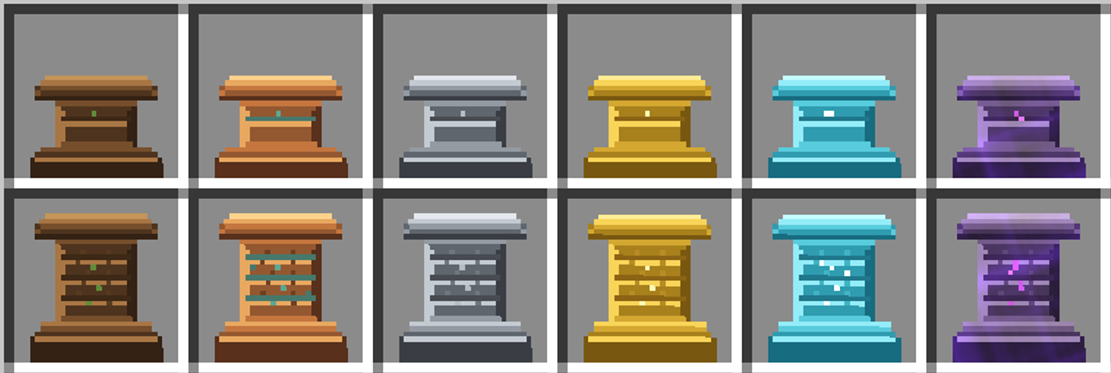
• 6 Totem Tiers - Wood to Netherite with increasing power and range
• Visual Pattern Guides - Redstone-powered particle markers for easy setup
• Fire Sacrifice System - Immersive activation requiring catalyst offerings
• Interactive Menu System - In-game totem browser and admin tools
• Custom Textures & Animations - Beautiful visual effects and smooth item displays
• Fully Configurable - Customize ranges, frequencies, and behavior
• Debug & Kiwi Modes - Developer tools and easy mode for testing
Built with care for the Minecraft community—open source, tweakable, and ready to enchant your next adventure.
Installation
📦 Step-by-Step Installation Guide (Click to Expand)
This guide assumes you have no prior experience with Minecraft datapacks. A datapack is a special folder that adds new features to your Minecraft world.
1. Download the Datapack
- If you received this as a ZIP file, you're ready to go
- If you have the folder structure, compress it into a ZIP file first
2. Locate Your World Save Folder
- Open Minecraft and note which world you want to add this to
- Close Minecraft (important!)
- Find your Minecraft saves folder:
- Windows: Press
Win + R, type%appdata%\.minecraft\savesand press Enter - Mac: Press
Cmd + Space, type~/Library/Application Support/minecraft/savesand press Enter - Linux: Navigate to
~/.minecraft/saves
- Windows: Press
3. Install the Datapack
- Find the folder with your world's name
- Open the
datapacksfolder inside (create it if it doesn't exist) - Place the datapack ZIP file (or folder) into this
datapacksfolder
4. Enable the Datapack
- Launch Minecraft and open your world
- You should see a message in chat: "[Totem Rituals] Datapack loaded successfully!"
- If you don't see the message, type
/reloadin the chat and press Enter
5. Get Started
- Type
/function rituals:give/allto receive all totem items - You're now ready to perform rituals!
Note: servers with performance modifications that combine drops from more than 1.5 blocks away will not be able to perform rituals that require catalysts dropped on the ground.
Getting Started
Quick Start Guide
This datapack adds a new item category called "Totems" which can be crafted and placed in your world. When you place totems with specific items displayed on them, you can activate powerful rituals. Single-totem mode is enabled by default!
Basic Workflow:
- Craft totems (see Crafting Recipes)
- Right-click on the ground to place a totem
- Right-click a placed totem with an item to display it
- Drop 4 catalyst items around the totem (N/S/E/W)
- Light fire at the totem base - the ritual activates!
Note: Rituals now require a Fire Sacrifice to activate! See Ritual System below.
Available Rituals
🌟 Standard Single-Totem Rituals (6 Available)
These powerful rituals work with just 1 totem displaying the correct item. Perfect for beginners and small-scale magic!
1. Growth Ritual 🌱
- Required Item:
Emerald - Effect: Automatically bonemeals crops and plants in range
- Frequency: Every 15 seconds (Tier 1) → Every 3 seconds (Tier 6)
- Range: 2×2 to 7×7 horizontal area based on tier
- Visual: Green happy villager particles
- Perfect For: Farming automation, tree growth, crop acceleration
2. Strength Ritual 💪
- Required Item:
Diamond - Effect: Grants Strength and Resistance buffs to nearby players
- Duration: 10-30 seconds based on tier
- Frequency: Every 2 seconds to 0.75 seconds based on tier
- Range: Tier-based area effect
- Visual: Critical hit particles
- Perfect For: Combat preparation, mining expeditions, mob farms
3. Prosperity Ritual 💰
- Required Item:
Netherite Block - Effect: Attracts nearby items to the totem and grants Luck effect to players
- Pull Speed: 0.3 to 1.0 blocks/tick based on tier
- Luck Level: 0-2 based on tier (helps with loot drops)
- Range: Tier-based area effect
- Visual: Golden dust particles
- Perfect For: Item collection, loot farming, treasure hunting
4. Protection Ritual ⚔️
- Required Item:
Iron Ingot - Effect: Damages hostile mobs in range periodically
- Damage: 2-8 half-hearts per hit based on tier
- Frequency: Every 9 seconds to 1.5 seconds based on tier
- Range: Tier-based area effect
- Visual: Blue dust particles and magic damage
- Perfect For: Base defense, mob control, area protection
5. Healing Ritual 💖
- Required Item:
Nether Star - Effect: Applies regeneration to nearby players and animals
- Duration: 10-120 seconds based on tier
- Frequency: Every 3 seconds to 1.25 seconds based on tier
- Bonus: Absorption at tier 3+
- Range: Tier-based area effect
- Visual: Pink/purple dust particles
- Perfect For: Health regeneration, animal care, safe zones
6. Sentry Ritual 🏹
- Required Item:
Arrow - Effect: Fires homing magical projectiles at hostile mobs
- Damage: 1.5-12 half-hearts based on tier
- Fire Rate: Every 9 seconds to 1.5 seconds based on tier
- Projectile Speed: 0.4-1.2 blocks/tick based on tier
- Range: 2× the normal tier range
- Visual: Glowing projectile with trail particles
- Perfect For: Automated defense, mob farming, perimeter security
🎯 Advanced Multi-Totem Pattern Rituals (2 Available)
These complex rituals require specific geometric patterns with multiple totems. Each totem must display a specific item, and the pattern must be exact!
7. Auto-Farming Ritual 🚜
- Central Item:
Diamond Hoe - Pattern: Square (4 diagonal corners)
- Layout: 4 totems at corners, 5 blocks diagonal from center
- Required Items:
- NE Corner (+5,+5):
Wheat - SE Corner (+5,-5):
Carrot - SW Corner (-5,-5):
Potato - NW Corner (-5,+5):
Beetroot
- NE Corner (+5,+5):
- Effect: Automatically harvests and replants fully grown crops every 5 seconds
- Supported Crops: Wheat, Carrots, Potatoes, Beetroots, Nether Wart, Pumpkins, Melons, Sweet Berries, Cocoa Beans
- Range: Tier-based from center
- Min Totems: 5 (1 center + 4 corners)
- Perfect For: Large-scale farming, AFK crop production
8. Auto-Breeding Ritual 🐄
- Central Item:
Wheat - Pattern: Star (4 cardinal directions)
- Layout: 4 totems at cardinal directions, 5 blocks from center
- Required Items:
- North (0,5):
Seeds - East (5,0):
Carrot - South (0,-5):
Potato - West (-5,0):
Beetroot Seeds
- North (0,5):
- Effect: Automatically breeds animals in range when breeding conditions are met
- Range: Tier-based from center
- Min Totems: 5 (1 center + 4 cardinals)
- Perfect For: Animal farms, livestock management, passive mob breeding
🎨 Visual Pattern Guides
Power your central totem with redstone (place redstone block/torch/lever next to it) to see:
- Colored particle markers showing where each surrounding totem should be placed
- Different colors for each position indicating the required item
- Enchanting particle effects to indicate the pattern type
- Real-time updates when you change items or totem positions
This makes setup MUCH easier - you don't need to memorize coordinates!
Ritual System
Rituals now require a fire sacrifice to activate, making them more immersive and balanced.
How It Works
- Place your totem and add a ritual item (Diamond, Emerald, etc.)
- Drop 4 catalyst items on the ground around your totem (North, South, East, West)
- Light a fire at the totem's base using flint & steel
- The offerings are consumed and your ritual begins!
Catalyst Costs by Tier
- 🪵 Wood: 4× Coal
- 🟠 Copper: 4× Copper Ingot
- ⚙️ Iron: 4× Iron Ingot
- 🟡 Gold: 4× Gold Ingot
- 💎 Diamond: 4× Diamond
- 🟣 Netherite: 4× Netherite Ingot
Why this system?
- Makes rituals feel more magical and intentional
- Balanced resource cost encourages totem upgrades
- Prevents "set and forget" infinite rituals
- You control when rituals activate
📖 See FIRE_SACRIFICE_GUIDE.md for complete instructions!
⚙️ Prefer Auto-Activation? (Click to Expand)
Server admins can disable fire sacrifice and restore the old automatic activation:
/data modify storage rituals:config require_fire_sacrifice set value false
/function rituals:config/reload
Or enable Kiwi Mode for easy testing:
/function rituals:admin/enable_kiwi_modeTotem Tiers
⚡ View All Totem Tiers (Click to Expand)
There are six tiers of totems, each with increasing effect power. All totems use tier-based ranges, with higher tiers providing stronger effects and larger areas.
Tier 1 - Wood Totem
- Material: Oak Planks + Sticks
- Range: 2×2 horizontal, 3 up, 3 down
- Effect Power: Basic
- Visual: Oak fence post with item display on top
Tier 2 - Copper Totem
- Material: Copper Ingots
- Range: 3×3 horizontal, 4 up, 4 down
- Effect Power: Improved
- Visual: Copper-colored post
Tier 3 - Iron Totem
- Material: Iron Ingots
- Range: 4×4 horizontal, 5 up, 5 down
- Effect Power: Strong
- Visual: Iron bars with particles
Tier 4 - Gold Totem
- Material: Gold Ingots
- Range: 5×5 horizontal, 6 up, 6 down
- Effect Power: Very Strong
- Visual: Golden post with particles
Tier 5 - Diamond Totem
- Material: Diamonds
- Range: 6×6 horizontal, 7 up, 7 down
- Effect Power: Powerful
- Visual: Diamond post with cyan particles
Tier 6 - Netherite Totem
- Material: Netherite Ingots
- Range: 7×7 horizontal, 8 up, 8 down
- Effect Power: Maximum
- Visual: Netherite post with purple particles
Range Visualization
      [item]  ← Item display on top
        |     ← Totem pole (fence post)
    ███████   ← 5×5×6 effect zone
    ███████     (3 blocks up, 3 down)
    ███████
Visual comparison of effect ranges for all totem tiers
See RANGE_DIAGRAM.md for detailed range specifications.
How to Use Totems
Placing a Totem
- Hold a totem item in your hand
- Look at the ground where you want to place it
- Right-click on the ground
- The totem will appear as a vertical pole
Adding Items to Totems
- Hold the item you want to display
- Right-click the totem
- The item will appear floating above the totem
- Only one item can be displayed per totem
Removing Items from Totems
- Break the totem with the corresponding tool.
- Re-place the totem if desired.
Breaking Totems
- Punch (left-click or attack) the totem
- The totem and any displayed item will drop
- All visual effects will be removed
Interactive Menu System
🎮 In-Game Menu Features (Click to Expand)
The datapack includes a comprehensive interactive menu system accessible via commands:
Main Menu
- Access:
/function rituals:menu/main - Features:
- Totem browser with all available tiers
- Quick access to guidebook
- Admin tools and configuration options
Totem Browser
- Access: Through main menu or
/function rituals:menu/totems - Features:
- Visual preview of all totem tiers
- Crafting recipe display
- Range and effect information
- One-click item giving
Admin Tools
- Debug Mode:
/function rituals:admin/enable_debug_mode- Shows detailed ritual timing and range information
- Displays particle effects for troubleshooting
- Kiwi Mode:
/function rituals:admin/enable_kiwi_mode- Disables fire sacrifice requirement for easy testing
- Perfect for creative mode and experimentation
- Reset All:
/function rituals:admin/reset_all- Clears all active rituals and resets configuration
- List Totems:
/function rituals:admin/list_totems- Shows all placed totems and their current state
Crafting Recipes
All totems come in two variants: Tall (2 blocks high) and Short (1 block high, walkable). Short variants use the same recipe but without the top ingredient.
🪵 Wood Totem Recipes
Wood Totem (Tall)

Wood Totem (Short)

🟠 Copper Totem Recipes
Copper Totem (Tall)

Copper Totem (Short)

⚙️ Iron Totem Recipes
Iron Totem (Tall)

Iron Totem (Short)

🟡 Gold Totem Recipes
Gold Totem (Tall)

Gold Totem (Short)

💎 Diamond Totem Recipes
Diamond Totem (Tall)

Diamond Totem (Short)

🟣 Netherite Totem Recipes
Netherite Totem (Tall)

Netherite Totem (Short)

Tip: Higher tier totems provide larger ranges and more powerful effects!
Commands
⌨️ Available Commands (Click to Expand)
Give Commands
These commands give you totem items. They can only be used by players with operator permissions (or in creative mode).
/function rituals:give/all- Gives you one of each totem tier/function rituals:give/totem_basic- Gives you a Wood Totem (tall)/function rituals:give/totem_basic_short- Gives you a Wood Totem (short)/function rituals:give/totem_copper- Gives you a Copper Totem (tall)/function rituals:give/totem_copper_short- Gives you a Copper Totem (short)/function rituals:give/totem_gold- Gives you a Gold Totem (tall)/function rituals:give/totem_gold_short- Gives you a Gold Totem (short)/function rituals:give/totem_advanced- Gives you a Diamond Totem (tall)/function rituals:give/totem_advanced_short- Gives you a Diamond Totem (short)/function rituals:give/totem_master- Gives you a Netherite Totem (tall)/function rituals:give/totem_master_short- Gives you a Netherite Totem (short)/function rituals:give/guidebook- Gives you the Totem Rituals Guidebook
Menu Commands
/function rituals:menu/main- Opens the main interactive menu/function rituals:menu/totems- Opens the totem browser/function rituals:help- Shows the in-game help menu
System Commands
/reload- Reloads all datapacks (use if the datapack isn't working)/function rituals:config/reload- Reloads configuration changes
Admin Commands
/function rituals:admin/enable_debug_mode- Enables debug mode for troubleshooting/function rituals:admin/disable_debug_mode- Disables debug mode/function rituals:admin/enable_kiwi_mode- Enables easy mode (no fire sacrifice)/function rituals:admin/disable_kiwi_mode- Disables easy mode/function rituals:admin/list_totems- Lists all placed totems/function rituals:admin/reset_all- Resets all rituals and configuration
Technical Details
🛠️ For Server Administrators (Click to Expand)
Performance Considerations
- The datapack uses interaction entities for totem placement (Minecraft 1.19.4+)
- Rituals check for activation every 20 ticks (once per second)
- Effects apply at intervals (20-40 ticks) to maintain performance
- Each totem uses 3-4 entities: 1 interaction, 1-2 block displays, 1 item display
- Item displays have smooth animations (rotation + bobbing) with 10-tick interpolation
Compatibility
- Should work with most other datapacks
- Uses custom scoreboard objectives (all prefixed with "rituals.")
- Uses storage namespace "rituals:config" and "rituals:temp"
- Custom tags are all in the "rituals" namespace
💻 For Datapack Developers (Click to Expand)
Architecture
- Main Loop:
rituals:tickruns fromminecraft:tick - Initialization:
rituals:loadruns fromminecraft:load - Entity System: Uses interaction entities for hitbox/data, display entities for visuals
- ID System: Each totem gets a unique ID for linking its entities
Scoreboards
rituals.data- Constants and global datarituals.timer- Tick counters for cooldowns/durationsrituals.distance- Totem range valuesrituals.tier- Totem tier (1-6)rituals.effect- Active ritual effect typerituals.temp- Temporary calculationsrituals.id- Entity linking system
Entity Tags
rituals.totem- Main totem interaction entitiesrituals.short_totem- Short variant totems (1 block tall)rituals.totem_visual- Block display entities for totem visualsrituals.totem_display- Item display entities for held itemsrituals.totem_barrier- Barrier block displays for collisionrituals.has_item- Totems with items displayedrituals.active_ritual- Totems participating in a ritualrituals.[ritual_type]_ritual- Specific ritual type tags
File Structure
data/
├── rituals/
│   ├── advancement/      # Achievement system
│   ├── function/
│   │   ├── load.mcfunction
│   │   ├── tick.mcfunction
│   │   ├── give/        # Item give commands
│   │   ├── totem/       # Totem placement/interaction
│   │   ├── ritual/      # Ritual effects
│   │   ├── config/      # Configuration system
│   │   └── admin/       # Admin utilities
│   ├── recipe/          # Crafting recipes
│   ├── predicate/       # Random chance predicates
│   ├── item_modifier/   # Item modification
│   └── tags/            # Custom tags
├── minecraft/
│   └── tags/
│       └── function/
└── pack.mcmeta
See SYSTEM_OVERVIEW.md for detailed technical documentation.
Configuration
⚙️ Configuration Options (Click to Expand)
You can customize various datapack settings using the config storage system.
Viewing Current Config
/data get storage rituals:configModifying Settings
/data modify storage rituals:config <key> set value <value>
/function rituals:config/reload
Available Settings
min_totems_required- Minimum number of totems needed for a ritual (default: 1)max_totem_distance- Maximum distance between totems in blocks (default: 32)ritual_duration- How long rituals last in ticks (default: 600 = 30 seconds)require_fire_sacrifice- Whether rituals require fire sacrifice (default: true)kiwi_mode- Easy mode that disables fire sacrifice (default: false)debug_mode- Enables debug information and particles (default: false)
See CONFIG_GUIDE.md for complete configuration documentation.
Redstone Range Display
🔴 Redstone Range Visualization (Click to Expand)
You can visualize a totem's effect range by powering it with redstone!
How to use:
- Place a lever, redstone torch, redstone block, or powered redstone wire next to or below your totem
- Red particles will show the exact ritual range (varies by tier)
- Turn off the redstone to hide the display
Supported redstone sources:
- Redstone torch (always on)
- Redstone block (always on)
- Lever (toggle on/off)
- Button (temporary)
- Powered redstone wire
See RANGE_DIAGRAM.md for detailed range specifications!
Troubleshooting
🔧 Common Issues & Solutions (Click to Expand)
Totems won't place:
- Make sure you're right-clicking (not sneaking required!)
- Ensure there's empty space (air block) where you're trying to place the totem
- Check that you have the actual totem item (should have custom name and colored text)
Items won't display on totems:
- Make sure you're right-clicking the totem, not the ground near it
- The totem can only hold one item at a time
- Try removing the current item first (right-click empty-handed)
Rituals won't activate:
- By default, only 1 totem is needed (check config if changed)
- Totems work individually by default (configurable to require multiple)
- Items must be placed ON the totems (floating above them)
- Wait 1 second after placing the last item (system checks every 20 ticks)
- Check fire sacrifice: Drop 4 catalyst items around totem and light fire
Pattern rituals won't work:
- Use redstone to see particle guides for correct placement
- Ensure all totems have the exact required items
- Check that totems are at the correct distances (5 blocks for most patterns)
- Verify the central totem has the correct item for the ritual type
Datapack not working:
- Type
/reloadin chat - Check that the datapack is in the correct folder (world/datapacks/)
- Ensure the folder structure is correct (pack.mcmeta should be at the root)
- Make sure you're using Minecraft 1.21 or later
Resource Pack Issues:
- The resource pack is optional but provides custom textures
- Place it in your
resourcepacksfolder and enable it in-game - If textures don't appear, make sure the pack is above other resource packs in the list
Debug Mode:
- Enable debug mode:
/function rituals:admin/enable_debug_mode - This shows detailed timing, range, and effect information
- Disable when done:
/function rituals:admin/disable_debug_mode
Related Documentation
- 🔥
FIRE_SACRIFICE_GUIDE.md- Complete fire sacrifice tutorial - 📐
RANGE_DIAGRAM.md- Detailed range specifications - 🔧
CONFIG_GUIDE.md- All configuration options - 📦
INSTALLATION.md- Detailed installation guide - 🛠️
SYSTEM_OVERVIEW.md- Technical architecture - 📝
CRAFTING_RECIPES.md- All crafting recipes - 🎯
PATTERN_RITUALS_GUIDE.md- Multi-totem pattern setup guide
Future Enhancements
Planned features for future versions:
- Flight Zone Ritual - Creative flight within zone boundaries
- Weather Control Ritual - Control local weather patterns
- Time Warp Ritual - Accelerate time for crops and processes
- Forcefield Ritual - Protective barriers against hostile mobs
- Mob Repellent Ritual - Prevent hostile mob spawning
- Mining Haste Ritual - Extreme mining speed and auto-pickup
- Ritual upgrade system to extend range
- More ritual types and effects
- Ritual combinations for unique effects
- Multi-totem ritual networks
- Integration with advancement system
- Multi-item rituals requiring different items
- Ritual altars and structures
Credits
Created with expertise in Minecraft datapack development and a passion for magical gameplay mechanics.
License
This datapack is provided as-is for use in Minecraft worlds. Feel free to modify it for personal use or server use, but please provide credit if you redistribute or share modifications.
Enjoy your mystical journey with Rituals!
For issues, questions, or suggestions, please contact the datapack maintainer.
All Versions
+ Add Version| Name | Game version | Platforms | Published | Downloads | Actions |
|---|---|---|---|---|---|
| 17h ago | 1 | ||||
| 17h ago | 1 | ||||
| 17h ago | 1 | ||||
| 17h ago | 1 | ||||
| 17h ago | 1 | ||||
| 17h ago | 1 | ||||
| 17h ago | 1 | ||||
| 17h ago | 1 | ||||
|
R
2.1.13
|
17h ago | 1 | |||
| 17h ago | 1 | ||||
|
R
2.1.1
|
17h ago | 1 | |||
| 17h ago | 1 | ||||
|
R
v2.1.0
|
17h ago | 1 | |||
| 17h ago | 1 | ||||
| 17h ago | 1 | ||||
| 17h ago | 1 | ||||
| 17h ago | 1 | ||||
| 17h ago | 1 | ||||
| 17h ago | 1 | ||||
| 17h ago | 1 | ||||
| 17h ago | 1 | ||||
| 17h ago | 1 | ||||
| 17h ago | 1 | ||||
| 17h ago | 1 | ||||
| 17h ago | 1 | ||||
| 17h ago | 1 | ||||
| 17h ago | 1 | ||||
| 17h ago | 1 | ||||
| 17h ago | 1 | ||||
| 17h ago | 1 | ||||
| 17h ago | 1 | ||||
| 17h ago | 1 | ||||
| 17h ago | 1 | ||||
| 17h ago | 1 | ||||
| 17h ago | 1 | ||||
| 17h ago | 1 | ||||
| 17h ago | 1 | ||||
| 17h ago | 1 | ||||
| 17h ago | 1 | ||||
| 17h ago | 1 | ||||
| 17h ago | 1 | ||||
| 17h ago | 1 | ||||
| 17h ago | 1 | ||||
| 17h ago | 1 | ||||
| 17h ago | 1 | ||||
| 17h ago | 1 | ||||
| 17h ago | 1 | ||||
| 17h ago | 1 | ||||
| 17h ago | 1 | ||||
|
R
0.0.4
|
17h ago | 1 | |||
|
R
0.0.3
|
17h ago | 1 | |||
|
R
0.0.2
|
17h ago | 1 | |||
| 17h ago | 1 |


- add on-join welcome message


The datapack variant, full changelog, and historical versions are also available at the above link.
Short version:
NEW SOUL EMBODIMENT RITUAL
and bug fixes
## v1.4.5 — Passive Soul XP Overhaul
### Bug Fixes
- Fixed: Soul XP gain completely non-functional** — The passive XP timer never started because
tick.mcfunctionchecked forsoul_embodied:1(integer) while items storesoul_embodied:1b(byte). All fourif itemspredicates intick.mcfunctionnow correctly use the1bbyte suffix, matching the actual NBT data written byawaken_item.mcfunctionandapply_soul_data.mcfunction.
### New Features
- XP Countdown Debug Toggle** — New ModMenu config option (
Soul XP → XP Countdown Log) and TOML field (soulXp.countdown) that logs a once-per-second countdown in chat showing timer progress and seconds until next XP award. Invaluable for verifying the passive XP system is working.
/rituals config xp_intervalCommand** — Server admins can now set the soul XP rate directly from chat or console. Accepts a preset name (easy,hard,brutal, etc.) or a custom tick count (minimum 20). Saves to TOML and pushes to the datapack immediately. Requires OP level 2+.
- Datapack-Only XP Rate Functions** — For servers running the datapack without the mod, 13 preset functions are available:
/function rituals:config/soul_xp/set_trivialthrough/function rituals:config/soul_xp/set_impossible/function rituals:config/soul_xp/set_intervalfor custom values (set storage first, then call)
- Expanded XP Rate Presets (13 + Custom)** — Replaced the original 3 presets (Easy/Medium/Hard) with 13 presets spanning 10 seconds to 60 minutes, providing granular difficulty control:
| Preset | Interval | Time to Lv 100 (no catalyst) |
|---|---|---|
| Trivial | 10s | ~160 hours |
| Easy | 30s | ~481 hours |
| Moderate | 1m | ~961 hours |
| Standard | 2m | ~1,923 hours |
| **Hard (default)** | **3m** | **~2,884 hours** |
| Tough | 5m | ~4,807 hours |
| Grueling | 8m | ~7,691 hours |
| Brutal | 10m | ~9,614 hours |
| Punishing | 15m | ~14,421 hours |
| Extreme | 20m | ~19,228 hours |
| Insane | 30m | ~28,842 hours |
| Nightmare | 45m | ~43,262 hours |
| Impossible | 60m | ~57,683 hours |
### Documentation
- [SOUL_EMBODIMENT_PLAYER_GUIDE.md](https://github.com/Underwood-Inc/rituals/blob/master/docs/SOUL_EMBODIMENT_PLAYER_GUIDE.md)** — Complete rewrite of the "Earning XP" section for the passive system. Added time-to-level tables for all 13 presets at key milestones (Lv 15, 50, 100). Added offhand catalyst multiplier reference. Fixed total XP to max level (420,631 → 57,683). Updated Soul Bond lore, example journey, and quick reference card.
- wiki/SOUL_EMBODIMENT_GUIDE.md** — Replaced action-based XP mindmap with passive XP flowchart. Added catalyst and preset tables. Fixed total XP figure.
- CONFIG_GUIDE.md** — New "Soul XP System" section with Mermaid Gantt chart, full preset reference, mod and datapack command examples, TOML config reference, catalyst rate defaults, and debug countdown docs.
- COMMANDS_GUIDE.md** — Documented
/rituals config xp_intervalwith all presets and datapack equivalents. Fixed permissions (config commands require OP, not level 0). Updated version to 1.4.5 / MC 1.21.11. - In-game Guidebook** — Updated Soul Leveling, Soul Bond, Channeling, Foolish Awakenings, Configuration, and Commands pages to reflect passive XP and new commands (both datapack
give/guidebook.mcfunctionand JavaRitualsMod.javaguidebook). - ModMenu Cloth Config** — Description now dynamically shows estimated hours to max level based on current preset and base rate.
### Changed
- Default XP rate is now **Hard (3,600 ticks / 3 minutes)** — previously Hard was 600 ticks (30 seconds). The old "Easy" (200 ticks / 10s) is now "Trivial". This reflects the expanded preset range.
set_medium.mcfunctionretained for backward compatibility, maps to Moderate (1,200 ticks) with a deprecation note.- Config commands (
/rituals config reload,/rituals config xp_interval) now require OP level 2+.
### Files Changed
- Java (4 files):**
RitualsMod.java— Addedxp_intervalsubcommand, updated guidebook pagesRitualsConfig.java— AddedsoulXpCountdownfield, TOML load/save, updated preset commentsRitualsClothConfigScreen.java— Added countdown toggle, time-to-max display, updated tooltipSoulXpTracker.java— Pushes#xp_countdownflag to datapack scoreboardSoulXpRate.java— Expanded from 4 to 14 enum values
- Datapack (17 files):**
soul/tick.mcfunction— Fixed1bbyte matching, added debug countdown callsoul/debug_countdown.mcfunction— **New** — 1/second countdown loggerconfig/soul_xp/load.mcfunction— Updated default to 3,600 ticks, updated commentsconfig/soul_xp/set_interval.mcfunction— **New** — Custom interval setter with time displayconfig/soul_xp/set_trivial.mcfunctionthroughset_impossible.mcfunction— **New** (11 files) + updated existingset_easy,set_medium,set_hardgive/guidebook.mcfunction— Updated Soul Leveling and Commands pages
- Documentation (4 files):**
docs/SOUL_EMBODIMENT_PLAYER_GUIDE.mddocs/wiki/SOUL_EMBODIMENT_GUIDE.mddocs/CONFIG_GUIDE.mdCOMMANDS_GUIDE.md
- delete: remove test_basic.json recipe file by @mamokin in https://github.com/Underwood-Inc/rituals/pull/10
- Full Changelog**: https://github.com/Underwood-Inc/rituals/compare/1.3.1...1.3.2
- delete: remove test_basic.json recipe file by @mamokin in https://github.com/Underwood-Inc/rituals/pull/10
- Full Changelog**: https://github.com/Underwood-Inc/rituals/compare/1.3.1...1.3.2
## TPS-Independent Animation Improvements
### Datapack Animation Optimization
- Problem:** Item display animations were choppy during TPS lag (tied to game ticks).
- Solution:** Optimized interpolation timing to mask TPS fluctuations:
- Increased interpolation duration: **10 ticks → 30 ticks**
- Reduced update frequency: **every 10 ticks → every 20 ticks**
- Simplified keyframes: **12 keyframes → 6 keyframes** with longer transitions
- Each keyframe explicitly sets
interpolation_duration:30
This is only remediation; there are limitations due to this being a datapack at its core and how animations work in Minecraft. Look at it as a visual TPS indicator 😹
- Files Modified:**
totem/initialize.mcfunction- Entity spawn with 30-tick interpolationtotem/animate_item_display.mcfunction- Update frequency changedtotem/animate_item_step.mcfunction- Fewer keyframes, longer interpolation
- Result:** Animations remain smooth even during TPS drops by leveraging Minecraft's built-in client-side interpolation buffer.
## Totem Progression System
### Recipe Unlocking
- Problem:** Recipes had no advancement requirements - players could craft any tier immediately.
- Solution:** Added progression checks via
confiscate_*functions (already implemented): - Players attempting to craft locked totems have items confiscated
- Materials returned via
givecommands - Error messages display progression requirements
- Implementation:** The
check_illegal_totem.mcfunctionruns every tick checking player inventories.
### Advancement Support for Short Totems
- Problem:** Advancements only checked for tall totems (missing
totem_short: 1NBT).
- Solution:** NBT matching is "contains" not "exact match" - short totems naturally trigger since they have
totem_tierfield.
- Result:** Both tall AND short variants progress the advancement tree (already worked, confirmed via testing).
### Material Drops on Break
- Problem:** Breaking totems only dropped the totem item itself.
- Solution:** Updated all 12 drop functions to return the corresponding totem recipe item (no material duplication).
- Files Modified:**
- All
totem/drop/tier*.mcfunctionfiles (1-6, tall + short)
- Result:** Breaking totems returns the totem recipe items for reuse/relocation (no resource duping).
## Summary
- ✅ **Animations:** 3x smoother during TPS lag via interpolation buffering
- ✅ **Progression:** Working via confiscate system (runs every tick)
- ✅ **Advancements:** Support both tall and short totem variants
- ✅ **Drop System:** Returns totem recipe items without duplication
- Full Changelog**: https://github.com/Underwood-Inc/rituals/compare/1.1.1...1.3.0
## TPS-Independent Animation Improvements
### Datapack Animation Optimization
- Problem:** Item display animations were choppy during TPS lag (tied to game ticks).
- Solution:** Optimized interpolation timing to mask TPS fluctuations:
- Increased interpolation duration: **10 ticks → 30 ticks**
- Reduced update frequency: **every 10 ticks → every 20 ticks**
- Simplified keyframes: **12 keyframes → 6 keyframes** with longer transitions
- Each keyframe explicitly sets
interpolation_duration:30
This is only remediation; there are limitations due to this being a datapack at its core and how animations work in Minecraft. Look at it as a visual TPS indicator 😹
- Files Modified:**
totem/initialize.mcfunction- Entity spawn with 30-tick interpolationtotem/animate_item_display.mcfunction- Update frequency changedtotem/animate_item_step.mcfunction- Fewer keyframes, longer interpolation
- Result:** Animations remain smooth even during TPS drops by leveraging Minecraft's built-in client-side interpolation buffer.
## Totem Progression System
### Recipe Unlocking
- Problem:** Recipes had no advancement requirements - players could craft any tier immediately.
- Solution:** Added progression checks via
confiscate_*functions (already implemented): - Players attempting to craft locked totems have items confiscated
- Materials returned via
givecommands - Error messages display progression requirements
- Implementation:** The
check_illegal_totem.mcfunctionruns every tick checking player inventories.
### Advancement Support for Short Totems
- Problem:** Advancements only checked for tall totems (missing
totem_short: 1NBT).
- Solution:** NBT matching is "contains" not "exact match" - short totems naturally trigger since they have
totem_tierfield.
- Result:** Both tall AND short variants progress the advancement tree (already worked, confirmed via testing).
### Material Drops on Break
- Problem:** Breaking totems only dropped the totem item itself.
- Solution:** Updated all 12 drop functions to return the corresponding totem recipe item (no material duplication).
- Files Modified:**
- All
totem/drop/tier*.mcfunctionfiles (1-6, tall + short)
- Result:** Breaking totems returns the totem recipe items for reuse/relocation (no resource duping).
## Summary
- ✅ **Animations:** 3x smoother during TPS lag via interpolation buffering
- ✅ **Progression:** Working via confiscate system (runs every tick)
- ✅ **Advancements:** Support both tall and short totem variants
- ✅ **Drop System:** Returns totem recipe items without duplication
- Full Changelog**: https://github.com/Underwood-Inc/rituals/compare/1.1.1...1.3.0
- displayed item animations should be less prone to interference by TPS lag
- newly placed totems no longer create a totem that is self-illuminated
- add modmenu integration (you need the [modmenu](https://modrinth.com/mod/modmenu/) mod to leverage this properly)
- Full Changelog**: https://github.com/Underwood-Inc/rituals/compare/1.1.1...1.2.0
- displayed item animations should be less prone to interference by TPS lag
- newly placed totems no longer create a totem that is self-illuminated
- add modmenu integration (you need the [modmenu](https://modrinth.com/mod/modmenu/) mod to leverage this properly)
- Full Changelog**: https://github.com/Underwood-Inc/rituals/compare/1.1.1...1.2.0
- Full Changelog**: https://github.com/Underwood-Inc/rituals/compare/1.1.0...1.1.1
<img width="1024" height="256" alt="image" src="https://github.com/user-attachments/assets/d7ec352a-0cd3-4f1d-9846-ff9d067bf5e3" />
## Overview
This release introduces the **Fabric Mod variant** of Rituals, providing native mod commands that work seamlessly in singleplayer without requiring a multiplayer server. The mod variant includes all the functionality of the datapack version but with improved command integration and user experience.
## 🎮 Key Features
### Native Mod Commands
- All commands now use
/rituals** instead of/function rituals:* - Works in singleplayer** - No need to "Open to LAN" or run a dedicated server
- Improved help system** - Comprehensive categorized command guide
- Permission-aware** - Admin commands only visible to operators
- Pure Java implementation** - Commands interact directly with Minecraft's internal systems
### Command Structure
``
/rituals <command> [subcommand] [arguments]
## 📋 Complete Command Reference

### Basic Commands

| Command | Description | Permission |
|---------|-------------|------------|
| | Display comprehensive command guide with categories | All players |
| /rituals guidebook | Receive the Rituals guidebook (written book) | All players |
| /rituals get | Display information about obtaining ritual items | All players |
### Item Commands
| Command | Description | Permission |
|---------|-------------|------------|
| /rituals give all | Give all 12 totems (6 tiers × 2 variants) + guidebook | All players |
| /rituals give guidebook | Give another copy of the guidebook | All players |
| /rituals give totem_basic | Give Basic Totem (Tier 1) | All players |
| /rituals give totem_copper | Give Copper Totem (Tier 2) | All players |
| /rituals give totem_iron | Give Iron Totem (Tier 3) | All players |
| /rituals give totem_gold | Give Gold Totem (Tier 4) | All players |
| /rituals give totem_advanced | Give Advanced Totem (Tier 5) | All players |
| /rituals give totem_netherite | Give Netherite Totem (Tier 6) | All players |
| /rituals give totem_basic_short | Give Basic Totem (short variant) | All players |
| /rituals give totem_copper_short | Give Copper Totem (short variant) | All players |
| /rituals give totem_iron_short | Give Iron Totem (short variant) | All players |
| /rituals give totem_gold_short | Give Gold Totem (short variant) | All players |
| /rituals give totem_advanced_short | Give Advanced Totem (short variant) | All players |
| /rituals give totem_netherite_short | Give Netherite Totem (short variant) | All players |
### Configuration & Progress
| Command | Description | Permission |
|---------|-------------|------------|
| /rituals config reload | Reload configuration from storage | All players |
| /rituals badges check_status | View your ritual mastery progress and badge tier | All players |
### Admin Commands (Requires OP)
| Command | Description | Permission |
|---------|-------------|------------|
| /rituals admin enable_kiwi_mode | Enable easy mode (rituals don't require fire sacrifice) | OP Level 2 |
| /rituals admin disable_kiwi_mode | Disable easy mode (restore fire sacrifice requirement) | OP Level 2 |
| /rituals admin enable_debug_mode | Enable debug messages for troubleshooting | OP Level 2 |
| /rituals admin disable_debug_mode | Disable debug messages | OP Level 2 |
| /rituals admin debug_status | View current system configuration and status | OP Level 2 |
| /rituals admin list_totems | List all active totems in the world | OP Level 2 |
| /rituals admin reset_all | Reset all active rituals and clear ritual states | OP Level 2 |
| /rituals admin uninstall | Remove all Rituals data (scoreboards, entities, storage) | OP Level 2 |
| /rituals admin unlock_all_recipes | Unlock all 12 totem crafting recipes for yourself | OP Level 2 |
| /rituals admin update_previews | Update ritual preview displays (placeholder) | OP Level 2 |
| /rituals admin test_recipes | Test recipe functionality (placeholder) | OP Level 2 |
| /rituals admin debug_recipes | Debug recipe issues (placeholder) | OP Level 2 |
| /rituals admin debug_barriers | Debug barrier-related issues | OP Level 2 |
## 🔄 Migration from Datapack Commands
### Command Comparison
| Old Datapack Command | New Mod Command | Notes |
|---------------------|-----------------|-------|
| /function rituals:help | /rituals help | Improved categorized display |
| /function rituals:guidebook | /rituals guidebook | Identical functionality |
| /function rituals:give/all | /rituals give all | Now includes guidebook |
| /function rituals:give/guidebook | /rituals give guidebook | Identical functionality |
| /function rituals:give/totem_basic | /rituals give totem_basic | All 6 tiers supported |
| /function rituals:config/reload | /rituals config reload | Silent scoreboard updates |
| /function rituals:badges/check_status | /rituals badges check_status | Identical functionality |
| /function rituals:admin/enable_kiwi_mode | /rituals admin enable_kiwi_mode | No more /function in output |
| /function rituals:admin/enable_debug_mode | /rituals admin enable_debug_mode | Clean broadcast messages |
| /function rituals:admin/debug_status | /rituals admin debug_status | Improved formatting |
| /function rituals:admin/list_totems | /rituals admin list_totems | Identical functionality |
| /function rituals:admin/reset_all | /rituals admin reset_all | Identical functionality |
| /function rituals:admin/uninstall | /rituals admin uninstall | Identical functionality |
| /function rituals:admin/unlock_all_recipes | /rituals admin unlock_all_recipes | Identical functionality |
## 🛠️ Technical Changes
### Architecture
- Fabric API Integration** - Commands use Fabric's Command API v2
- Pure Java Implementation** - No longer wraps datapack functions for core commands
- Data Component System** - Uses Minecraft 1.21's DataComponentTypes for item creation
- Persistent Storage Integration** - Admin commands modify
data storage rituals:config and sync to scoreboardsSilent Command Execution** - Config updates use ServerCommandSource.withSilent() to prevent chat spam
### Code Organization
RitualsMod.java - Main mod initializer and command registrationHelpCommand.java - Comprehensive help systemAdminCommands.java - All administrative commandsRitualsConfig.java - Configuration management (future use)
### Item Generation
- Guidebook**: 16-page written book with identical content to datapack version
- Totems**: Warped fungus on a stick with custom NBT data (
rituals_totem, totem_tier, totem_short)Custom Names**: Hex color codes preserved (#D2691E, #FF6347, #C0C0C0, #FFD700, #00CED1, #8B008B) Enchantment Glint**: Diamond and Netherite totems show enchantment glint
### Compatibility
- Datapack Still Included** - The core ritual mechanics still use the datapack
- Hybrid System** - Commands are Java, game logic is datapack
- Storage Integration** - Java commands write to same NBT storage datapack reads
- Scoreboard Sync** - Config changes automatically update scoreboard values
## 📦 Installation
### Requirements
- Minecraft 1.21+
- Fabric Loader 0.16.0+
- Fabric API 0.100.0+
### Setup
1. Install Fabric Loader for Minecraft 1.21+
2. Download and install Fabric API
3. Place rituals-1.1.0.jar in your mods folder
4. Launch the game - the datapack is included in the mod
## 🎯 Benefits of Mod Variant
### For Players
- ✅ **Works in pure singleplayer** - No "Open to LAN" required
- ✅ **Tab completion** - All commands support tab completion
- ✅ **Better help system** - Categorized, color-coded command guide
- ✅ **Cleaner chat** - No
/function references in command output✅ **Permission-aware** - Only see commands you can actually use
### For Server Admins
- ✅ **Same functionality** - All datapack features preserved
- ✅ **Better command structure** - Easier to remember
/rituals prefix✅ **Silent updates** - Config changes don't spam chat ✅ **Native integration** - Uses Fabric's permission system
### For Developers
- ✅ **Organized code** - Separated into logical classes
- ✅ **Maintainable** - Pure Java is easier to debug than mcfunction
- ✅ **Extensible** - Easy to add new commands
- ✅ **Well-documented** - Inline comments and structure
## 🐛 Known Issues
None currently identified. The mod has been tested in both singleplayer and multiplayer environments.
## 🔮 Future Plans
- Add more admin commands for ritual management
- Implement in-game config GUI
- Add command aliases for common operations
- Expand help system with example usage
- Add command cooldowns/rate limiting options
## 📝 Changelog Summary
### Added
- Native
/rituals command system with 30+ subcommandsComprehensive categorized help menu Pure Java implementations for all user-facing commands Permission-aware command visibility Silent config update system
### Changed
- All commands now use
/rituals prefix instead of /function rituals:`### Fixed
- Commands now work in pure singleplayer
- Admin commands properly sync storage to scoreboards
- Item generation uses correct NBT structure for totems
- Guidebook content matches datapack version exactly
### Technical
- Migrated to Fabric Command API v2
- Implemented DataComponentTypes for item creation
- Added RitualsConfig and AdminCommands classes
- Integrated with Minecraft's persistent storage system
## 💬 Support
- Discord**: [Join our Discord](https://discord.gg/mpThbx67J7)
- GitHub**: [Report Issues](https://github.com/Underwood-Inc/rituals/issues)
- Modrinth**: [View on Modrinth](https://modrinth.com/datapack/totem-rituals)
- Note**: The datapack variant is still available separately for users who prefer traditional datapack functionality or cannot use Fabric mods.
- Full Changelog**: https://github.com/Underwood-Inc/rituals/compare/1.1.0...1.1.1
<img width="1024" height="256" alt="image" src="https://github.com/user-attachments/assets/d7ec352a-0cd3-4f1d-9846-ff9d067bf5e3" />
## Overview
This release introduces the **Fabric Mod variant** of Rituals, providing native mod commands that work seamlessly in singleplayer without requiring a multiplayer server. The mod variant includes all the functionality of the datapack version but with improved command integration and user experience.
## 🎮 Key Features
### Native Mod Commands
- All commands now use
/rituals** instead of/function rituals:* - Works in singleplayer** - No need to "Open to LAN" or run a dedicated server
- Improved help system** - Comprehensive categorized command guide
- Permission-aware** - Admin commands only visible to operators
- Pure Java implementation** - Commands interact directly with Minecraft's internal systems
### Command Structure
``
/rituals <command> [subcommand] [arguments]
## 📋 Complete Command Reference

### Basic Commands

| Command | Description | Permission |
|---------|-------------|------------|
| | Display comprehensive command guide with categories | All players |
| /rituals guidebook | Receive the Rituals guidebook (written book) | All players |
| /rituals get | Display information about obtaining ritual items | All players |
### Item Commands
| Command | Description | Permission |
|---------|-------------|------------|
| /rituals give all | Give all 12 totems (6 tiers × 2 variants) + guidebook | All players |
| /rituals give guidebook | Give another copy of the guidebook | All players |
| /rituals give totem_basic | Give Basic Totem (Tier 1) | All players |
| /rituals give totem_copper | Give Copper Totem (Tier 2) | All players |
| /rituals give totem_iron | Give Iron Totem (Tier 3) | All players |
| /rituals give totem_gold | Give Gold Totem (Tier 4) | All players |
| /rituals give totem_advanced | Give Advanced Totem (Tier 5) | All players |
| /rituals give totem_netherite | Give Netherite Totem (Tier 6) | All players |
| /rituals give totem_basic_short | Give Basic Totem (short variant) | All players |
| /rituals give totem_copper_short | Give Copper Totem (short variant) | All players |
| /rituals give totem_iron_short | Give Iron Totem (short variant) | All players |
| /rituals give totem_gold_short | Give Gold Totem (short variant) | All players |
| /rituals give totem_advanced_short | Give Advanced Totem (short variant) | All players |
| /rituals give totem_netherite_short | Give Netherite Totem (short variant) | All players |
### Configuration & Progress
| Command | Description | Permission |
|---------|-------------|------------|
| /rituals config reload | Reload configuration from storage | All players |
| /rituals badges check_status | View your ritual mastery progress and badge tier | All players |
### Admin Commands (Requires OP)
| Command | Description | Permission |
|---------|-------------|------------|
| /rituals admin enable_kiwi_mode | Enable easy mode (rituals don't require fire sacrifice) | OP Level 2 |
| /rituals admin disable_kiwi_mode | Disable easy mode (restore fire sacrifice requirement) | OP Level 2 |
| /rituals admin enable_debug_mode | Enable debug messages for troubleshooting | OP Level 2 |
| /rituals admin disable_debug_mode | Disable debug messages | OP Level 2 |
| /rituals admin debug_status | View current system configuration and status | OP Level 2 |
| /rituals admin list_totems | List all active totems in the world | OP Level 2 |
| /rituals admin reset_all | Reset all active rituals and clear ritual states | OP Level 2 |
| /rituals admin uninstall | Remove all Rituals data (scoreboards, entities, storage) | OP Level 2 |
| /rituals admin unlock_all_recipes | Unlock all 12 totem crafting recipes for yourself | OP Level 2 |
| /rituals admin update_previews | Update ritual preview displays (placeholder) | OP Level 2 |
| /rituals admin test_recipes | Test recipe functionality (placeholder) | OP Level 2 |
| /rituals admin debug_recipes | Debug recipe issues (placeholder) | OP Level 2 |
| /rituals admin debug_barriers | Debug barrier-related issues | OP Level 2 |
## 🔄 Migration from Datapack Commands
### Command Comparison
| Old Datapack Command | New Mod Command | Notes |
|---------------------|-----------------|-------|
| /function rituals:help | /rituals help | Improved categorized display |
| /function rituals:guidebook | /rituals guidebook | Identical functionality |
| /function rituals:give/all | /rituals give all | Now includes guidebook |
| /function rituals:give/guidebook | /rituals give guidebook | Identical functionality |
| /function rituals:give/totem_basic | /rituals give totem_basic | All 6 tiers supported |
| /function rituals:config/reload | /rituals config reload | Silent scoreboard updates |
| /function rituals:badges/check_status | /rituals badges check_status | Identical functionality |
| /function rituals:admin/enable_kiwi_mode | /rituals admin enable_kiwi_mode | No more /function in output |
| /function rituals:admin/enable_debug_mode | /rituals admin enable_debug_mode | Clean broadcast messages |
| /function rituals:admin/debug_status | /rituals admin debug_status | Improved formatting |
| /function rituals:admin/list_totems | /rituals admin list_totems | Identical functionality |
| /function rituals:admin/reset_all | /rituals admin reset_all | Identical functionality |
| /function rituals:admin/uninstall | /rituals admin uninstall | Identical functionality |
| /function rituals:admin/unlock_all_recipes | /rituals admin unlock_all_recipes | Identical functionality |
## 🛠️ Technical Changes
### Architecture
- Fabric API Integration** - Commands use Fabric's Command API v2
- Pure Java Implementation** - No longer wraps datapack functions for core commands
- Data Component System** - Uses Minecraft 1.21's DataComponentTypes for item creation
- Persistent Storage Integration** - Admin commands modify
data storage rituals:config and sync to scoreboardsSilent Command Execution** - Config updates use ServerCommandSource.withSilent() to prevent chat spam
### Code Organization
RitualsMod.java - Main mod initializer and command registrationHelpCommand.java - Comprehensive help systemAdminCommands.java - All administrative commandsRitualsConfig.java - Configuration management (future use)
### Item Generation
- Guidebook**: 16-page written book with identical content to datapack version
- Totems**: Warped fungus on a stick with custom NBT data (
rituals_totem, totem_tier, totem_short)Custom Names**: Hex color codes preserved (#D2691E, #FF6347, #C0C0C0, #FFD700, #00CED1, #8B008B) Enchantment Glint**: Diamond and Netherite totems show enchantment glint
### Compatibility
- Datapack Still Included** - The core ritual mechanics still use the datapack
- Hybrid System** - Commands are Java, game logic is datapack
- Storage Integration** - Java commands write to same NBT storage datapack reads
- Scoreboard Sync** - Config changes automatically update scoreboard values
## 📦 Installation
### Requirements
- Minecraft 1.21+
- Fabric Loader 0.16.0+
- Fabric API 0.100.0+
### Setup
1. Install Fabric Loader for Minecraft 1.21+
2. Download and install Fabric API
3. Place rituals-1.1.0.jar in your mods folder
4. Launch the game - the datapack is included in the mod
## 🎯 Benefits of Mod Variant
### For Players
- ✅ **Works in pure singleplayer** - No "Open to LAN" required
- ✅ **Tab completion** - All commands support tab completion
- ✅ **Better help system** - Categorized, color-coded command guide
- ✅ **Cleaner chat** - No
/function references in command output✅ **Permission-aware** - Only see commands you can actually use
### For Server Admins
- ✅ **Same functionality** - All datapack features preserved
- ✅ **Better command structure** - Easier to remember
/rituals prefix✅ **Silent updates** - Config changes don't spam chat ✅ **Native integration** - Uses Fabric's permission system
### For Developers
- ✅ **Organized code** - Separated into logical classes
- ✅ **Maintainable** - Pure Java is easier to debug than mcfunction
- ✅ **Extensible** - Easy to add new commands
- ✅ **Well-documented** - Inline comments and structure
## 🐛 Known Issues
None currently identified. The mod has been tested in both singleplayer and multiplayer environments.
## 🔮 Future Plans
- Add more admin commands for ritual management
- Implement in-game config GUI
- Add command aliases for common operations
- Expand help system with example usage
- Add command cooldowns/rate limiting options
## 📝 Changelog Summary
### Added
- Native
/rituals command system with 30+ subcommandsComprehensive categorized help menu Pure Java implementations for all user-facing commands Permission-aware command visibility Silent config update system
### Changed
- All commands now use
/rituals prefix instead of /function rituals:`### Fixed
- Commands now work in pure singleplayer
- Admin commands properly sync storage to scoreboards
- Item generation uses correct NBT structure for totems
- Guidebook content matches datapack version exactly
### Technical
- Migrated to Fabric Command API v2
- Implemented DataComponentTypes for item creation
- Added RitualsConfig and AdminCommands classes
- Integrated with Minecraft's persistent storage system
## 💬 Support
- Discord**: [Join our Discord](https://discord.gg/mpThbx67J7)
- GitHub**: [Report Issues](https://github.com/Underwood-Inc/rituals/issues)
- Modrinth**: [View on Modrinth](https://modrinth.com/datapack/totem-rituals)
- Note**: The datapack variant is still available separately for users who prefer traditional datapack functionality or cannot use Fabric mods.
- Full Changelog**: https://github.com/Underwood-Inc/rituals/compare/1.0.0...1.1.0
# Changelog
- added protections to prevent accidental activated ritual changes
- to change a ritual on a totem you must break the totem itself
- when in display mode (no active ritual) you may still freely swap the displayed item
- Full Changelog**: https://github.com/Underwood-Inc/rituals/compare/1.0.0...1.1.0
# Changelog
- added protections to prevent accidental activated ritual changes
- to change a ritual on a totem you must break the totem itself
- when in display mode (no active ritual) you may still freely swap the displayed item
> ✨240 Downloads at time of writing
This release brings more advancements that, due to their nature, are largely untested. All rituals have been play-tested on at least one totem tier.
Please, report any bugs you find.
## Badge System Update - Per-Ritual Mastery Tracking
### New Features
- 76 Hidden Advancements Added**
- 8 Unique Type Progression** - Track completing different ritual types (First Steps → Ultimate Ritualist)
- 8 Specific Ritual Completion** - Unlock for completing each ritual once (Growth Master, Strength Master, etc.)
- 4 Total Activation Milestones** - Based on total rituals performed (10, 25, 50, 100)
- 56 Per-Ritual Mastery Advancements** - Each of the 8 ritual types now has 7 milestones:
- Apprentice (25), Adept (50), Expert (75), Virtuoso (100), Legend (200), Grandmaster (500), Transcendent (1000)
### Technical Changes
- New Scoreboards:**
rituals.growth_count- Tracks Growth Ritual activation countrituals.strength_count- Tracks Strength Ritual activation countrituals.prosperity_count- Tracks Prosperity Ritual activation countrituals.protection_count- Tracks Protection Ritual activation countrituals.healing_count- Tracks Healing Ritual activation countrituals.sentry_count- Tracks Sentry Ritual activation countrituals.farming_count- Tracks Auto-Farming Ritual activation countrituals.breeding_count- Tracks Auto-Breeding Ritual activation count
- Updated Functions:**
load.mcfunction- Initializes 8 new per-ritual countersmark_ritual_complete.mcfunction- Increments both total and per-ritual counterscheck_hidden_advancements.mcfunction- Grants 56 new per-ritual mastery advancementscheck_status.mcfunction- Displays total activation count
- New Advancement Files:**
- 56 advancement JSON files in
data/rituals/advancement/hidden/counts/{ritual_type}/{count}.json
### Player Impact
- All advancements are **completely hidden** until unlocked
- Progress tracks automatically - no player action needed
- Grandmaster (500) and Transcendent (1000) achievements announce to server chat
- Check progress anytime with
/function rituals:badges/check_status


