
SkyGridx - Official Support & Downloads
Join our Discord Community for help, support, issues, feedback, and discussions!
Click here to join: Join Our Discord
Download Links:
Overview
The SkyGrid Plugin offers access to the latest blocks (26.2) and empowers users to fully customize the grids in the Overworld, Nether, and End dimensions. The initial generation process, which typically takes ~1 minute, adapts to the server's capabilities. Subsequently, all generation activities occur efficiently in real-time.
This plugin also includes a built-in random teleport command for each dimension, ensuring that players can safely explore their chosen realm. Furthermore, it features an ore generator that can modify stone generation to create various blocks of your choice. While currently configured primarily for ores, the possibilities are virtually endless.

Key Features:
Block Selection:
- Create a unique SkyGrid with a variety of blocks from the Bukkit Material page.
- Customize block types and percentages effortlessly.
Real-time Generation:
- SkyGrid generates in real-time as you explore.
Built-in Fog Feature:
- Fog feature accompanied by a texture pack. Admins can enable it using
/fogonand disable with/fogoff. This feature allows lower render distances without disrupting immersion. - Feature is included in the settings file if you would like to enable it by default, it will come as disabled by default.
Material Distribution:
- Define personalized materials for block placement per world.
- Fine-tune material distribution percentages for a distinct experience.
- Choose parent materials as well as materials for all the sides and ends of said parent block material
Biome-Specific Grids:
- Customize grids in Overworld, Nether, and End with unique blocks at the biome level.
Ore Generation:
- Seamlessly integrated into the gameplay, this feature replaced generated stone, cobblestone or basalt with any blocks you want.
- The block types generated, and their percentages can be effortlessly modified to suit your preferences in the ores.yml file inside the OreGenBlock folder, and work on all worlds where stone, cobblestone or basalt can be generated.
Teleportation Command:
- Securely teleport to random locations in
- Overworld (/tpr overworld) or (/tpro)
- Nether (/tpr nether) or (/tprn)
- End (/tpr end) or (/tpre).
- Range can be customized in the settings
- Settings also include cooldown for per world command reuse
- All have their own individualize permissions
Spawner Settings:
- The available entities for use can be found at here
- Fine-tune spawner settings for entities, delay, max nearby entities, and more.
- Random entity selection based on spawn weights for added unpredictability.
- Customize spawners for specific biomes at the block level, adding a new layer of customization. For example, if you specify the biome as
DEEP_DARK,you can configure spawners to spawnWARDENentities exclusively in that biome.
Chest Loot Customization:
- Tailor chest loot settings with precision, specifying items, percentages, amounts, custom names, Enchantments , lore colors and more.
- Tiered loot distribution for added variety, each tier with its own set of items and probabilities.
- Customize chest loot for specific biomes, allowing for a more immersive and thematic distribution of items based on the environment.
Mini Chunk Regeneration
- Periodically regenerate selected chunks on a timer without touching the surrounding world.
- Configure with
/miniregenorMiniRegen/mini_regen_settings.ymlonce chunks have been chosen. - Supports custom material distributions and grouping for bulk removal.
Enhanced Eye of Ender
- Eyes follow a smooth arc to the nearest registered portal, hover for 5 s with particles, then refund the eye.
- If no portal exists, they pop instantly with a small explosion and refund.
- Portal coordinates stored in an efficient binary file (
portals.dat). - This is only for
END_PORTALmaterials used in the grid, and serves as a replacement for the missing stronghold structure.
Commands:
/tpr [world]: Random teleport in the Overworld, Nether, or End./tpro: Random teleport in the Overworld./tprn: Random teleport in the Nether./tpre: Random teleport in the End./fogon: Enable fog./fogoff: Disable fog./eclogson: Enable Event Control logging./eclogsoff: Disable Event Control logging./patch: Patch files to update materials and entities to the newest version./miniregen add [interval in seconds] [alias] [distribution] [group(optional)]: Schedule mini chunk regeneration for your current chunk./miniregen remove [alias]: Remove a mini chunk regeneration setting by alias./miniregen remove group [groupName]: Remove all mini regeneration settings in a given group.
Permissions:
(Default all)
sg.tpr: Allows teleportation to Overworld, Nether, and End using the/tpr [world]command.sg.tpr.overworld: Grants permission to use the/tprocommand for teleportation in the Overworld.sg.tpr.nether: Grants permission to use the/tprncommand for teleportation in the Nether.sg.tpr.end: Enables usage of the/tprecommand for teleportation in the End.
(Default OP)
sg.tpr.*: Provides access to all teleportation commands.sg.fogon: Allows enabling fog using the/fogoncommand.sg.fogoff: Allows disabling fog with the/fogoffcommand.sg.eclogson: Grants permission to enable Event Control logging using/eclogson.sg.eclogsoff: Grants permission to disable Event Control logging using/eclogsoff.sg.patch: Allows patching files to update materials and entities to another version.sg.regen: Grants permission to regenerate all loaded chunks using the/regencommand.sg.miniregen: Grants permission to manage mini chunk regeneration using the/miniregencommand.sg.*: Provides access to all SkyGrid commands.
Installation Instructions
For detailed installation instructions, click here.
Configuration Files
- Plugin Settings
- Ore Generator Settings
- Mob Spawner Settings
- Chest Settings
- SkyGrid World Block Selection Guide
Additional Mechanisms:
All Versions
+ Add Version


- Backported SkyGrid 26.2 from Java 25 to Java 21
- Get all new features and improvements from 26.2 for older versions
- One plugin build now supports Paper & Folia 1.21 through 1.21.11
- Fresh installs detect the server version & add the blocks, items, mobs & biomes available in that release
- Newer 1.21 servers also get content from every earlier 1.21 update
- Older servers won't receive content added in later versions
- Existing config files are left unchanged when updating
- Fixed version differences for mooshrooms, snow golems, chains & biome names
Commands haven't changed. Existing servers keep their current settings, while fresh servers get defaults matched to their Minecraft version.
- Updated for Paper and Folia 26.2
- Added the new 26.2 blocks to SkyGrid world generation:
- Cinnabar
- Sulfur
- Potent Sulfur
- Sulfur Spike
- Cinnabar and Sulfur can now show up as normal SkyGrid blocks
- Potent Sulfur and Sulfur Spike were added as rare blocks since they have special behavior
- Material lists in the config files were cleaned up and sorted
- Config comments were rewritten to be easier to read
- Existing config help, examples, and format notes were kept
- Fixed a YAML spacing issue that could cause config loading problems
This update mainly keeps SkyGrid ready for Paper and Folia 26.2 and adds the new 26.2 blocks to world generation. Cinnabar and Sulfur should appear more often because they are normal blocks. Potent Sulfur and Sulfur Spike are much rarer because they behave differently from normal blocks. Old config setups should still work. If you already changed your config files, compare them before replacing them.
- Updated for Paper and Folia 26.1.2
- SkyGrid now requires Java 25
- SkyGrid now focuses on Paper and Folia only (removed support for spigot and bukkit)
- Folia has been update to remove the need for Datapack, as well as moved over to using the sql light system for chest
- Better handling for beds, respawn anchors, portals, and SkyGrid world respawns
- New compatibility settings for Multiverse, CMI, and other spawn/world plugins
- Mini regen, fog, custom chests, Eyes of Ender, teleporting, and resource pack handling were updated for the new Paper/Folia scheduler system
- New grid-face material options for more detailed SkyGrid block setups
The biggest config feature is grid-face materials.
Server owners can now attach blocks to the top, bottom, or sides of a picked SkyGrid block.
Example:
``
yml
distributions:
  custom_mushroom_fields:
    GRASS_BLOCK: 25
      top:
        SUGAR_CANE: 20
      east:
        WATER: 10
``
Old block config entries still work, so simple setups do not need to change.
- Note**: A lot changed in the plugin code for this version. Please report any bugs you run into, especially if your server uses Multiverse, CMI, Folia, or another world/spawn manager.
- Boosted pregenerator performance by up to 25%
- Enhanced generator, custom chest, spawner, and related utility classes to utilize the fastutil library, yielding a performance increase of up to 3-7% and significantly reducing memory usage (observed differences of up to 1.5GB in certain scenarios).
- Optimized the custom chest class by minimizing the number of times the chest block is accessed. Used a "fake" chest represented by an array for item placement calculations, accessed the chest instance only twice, and implemented multithreading to significantly reduce processing time to get random chest items.
- Improved material loading by adopting a new alias, resulting in more balanced loading between materials with and without biomes. Fetching random materials for both world and biome is now notably faster, reducing thread blocking during operations like **/tpr**. Additionally, precomputing wherever feasible and implementing caching mechanisms have been employed to further reduce fetch times for random materials. CPU usage during **/tpr** decreased from consistently hitting 100% across all cores for 2-3 seconds to a range of 80-90% for less than a second (test done with simulation-distance=8 and view-distance=8).
Note: Many main classes have been almost fully overhauled to use the fastutil library. If you encounter any issues, please submit them on the [GitHub](https://github.com/DavidS-Repo/SkyGridx/issues) issue page. I tried my best to test every scenario I can think of, but I can't always catch every issue.
/gclogs(on)/(off): Updated to/eclogs(on)/(off). This change comes as the more general event control has been introduced and it's no longer just growth control.
## Updated Permissions:
gc.gclogson: Updated toec.gclogson. Grants permission to enable event control logging using /eclogson. (Default OP)gc.gclogsoff: Updated toec.gclogsoff. Grants permission to disable event control logging using /gclogsoff. (Default OP)
## New Configuration Settings:
### TPR Command Settings:
- Added a new option for the server to randomly teleport players on first join,
onFirstJoinby default is false, this provides servers without a spawn the option to random teleport the player only the first time they connect to the server. - Added a new delay option for usage of
/tprcommands,b2bDelayadds a fourth timer to prevent players from using the/tprcommand back-to-back. Players must wait for this duration before they can use any/tprcommands again. - Moved the list of blocks considered unsafe to teleport to settings file, under
DANGEROUSBLOCKS, this list is used by the code to determine what materials you do not want the player to be teleported on top of when they use the /tpr command.
### Event Control Settings:
EventControl: Lets you turn off and on all the newly added grid integrity checks, these monitor server events to prevent the following: BlockIgniteEvent, BlockFadeEvent, BlockFromToEvent, StructureGrowEvent, BlockSpreadEvent, BlockGrowEvent, BlockFormEvent, and EntityChangeBlock.- There is also a new list of materials in
GRAVITY_AFFECTED_BLOCKSwhich is used to determine what blocks you do not want snow to form on in the grid or general gravity-affected blocks that you do not want to fall due to server overload.
``
YML
# Configuration
# Generator settings
generator:
# Delay in ticks before processing chunks after chunk load event.
# A shorter delay increases server load, while a longer delay may affect player immersion.
processDelay: 5
# Max and Min height for blocks placed in the Grids for all Environments.
# Keep within increments of 4 starting from the current min or max.
# i.e. 0, 4, 8, 12, 16 ... or 128, 124, 120, 116, 112 ...
# Exceeding max heights for worlds will result in errors.
# Nether settings (min 0, max 128)
nether:
minY: 0
maxY: 128
# End settings (min 0, max 128)
end:
minY: 0
maxY: 128
# Normal world settings (min -64, max 256)
normal:
minY: -64
maxY: 64
# Default settings for unspecified environments (min and max depend on your custom environment)
default:
minY: 0
maxY: 128
# TPR Command settings
tprCommand:
# Randomly teleports the player using /tpr when they first join.
# Set to true to enable.
onFirstJoin: false
# The delay in seconds to prevent players from using the /tpr command back-to-back.
# Players must wait for this duration before they can use the /tpr command again.
b2bDelay: 10
# Delay in seconds before teleporting in the overworld
tprDelay: 30
# Delay in seconds before teleporting in the nether
tprNetherDelay: 30
# Delay in seconds before teleporting in the end
tprEndDelay: 30
# Maximum X coordinate for random teleport (max 29999983)
maxX: 29999983
# Maximum Z coordinate for random teleport (max 29999983)
maxZ: 29999983
# Minimum X coordinate for random teleport (max -29999983)
minX: -29999983
# Minimum Z coordinate for random teleport (max -29999983)
minZ: -29999983
# Default Y coordinate for teleport destination (min -64, max 256, try to get it somewhere in between all your environments)
destinationY: 64
# These are materials that the tpr command considers dangerous and will prevent players from being placed on them when /tpr is used.
DANGEROUSBLOCKS:
Materials:
- AIR
- ALLIUM
- AZURE_BLUET
- BEETROOTS
- BIG_DRIPLEAF
- BLUE_ORCHID
- BROWN_MUSHROOM
- CACTUS
- CAMPFIRE
- CARROTS
- CAVE_VINES_PLANT
- COBWEB
- CORNFLOWER
- CRIMSON_FUNGUS
- CRIMSON_ROOTS
- DANDELION
- DEAD_BUSH
- FERN
- FIRE
- GLOW_LICHEN
- HANGING_ROOTS
- KELP
- KELP_PLANT
- LARGE_FERN
- LAVA
- LAVA_CAULDRON
- LILAC
- LILY_OF_THE_VALLEY
- MAGMA_BLOCK
- MELON_STEM
- NETHER_SPROUTS
- NETHER_WART
- ORANGE_TULIP
- OXEYE_DAISY
- PEONY
- PINK_TULIP
- PITCHER_PLANT
- POINTED_DRIPSTONE
- POPPY
- POTATOES
- POWDER_SNOW
- PUMPKIN_STEM
- RED_MUSHROOM
- RED_TULIP
- ROSE_BUSH
- SCULK_VEIN
- SEAGRASS
- SHORT_GRASS
- SMALL_DRIPLEAF
- SNOW
- SOUL_FIRE
- SPORE_BLOSSOM
- SUGAR_CANE
- SUNFLOWER
- SWEET_BERRY_BUSH
- TALL_GRASS
- TALL_SEAGRASS
- TORCHFLOWER
- TORCHFLOWER_CROP
- TWISTING_VINES
- VINE
- VOID_AIR
- WARPED_FUNGUS
- WARPED_ROOTS
- WATER
- WEEPING_VINES
- WHEAT
- WHITE_TULIP
- WITHER_ROSE
# Fog settings
fog:
# Auto-enable fog setting
# Set to true to automatically enable fog when the plugin starts.
autoEnable: false
# Event Control settings
EventControl:
# (true to enable event check, false to disable)
# BlockIgniteEvent - Prevents lava from causing fires to near by flammable grid blocks
BlockIgniteEvent: true
# BlockFadeEvent - Prevents ice from melting if it's in the grid and fire from burning out
BlockFadeEvent: true
# BlockFromToEvent - Prevents lava and water from flowing due to server overload
BlockFromToEvent: true
# StructureGrowEvent - Prevents saplings in floating in grid from growing
StructureGrowEvent: true
# BlockSpreadEvent - Prevents bamboo sapling from growing since it does not trigger with StructureGrowEvent
BlockSpreadEvent: true
# BlockGrowEvent is used for KELP_PLANT, SUGAR_CANE, CACTUS, and TWISTING_VINES_PLANT (not logged in /eclogson, to much spam)
BlockGrowEvent: true
# BlockFormEvent - Prevents block updates that mess up the grid in snow biomes, snow forming on top of blocks
BlockFormEvent: true
# EntityChangeBlock - Prevents gravity-affected blocks from randomly falling due to overload
EntityChangeBlockEvent: true
# This list is for blocks that you want to monitor the BlockFormEvent and EntityChangeBlock events.
GRAVITY_AFFECTED_BLOCKS:
Materials:
- SAND
- RED_SAND
- GRAVEL
- KELP_PLANT
- ANVIL
- SUSPICIOUS_SAND
- SUSPICIOUS_GRAVEL
- DRAGON_EGG
- BLACK_CONCRETE_POWDER
- BLUE_CONCRETE_POWDER
- BROWN_CONCRETE_POWDER
- CYAN_CONCRETE_POWDER
- GRAY_CONCRETE_POWDER
- GREEN_CONCRETE_POWDER
- LIGHT_BLUE_CONCRETE_POWDER
- LIGHT_GRAY_CONCRETE_POWDER
- LIME_CONCRETE_POWDER
- MAGENTA_CONCRETE_POWDER
- ORANGE_CONCRETE_POWDER
- PINK_CONCRETE_POWDER
- PURPLE_CONCRETE_POWDER
- RED_CONCRETE_POWDER
- WHITE_CONCRETE_POWDER
- YELLOW_CONCRETE_POWDER
`
## Generator Update:
- Auto populates
and BEE_NEST, currently only 2 are added to reduce the use of resources.Updated generator to improve efficiency, offloading some of the work off the main thread when possible.
## Other Updates:
- Grid and Block Pallets: New block pallet changes for more variety and better distribution.
- The chest loading has been simplified and optimized. Improved method for filling chests with items to increase performance.
- Updated
FirstBootChecker to consider any missing files as a first boot not just the world.txt file in the SkygridBlocks folder.Reduced the chunks preloaded in the initial check on first boot to 4 chunk distance instead of 16. Update chest settings to add the missing biome THE_END` to the end chest settings.Thank you for your continued support! Please report any bugs/issues/feature suggestions on my [GitHub](https://github.com/DavidS-Repo/SkyGridx/issues).
## New Features and Commands:
### New Commands
- /tpro**: Random teleport in the Overworld.
- /tprn**: Random teleport in the Nether.
- /tpre**: Random teleport in the End.
- These are shorthand versions of the previous **/tpr [world]** command with the advantage of being able to set the permissions individually.
### Updated Command
- /tpr [world]**: Random teleport in the Overworld, Nether, or End. Updated to add
overworldto the autocomplete. Using/tprwith no arguments still defaults tooverworld.
## Permissions:
### Added Permissions for every command
sg.tpr: Allows teleportation to Overworld, Nether, and End using the/tpr [world]command. (Default all)sg.tpr.overworld: Grants permission to use the/tprocommand for teleportation in the Overworld. (Default all)sg.tpr.nether: Grants permission to use the/tprncommand for teleportation in the Nether. (Default all)sg.tpr.end: Enables usage of the/tprecommand for teleportation in the End. (Default all)sg.tpr.*: Provides access to all teleportation commands. (Default OP)sg.fogon: Allows enabling fog using the/fogoncommand. (Default OP)sg.fogoff: Allows disabling fog with the/fogoffcommand. (Default OP)sg.gclogson: Grants permission to enable GrowthControl logging using/gclogson. (Default OP)sg.gclogsoff: Grants permission to disable GrowthControl logging using/gclogsoff. (Default OP)sg.pregen: Grants permission to use the pre-generation command with customizable parameters. (Default OP)sg.pregenoff: Grants permission to disable pre-generation using the/pregenoffcommand. (Default OP)sg.patch: Allows patching files to update materials and entities to another version. (Default OP)sg.regen: Grants permission to regenerate all loaded chunks using the/regencommand. (Default OP)sg.*: Provides access to all SkyGrid commands. (Default OP)
## Configuration:
### New Configuration File
settings.yml#### Generator Settings
processDelay: Delay in ticks before processing chunks after chunk load event (default: 10).- Environment-specific grid generation height minY and maxY settings for Nether, End, and Normal worlds.
#### TPR Command Settings
- Delay in seconds before using the /tpr commands again (default: 30). You can change it individualy for each environment.
- Max and Min coordinates for random teleportation.
- Default Y coordinate for teleport destination.
#### Fog Settings
autoEnable: Automatically enable fog when the plugin starts (default: false).
``
YML
# Configuration

# Generator settings
generator:
  # Delay in ticks before processing chunks after chunk load event.
  # A shorter delay increases server load, while a longer delay may affect player immersion.
  processDelay: 10

  # Max and Min height for blocks placed in the Grids for all Environments.
  # Keep within increments of 4 starting from the current min or max.
  # i.e. 0, 4, 8, 12, 16 ... or 128, 124, 120, 116, 112 ...
  # Exceeding max heights for worlds will result in errors.

    # Nether settings (min 0, max 128)
  nether:
    minY: 0
    maxY: 128

  # End settings (min 0, max 128)
  end:
    minY: 0
    maxY: 128

  # Normal world settings (min -64, max 256)
  normal:
    minY: -64
    maxY: 64

  # Default settings for unspecified environments (min and max depend on your custom environment)
  default:
    minY: 0
    maxY: 128

# TPR Command settings
tprCommand:
  # Delay in seconds before teleporting in the overworld
  tprDelay: 30

  # Delay in seconds before teleporting in the nether
  tprNetherDelay: 30

  # Delay in seconds before teleporting in the end
  tprEndDelay: 30

  # Maximum X coordinate for random teleport (max 29999983)
  maxX: 29999983

  # Maximum Z coordinate for random teleport (max 29999983)
  maxZ: 29999983

  # Minimum X coordinate for random teleport (max -29999983)
  minX: -29999983

  # Minimum Z coordinate for random teleport (max -29999983)
  minZ: -29999983

  # Default Y coordinate for teleport destination (min -64, max 256, try to get it somewhere in between all your environments)
  destinationY: 64

# Fog settings
fog:
  # Auto-enable fog setting
  # Set to true to automatically enable fog when the plugin starts.
  autoEnable: true
``## Performance Improvements:
- Made the plugin faster and more efficient by using better data handling methods.
- Reduced unnecessary code execution to improve speed.
## Bug Fixes:
- Fixed the problem with empty chunks in the spawn chunk region. Spawn chunks are now force-loaded using Paperlib async operations before the player connects, then regenerated to prevent the issue or fix it if present.
I hope you enjoy the new features, performance improvements, and added flexibility with configurations! Feel free to reach out with any feedback or issues :)
https://github.com/DavidS-Repo/SkyGridx/issues
## New Features:
- /regen Command:
- Introducing the **/regen** command, allowing you to refresh all currently loaded areas with new materials from your configuration file. This is useful for those who modify biomes in the files and helps fix any bugged areas with empty chunks.

## Performance Improvements:
- Material Manager Enhancements:
- Made the plugin run faster and handle large amounts of data more efficiently.
- Reading files is now quicker, making the plugin respond faster.
- Optimized how materials are loaded and distributed to improve overall performance.
## Material Loading Process:
- Separated Loaders:
- The process of loading materials is now divided into two types:
- Basic Material Loader:
- For simpler setups without specific biomes.
- Ensures materials are evenly distributed across all biomes.
- Advanced Material Loader:
- For setups that include specific biomes.
- Uses a system that distributes materials based on their specified weights.
- Requires all biomes to be listed in the configuration file to prevent missing areas in the game.
- You can play around with using either one or see what works best for you, all the biomes are listed in the world text files.
## Bug Fixes:
- Teleportation Cooldown:
- Fixed an issue where players could bypass the cooldown for teleportation by disconnecting and reconnecting. Now, cooldowns are enforced properly.
## Additional Improvements:
- Updated Descriptions:
- Improved world text file descriptions to better explain the new material loaders, making it easier to understand and use all the features.
I hope you enjoy the new features and improvements!
Feel free to reach out with any feedback or issues :)
## **What’s New:**
- Updated generator to add randomly sized bamboo leaves when bamboo is picked.
- Fixed a bug where the first boot message was displayed after first boot.
- Other general improvements to generator performance.
Resolved an issue where spawn chunks were not generating properly in experimental versions of 1.20.6 for Paper.
Fixed issues with block distribution logic, Updated world files to explain how to use the generation features.
When using 1.20.6 paper there might be issues cause by the experimental build. If you get any errors in console, send them over.
## **What’s New:**
### Armadillo Scuttles in Chest Loot Tables
- I've temporarily added Armadillo Scuttles to the chest loot tables for the overworld, giving players quick access to new update items.
### Armadillos in Overworld Spawner Settings
- Armadillos have been permanently added to the Overworld entity list in Spawner Settings.
### Introducing the /patch Command
- The new /patch command allows for the forced patching of files to their new versions, ideal for servers with default settings. It replaces old files with new ones containing updated materials or entities. For heavily modified files, manual updating is recommended.
### New Items and Entities
- The new items introduced are ARMADILLO_SCUTE and WOLF_ARMOR, while the ARMADILLO entity has been added as well.
I plan to further enhance compatibility by adding support for specific versions to the /patch command in the future and their associated items and entities.
## **Pre-Generator Feature:**
- Built in async pregenerator feature that allows for efficient world generation. This feature is accessible through the /**pregen** command, with customizable parameters for chunks per cycle and print update delay.
- Works best on paper servers, on none paper servers the async functionality will not be used. Recommend you go into your paper server **paper-global.yml** and update these.
``
chunk-system:
  gen-parallelism: 'true'
  io-threads: 12
  worker-threads: 12
- Adjust **io-threads** and **worker-threads** to match your CPU’s thread count. Default settings utilize only half.
- Usage: /**pregen** _chunksPerCycle_ _PrintUpdate_(DelayinMinutes)
- For "**chunksPerCycle**" It’s recommended to match the number of threads your system has. For example, 12 threads yielded 50-80 chunks per second on a 5600x CPU, depending on server activity and other system tasks.
- I left some headroom on CPU usage to decrease the likelihood of unintended block updates. I don't recommend playing while the pregeneration is happening, you can just let it run for a while if you don't want to play in a server and just want to generate the world, about 24 hours should be good enough.
## **Command Updates:**
- Removed the "**/sgon**" command, eliminating the need for user-triggered commands to turn on SkyGrid generation. It now starts automatically during the first boot or subsequent server restarts/reloads. This modification improves the user experience by providing a more user-friendly and automated approach to SkyGrid generation, making the plugin more intuitive for server administrators.
This update is all about making your life easier and your server more efficient. I have been testing pregen for the last two months, if you run into any issue, please let me know ([here](https://github.com/DavidS-Repo/SkyGridx/issues)).
## Updated Generator for enhanced biome generation, Fog feature Improvements and performance improvements
- Added support for multiple biomes**: Modified the code to support multiple biomes in the header of the material files. You can now specify multiple biomes separated by commas.
- OCEAN,COLD_OCEAN,DEEP_COLD_OCEAN,DEEP_FROZEN_OCEAN,DEEP_LUKEWARM_OCEAN,DEEP_OCEAN,FROZEN_OCEAN,LUKEWARM_OCEAN-
SAND:80
SANDSTONE:9.0
SEA_PICKLE:1.0
TUBE_CORAL:1.0
TUBE_CORAL_FAN:1.0
HORN_CORAL:1.0
HORN_CORAL_FAN:1.0
FIRE_CORAL:1.0
FIRE_CORAL_FAN:1.0
BUBBLE_CORAL:1.0
BUBBLE_CORAL_FAN:1.0
BRAIN_CORAL:1.0
BRAIN_CORAL_FAN:1.0
- WARM_OCEAN-
SAND:80
SANDSTONE:20
- Updated Generator**: Previously, the biome generation was done once per chunk, but it has been updated to check the biome for every block generated in the grid. This change ensures more accurate biome-specific generation and avoids issues where biomes don't extend all the way underground.
- Generator optimizations**: Optimized to improve performance. Changes include storing constant values in local variables, minimizing block data modifications inside the loop, and reducing exception handling to enhance efficiency.
- Updates to Fog feature**: Improved user experience by changing how the resource pack is installed. Previously, the resource pack was installed every time a player joined the server while the plugin was enabled. Now, the resource pack is only asked to be installed when the **fogon** command is used. This change provides a better experience for users who do not use the fog feature but were previously asked to install the resource pack every time they joined.
These changes allow for more precise biome-based block generation and improve the overall performance of the plugin. The updates ensure that the generated biomes are accurately represented throughout the world, overcoming limitations of the previous chunk-based approach.
## New Feature and Improvements
### Check out the updated installation Instructions
- Generator Overhaul**: Completely revamped the generator for a 2x efficiency boost. Eliminated unnecessary chunk clearing checks, relying entirely on the datapack for smoother operation. Moved away from reliance on files to keep track of data, the only files now needed are in the OreGenBlock folder and SkygridBlocks folder.
- Introduction of GrowthControl Class**: Ensures regulated growth of sugarcane and cactus generated by the system. Includes optional log commands (toggleable with 'gclogson' and 'gclogsoff') for tracking controlled plants, enhancing server management. This maintains the integrity of the skygrid over time with minimal performance impact. Even under simulated heavy loads, such as a high 'randomtickspeed' for 300 players, no discernible TPS drop occurred.
- Built-in Fog Feature**: Added a new fog feature accompanied by a texture pack. Admins can enable it using '/fogon' and disable with '/fogoff'. This feature allows lower render distances without disrupting immersion. Upon server connection, users will receive a prompt to install a datapack for the fog; failure to install may result in a white bar at the top when the fog feature is activated. The texture pack conceals this UI change, crucial for the feature to function properly, as it cannot be implemented directly into the server's datapack files due to its nature.
- Reworked Ore Generation**: Enhanced control allowing customization of stone and cobblestone generation via a new yml format. Preserves existing txt files for those with modifications, enabling an easy port-over to the new format.
``
yml
# Ore Replacement Chances

# This file is used to specify the chances of different ores being chosen for replacement
# when lava or water generates stone blocks in the world. The stone generate in the world can be replaced by any block you want as long as its in the bukkit materials list https://hub.spigotmc.org/javadocs/bukkit/org/bukkit/Material.html

# Format: Material_Name:Percentage
# The percentage represents the chance (in whole numbers) of the ore being chosen
# for replacement out of the total replacements when lava or water generates stone.

# Each line represents one ore with its corresponding replacement chance.
# Lines starting with '#' are considered comments and will be ignored by the code.

# Example:
# DIAMOND_ORE:5
# This means that there is a 5% chance of a diamond ore block being chosen
# when lava or water generates a stone block.

# The total sum of percentages should be less than or equal to 100.
# If the sum exceeds 100, the probabilities will be scaled down proportionally
# to fit within the 0-100 range.

# For example, if the total sum of percentages exceeds 100 as follows:
# DIAMOND_ORE:40
# COAL_ORE:60
# IRON_ORE:30
# GOLD_ORE:20

# The total sum is 40 + 60 + 30 + 20 = 150, which exceeds 100.
# To fit within the 0-100 range, the probabilities will be scaled down proportionally:
# DIAMOND_ORE: 40 * (100 / 150) = 26 (approximately 27)
# COAL_ORE: 60 * (100 / 150) = 40
# IRON_ORE: 30 * (100 / 150) = 20
# GOLD_ORE: 20 * (100 / 150) = 13 (approximately 13)

# The adjusted probabilities now add up to 26 + 40 + 20 + 13 = 99, which is within the 0-100 range.


#For if the block generated though water and lava is stone
STONE:
  STONE: 98
  COAL_ORE: 0.3
  COPPER_ORE: 0.4
  DIAMOND_ORE: 0.1
  EMERALD_ORE: 0.1
  GOLD_ORE: 0.2
  IRON_ORE: 0.4
  LAPIS_ORE: 0.2
  REDSTONE_ORE: 0.3

#For if the block generated though water and lava is cobblestone
COBBLESTONE:
  DEEPSLATE: 98
  DEEPSLATE_COAL_ORE: 0.3
  DEEPSLATE_COPPER_ORE: 0.4
  DEEPSLATE_DIAMOND_ORE: 0.1
  DEEPSLATE_EMERALD_ORE: 0.1
  DEEPSLATE_GOLD_ORE: 0.2
  DEEPSLATE_IRON_ORE: 0.4
  DEEPSLATE_LAPIS_ORE: 0.2
  DEEPSLATE_REDSTONE_ORE: 0.3
``## Synchronized Chunk Clearing:
- Resolved an issue with out-of-sync chunk clearing between the Void Worldgen Data pack and the plugin's block placement, preventing blocks from being placed in chunks not yet processed by the data pack. Increased delay for chunk processing after loading to minimize potential conflicts, particularly during high server loads. Despite this mitigation, during periods of extreme overload, the generator and datapack may still go out of sync intermittently. To further reduce the chance of chunk errors during high loads, consider reducing player render distance. Typically, a reasonable distance is around 6 chunks, but further reduction may be necessary on less capable servers to maintain stability and prevent chunk-related issues.
## Performance Optimization:
- Adjusted generator settings to optimize performance on less capable servers. Previously, block placements for the overworld covered a range from -64 to 256, while the nether and end were limited to 0 to 128. Modified block placements to unify the height across all dimensions, reducing load by restricting overworld block placements from -64 to 64, resulting in uniform grids of 128 blocks in height across all dimensions. This adjustment aims to alleviate server load, particularly in environments with higher user activity.
These adjustments aim to enhance synchronization between the plugin and the data pack, ensuring smoother block generation while optimizing server performance for a better user experience.
## New Feature: Chest Support Added
## Key Features:
- Flexible Loot Customization**: Tailor chest loot settings with precision, specifying the items, percentages, and amounts.
- Tiered Loot Distribution**: Items are distributed into tiers, adding variety and complexity to the loot. Each tier has its own set of items with different probabilities.
- Biome-Specific Chests**: Customize chest loot for specific biomes, allowing for a more immersive and thematic distribution of items based on the environment.
- Easy Configuration**: Edit the ChestSettings.yml file located in the SkygridBlocks folder to define the loot settings for each chest. Use compact or expanded formatting for easy customization.
## How to Use:
1. Update your plugin to the latest version.
2. **Configure Chests**: Open the ChestSettings.yml file located in the plugin's SkygridBlocks folder.
3. **Customize Loot Settings**: Define the loot settings for each chest in the configuration file. Use the provided examples as a guide.
``
# The available items for use can be found at https://hub.spigotmc.org/javadocs/bukkit/org/bukkit/Material.html
# The available biomes can be found here: https://hub.spigotmc.org/javadocs/bukkit/org/bukkit/block/Biome.html

# In YAML, identifiers or keys (such as "Chest1" in your example) are subject to certain rules.

# - Do's -
# Alphanumeric Characters: Identifiers can contain letters (both uppercase and lowercase) and numbers. For example, "Chest1" is a valid identifier.
# Underscores: You can use underscores (_) in identifiers. For instance, "my_chest" is a valid identifier.
# Hyphens in Quoted Strings: If an identifier contains special characters or spaces, you can enclose it in single or double quotes. For example, "'Special Chest'" or "\"Special Chest\"" are valid.

# - Don'ts -
# Special Characters: Avoid using special characters like !, @, #, $, %, etc., in identifiers without enclosing them in quotes. For example, "Chest@123" should be written as "'Chest@123'" if you want to use special characters.
# Leading Spaces: Identifiers should not have leading spaces. For instance, " MyChest" with a space at the beginning is not a valid identifier.
# Trailing Spaces: Similarly, identifiers should not have trailing spaces. "MyChest " with a space at the end is not valid.
# Spaces in the Middle: While you can use spaces within identifiers if they are enclosed in quotes, it's generally a good practice to avoid spaces within identifiers for clarity. For example, "My Chest" is valid, but "MyChest" is more commonly used.
# Reserved Keywords: Avoid using YAML reserved keywords as identifiers. These keywords have special meaning in YAML and should not be used as keys. For example, "true," "false," and "null" are reserved keywords.
# Case Sensitivity: YAML is case-sensitive. "myChest" and "MyChest" would be considered as two different identifiers.

# ChestSettings: This is the top-level section of the YAML configuration and acts as the main container for all chest settings.
# Chest1: This represents the first chest configuration, which we'll be using as an example. The code will look for a chest configuration with the key "Chest1." The key can be whatever you want; it serves as an identifier.
# Items: Under the "Chest1" configuration, there is an "Items" section. The code will process the items listed here to determine what should be placed in the chest's inventory. Formatting: "- ITEM_NAME:PERCENTAGE:MAX_AMOUNT"
# Biomes: This section lists the biomes in which the chest's item configuration will apply. Formatting: "- BIOME_NAME"
## Example with Expanded Formatting:
ChestSettings:
Chest1:
Items:
- MYCELIUM:30:5
- RED_MUSHROOM:20:5
- BROWN_MUSHROOM:20:5
- RED_MUSHROOM_BLOCK:10:5
- BROWN_MUSHROOM_BLOCK:10:5
- MUSHROOM_STEM:10:5
Biomes:
- MUSHROOM_FIELDS
# The YAML above will be interpreted as follows:
# For a chest located in the "MUSHROOM_FIELDS" biome, the code will use the specified item settings to randomly populate the chest's inventory. The percentage chances and amount ranges for each item will be considered when filling the chest.
# MYCELIUM:30:5 - This line specifies an item with the name "MYCELIUM" with a chance of 30% (percentage) of being placed in the chest, and the max amount of this item is 5. The code will randomly select a value between 1 and 5 for the number of MYCELIUM to place in the chest.
## Example with Compact Formatting:
ChestSettings:
  Chest1:
    Items: [WOODEN_AXE:20:1, WOODEN_PICKAXE:20:1, CROSSBOW:20:1, ...]
    Biomes: [BADLANDS, BAMBOO_JUNGLE, BIRCH_FOREST, ...]

# This is a more compact way of formatting the above. Both versions are valid.
# How to format item entries: [ITEM_NAME:PERCENTAGE:MAX_AMOUNT]. If there is more than one item, you can do [ITEM_NAME:PERCENTAGE:MAX_AMOUNT, ITEM_NAME:PERCENTAGE:MAX_AMOUNT].
# If you are doing multiple biomes, this is also a more compact way of formatting it.
# How to format biome entries: [BIOME_NAME]. If there is more than one biome, you can do [BIOME_NAME, BIOME_NAME].
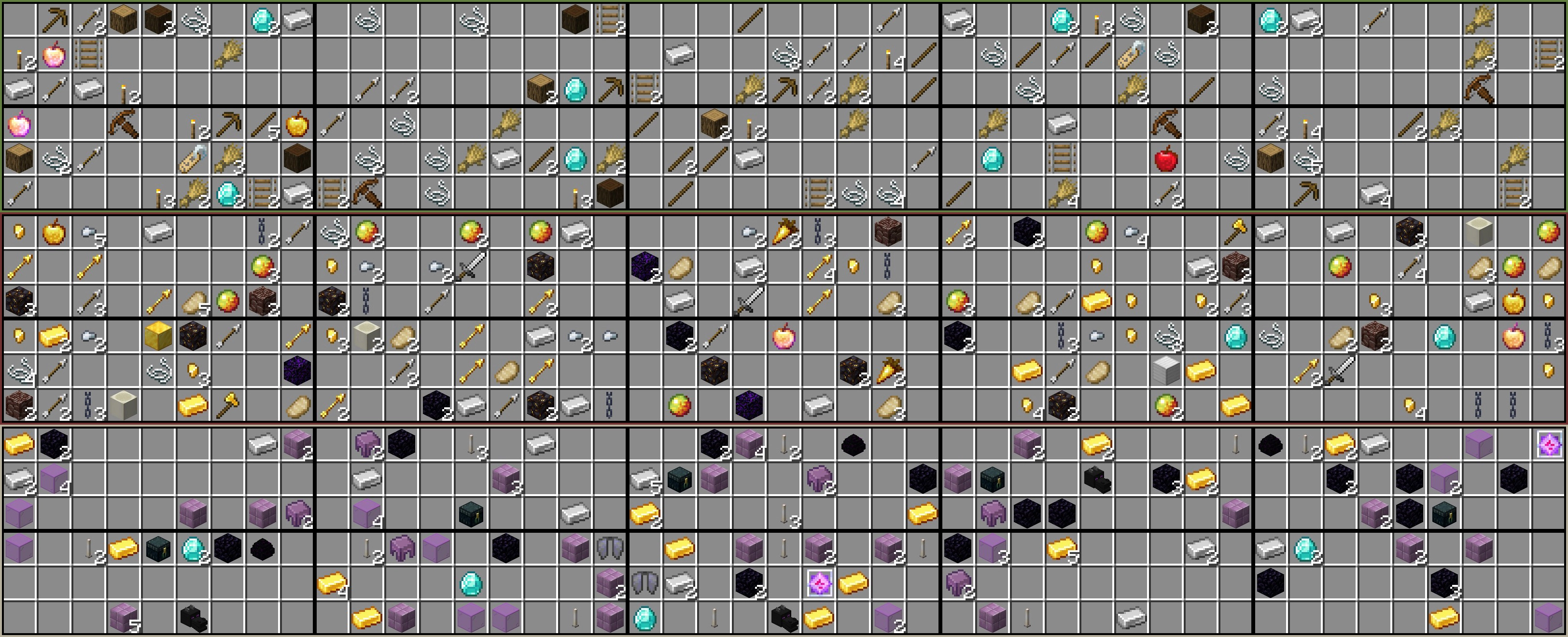
Sample of 10 chest from the Overworld, Nether, and End with the included Pre-Configuration.
## New Feature: Customize Mob Spawner Settings
Elevate your Skygrid adventures with the new Spawner Support feature, offering complete control over mob spawner settings. Customize spawner attributes, including the types of entities, spawn rates, and other parameters.
## Key Features:
- Fine-Tune Spawner Settings**: Precisely adjust the spawner settings, specifying the entity, delay, max nearby entities, and more.
- Random Entity Selection**: Set the spawn weights for entities to add unpredictability to your gameplay. The plugin will select entities randomly based on these weights.
- Worldwide Customization**: Customize spawners for all biomes across all world dimensions, ensuring a seamless and immersive experience.
- Grid Block Inclusion**: To enable the Spawner Support feature, be sure to add the SPAWNER block to your world.txt, world_nether.txt, or world_the_end.txt configuration in the SkygridBlocks folder. The Spawner code won't be called unless the SPAWNER block is added.
- Biome-Specific Spawners**: Customize spawners for specific biomes at the block level, adding a new layer of customization. For example, if you specify the biome as "DEEP_DARK," you can configure spawners to spawn WARDEN entities exclusively in that biome.
## How to Use:
1. Update your plugin to the latest version.
2. Configure Spawners: Open the SpawnerSettings.yml file located in the plugin's folder.
3. Customize Settings: Define the settings for each spawner in the configuration file, specifying the entity, delay, max nearby entities, and more. You can use either of the following YML formatting styles, and they will both be read the same by the YML parser:
``
# The available entities for use can be found at https://hub.spigotmc.org/javadocs/bukkit/org/bukkit/entity/EntityType.html
# The available biomes can be found here: https://hub.spigotmc.org/javadocs/bukkit/org/bukkit/block/Biome.html

# Entities - Define entities and their chances of being chosen for the spawner. Formatting "- DOLPHIN:33.33"
# Biomes -  List the biomes where this spawner will spawn. Formatting "- BEACH"
# Delay: - Set the spawner's delay. If set to -1, the delay will be randomized (randomly choose a delay between min and max spawn delays).
# MaxNearbyEntities - Set the maximum nearby entities (of the same type) allowed. Default value is 16.
# MaxSpawnDelay - The maximum spawn delay amount (in ticks). This value must be greater than 0 and less than or equal to MaxSpawnDelay. Default value is 800 ticks.
# MinSpawnDelay - The minimum spawn delay amount (in ticks). Default value is 200 ticks.
# PlayerRange - Set the range for player activation (given that there are players online). Default value is 16.
# SpawnCount - Set how many mobs attempt to spawn. Default value is 4.
# SpawnRange - Set the radius around which the spawner will attempt to spawn mobs in. Default value is 4.
## Example with Expanded Formatting:
SpawnerSettings:
Spawner1:
Entities:
- SKELETON:100
- ZOMBIE:100
Biomes:
- FOREST
- PLAINS
Delay: -1
MaxNearbyEntities: 16
MaxSpawnDelay: 800
MinSpawnDelay: 200
PlayerRange: 16
SpawnCount: 4
SpawnRange: 4
## Example with Compact Formatting:
SpawnerSettings:
  Spawner1:
    Entities: [SKELETON:100, ZOMBIE:100]
    Biomes: [FOREST, PLAINS]
    Delay: -1
    MaxNearbyEntities: 16
    MaxSpawnDelay: 800
    MinSpawnDelay: 200
    PlayerRange: 16
    SpawnCount: 4
    SpawnRange: 4
In these examples, "Spawner1" can spawn both SKELETON and ZOMBIE entities with equal chances.
- Random Entity Selection**: Create a list of entities with associated spawn weights to add unpredictability to your spawners.
Entities: [SKELETON:10, ZOMBIE:10, CREEPER:5]
In these examples, "Spawner1" can spawn both SKELETON and ZOMBIE entities with equal chances.
With Spawner Support, you have the freedom to tailor your spawner settings to your liking. Enjoy the flexibility to customize spawners for all biomes across all world dimensions, making your Skygrid experience truly unique. Stay tuned for more updates, as I am working on additional features such as chest support. Your feedback and suggestions are highly valued as we continue to improve the plugin.
## New Feature: Biome-Specific Block Generation
- Customize the block generation in your world based on different biomes.
- Enjoy a more immersive and dynamic Skygrid experience with biome-specific block generation.
## How to Use:
1. Update your plugin to the latest version.
2. Configure Biome-Specific Blocks:
3. Open the text files for each world dimension (e.g., world.txt, world_nether.txt, world_the_end.txt) located in the plugin's folder.
4. Specify block materials and their respective percentages for each biome in your world.
## For example:
``
DIRT:20
STONE:20
GRASS_BLOCK:20
- OCEAN-
SAND:50
WATER:50
- DESERT-
SAND:100
- In this example, when generating chunks in the "**OCEAN**" biome, there's a 50% chance of generating "SAND" blocks and a 50% chance of generating "WATER" blocks. In the "**DESERT**" biome, only "SAND" blocks will be generated. For the blocks above they will be generated on all biomes not specified in the file for that dimension. So, if you only want to have 1 custom biome with the rest having another variety of blocks you can do that.
- Biomes are signified by the -**BIOME_NAME**-, everything under the biome header will generate only in that biome, unless there is another biome under it like in the example above.
## Here is another example,
- OCEAN-
SAND:80
SANDSTONE:9
SEA_PICKLE:1
TUBE_CORAL:1
TUBE_CORAL_FAN:1
HORN_CORAL:1
HORN_CORAL_FAN:1
FIRE_CORAL:1
FIRE_CORAL_FAN:1
BUBBLE_CORAL:1
BUBBLE_CORAL_FAN:1
BRAIN_CORAL:1
BRAIN_CORAL_FAN:1
- Supported biomes can be found here: [Biomes](https://hub.spigotmc.org/javadocs/bukkit/org/bukkit/block/Biome.html)
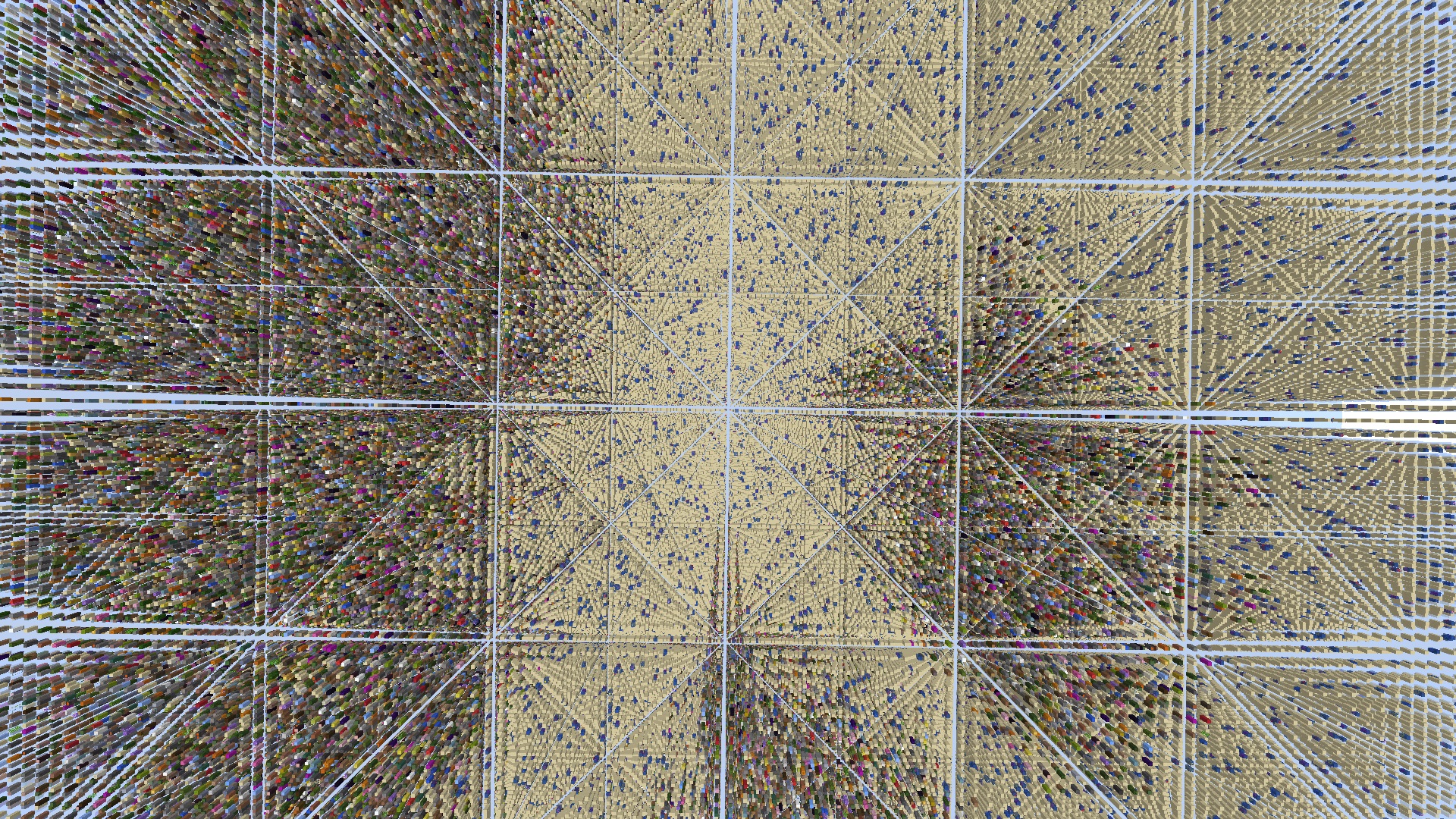
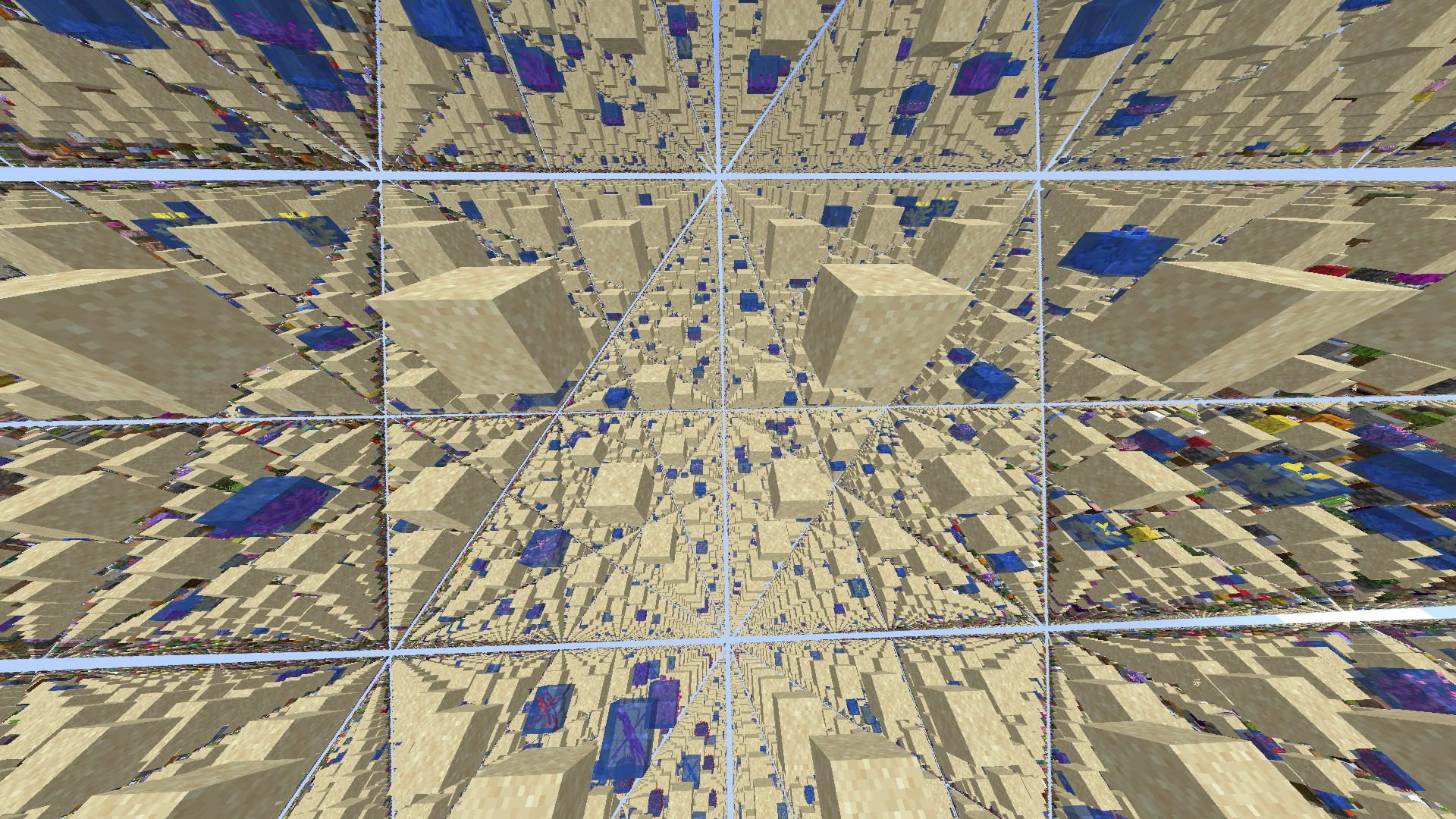
I hope this new feature adds a layer of depth to your Skygrid adventures. As always, we value your feedback and suggestions to further improve the plugin. Feel free to reach out with any questions or comments. Next features being worked on right now is spawner and chest support, no ETA.
## Issues:
- Fixed an issue were server desync while using /TPR would result in the player teleporting to the void resulting in them falling to their death
## Remedies:
- Introduced more safety mechanism to detect desync and prevent players from being teleported to unsafe places.
## Issues:
- Warning spam when players used /tpr command
- Example: [99:99:99 WARN]: Go0fy_Go0ber moved too quickly! 999,999,999
## Remedies:
- Resolved the issue of "moved too quickly" warnings spam by enhancing the block identification system, ensuring players are less likely to be teleported onto dangerous blocks.
## Issues:
- Thread Safety: The original code was not thread-safe, which could lead to data inconsistency when multiple threads access and modify the clearedChunks set simultaneously.
- Saving Chunks: The plugin needed to save cleared chunks periodically, but there was no mechanism to do so at regular intervals.
- Chunk Clearing: The code clears chunks in response to the ChunkLoadEvent, but it was necessary to ensure that the chunks were not cleared repeatedly.
## Remedies:
- Thread Safety: Used a ConcurrentHashMap.newKeySet() for the clearedChunks set to make it thread-safe. Additionally, I added the synchronized keyword to the saveClearedChunks method to ensure that the saving process is thread-safe.
- Saving Chunks: Implemented a scheduled task using Bukkit's scheduler to call the saveClearedChunks method at regular intervals (e.g., every 5 seconds) to save cleared chunks.
- Chunk Clearing: Introduced a check in the clearChunk method to ensure that chunks are not cleared again if they have already been cleared. This helps prevent repeated clearing of chunks in the same session.
By making these changes, the plugin should now handle data more safely and efficiently, especially in multi-threaded environments, and ensure that cleared chunks are saved periodically.


