
Description
Gallery
Changelog
Versions
Time Stop Clock


Features:
Version 1.19.x has been removed, and this mod has been completely rewritten.
Migrate to Cloth Config API from Previous Config System.(V2.0.0+)
Items:
- Time Clock - Ability to time stop, slow down (0.5x) and speed up (2.0x)
- Arrow - Can shoot most projectiles. Hold Shift to view shootable items
- Staff - No cooldown and no casting time (requires Iron's Spells 'n Spellbooks, suitable for use during time stop)
- Time Box Arrow - Quick creation of a TimeBox
- Rotating Item - Summons items that orbit around you, launch them as projectiles
- Rotating Block - Summons blocks that orbit around you, launch them as projectiles
Spells
- Time Freeze - Freezes the time of the current world for x seconds. The default duration is 6 seconds. The duration of Iron's Spells 'n Spellbooks increases with the level, and Ars Nouveau allow for free configuration.
- Time Box - When hitting a target, a Time Box is generated. Time inside the box is in a frozen state (this includes the ability to freeze only entities, blocks, and particles). When hitting a creature, a Time Box with a hitbox size of ×1.5 is generated; when hitting a block, a 5×5×5-sized Time Box is generated. The default duration is 6 seconds, and this is an exclusive spell of Ars Nouveau.
Time Box
- Time inside the box is in a frozen state, and it can only freeze entities, blocks, liquids, and particles. Due to technical limitations, it can only be generated via commands or spells.
The Time Box can be reversed through the configuration file. After reversal, time outside the Time Box will be in a frozen state, while time inside the box remains normal.
Commands:
- /timeclock tickrate
- Set the game tickrate /timeclock virtualtickrate — Sets the virtual tickrate of the current world /timeclock entityVirtualTickrate — Sets the virtual tickrate of target entities - /timeclock pauseTime <true/false> - Set whether to enable time stop, can be used to forcibly enable or disable time stop
- /timeclock whitelist list - View the whitelist
- /timeclock whitelist list <true/false> - Same as above, but choose whether to output to the log
- /timeclock whitelist clear - Remove all entities in the whitelist
- /timeclock whitelist remove
- Remove the target from the whitelist - /timeclock whitelist remove uuid
- Remove the UUID from the whitelist. - /timeclock whitelist add
- Add the target to the whitelist. - /timeclock config reload - Reload the config (required after making modifications to the external config file).v2.0.0+ Removed.
- /timeclock timebox add
- /timeclock timebox add
- /timeclock timebox add
- /timeclock timebox add
- /timeclock timebox add
- /timeclock timebox add
- /timeclock timebox remove
- /timeclock timebox clear
- /timeclock timebox list
- /timeclock timebox modify
[<active/color/expandAfterCreation/changeSpeed>] <active/color/expandAfterCreation/speed> - /timeclock timebox modify
[ ]
Key Bindings
- Left Ctrl + Mouse Wheel - Toggle time clock mode
- Right Ctrl - Open the tooltip overlay config screen
- G - Launch Orbit Objects
Config:
General:
- bypassInvulnerableTime - Enable the desaturate shader to convert the game graphics into a black and white effect
- slotInteraction - Whether interaction with slots in the container is allowed
- model_size -The model size of WeaponProjectile (non-vanilla projectiles shot by arrow in this mod)
- cooldown - Cooldown tick using timeclock
- soundType - The sound played when using the time clock
- ability_tick - Ticks needed to recover back to normal after using time manipulation
- reverse_timebox - Whether to reverse the feature of the Time Box
- blacklist - Blacklist of "arrow" projectiles
Render:
- desaturate - Enable the desaturate shader to convert the game graphics into a black and white effect
- overlay_tooltip - Add overlay of tooltip for mod on the screen
- overlay_tooltip_position - Determines which corner of the screen the tooltip overlay will be rendered
- overlay_background - The background of the tooltip overlay
- overlay_background_color - The color of the overlay tooltip background
- overlay_tooltip_offsetX - The X-axis offset of the overlay tooltip
- overlay_tooltip_offsetY - The Y-axis offset of the overlay tooltip
- overlay_tooltip_color - The color of the overlay tooltip
- glowing_color - Glowing color of whitelisted entity
- timebox_face - Whether to render the time box faces
- timebox_line - Whether to render the time box lines
Screen:


Issue Fix:
- Blueprint conflict crash
- Server startup crash
- Citadel conflict
- Glowing effect not working.
- Tickrate changes in other dimensions are not syncing to the server.
- Geckolib animation is stuttering during timestop.
- "Arrow" are infinitely generating ammunition in survival mode.
- Iron's Spells 'n Spellbooks mod is failing to cast spells properly during timestop.(forge)
- TaCZ cannot fire during time freeze.
- Command blocks cannot execute the commands of this mod.
- Server startup conflict (Forge).
Compatibility:
Citadel - Conflict with mixin(Fixed in version 1.1.0)
All Versions
+ Add Version| Name | Game version | Platforms | Published | Downloads | Actions |
|---|---|---|---|---|---|
| 14h ago | 1 | ||||
| 14h ago | 1 | ||||
| 14h ago | 1 | ||||
| 14h ago | 1 | ||||
| 14h ago | 1 | ||||
| 14h ago | 1 | ||||
| 14h ago | 1 | ||||
| 14h ago | 1 | ||||
| 14h ago | 1 | ||||
| 14h ago | 1 | ||||
| 14h ago | 1 | ||||
| 14h ago | 1 | ||||
| 14h ago | 1 | ||||
| 14h ago | 1 | ||||
| 14h ago | 1 | ||||
| 14h ago | 1 | ||||
| 14h ago | 1 | ||||
| 14h ago | 1 | ||||
| 14h ago | 1 | ||||
| 14h ago | 1 | ||||
| 14h ago | 1 | ||||
| 14h ago | 1 | ||||
| 14h ago | 1 | ||||
| 14h ago | 1 | ||||
| 14h ago | 1 | ||||
| 14h ago | 1 | ||||
| 14h ago | 1 | ||||
| 14h ago | 1 | ||||
| 14h ago | 1 | ||||
| 14h ago | 1 | ||||
| 14h ago | 1 | ||||
| 14h ago | 1 | ||||
| 14h ago | 1 | ||||
| 14h ago | 1 |


[4.8.0+forge] [Forge 1.20.1] v4.8.0
by Suel_ki on Oct 15, 2026
Download
## Version [v1.20.1-4.8.0] - 2026-09-19
### Features
### Bug fixes
### Features
- Time Box***
- Allow spawning a permanent Time Box by setting tick to 0 in the Time Box Arrow menu
- Command***
- ``
/timeclock entityVirtualTickrate <target> <value>`— Sets the virtual tickrate of target entities
- Item***
- Rotating Item - Summons items that orbit around you, launch them as projectiles
- Rotating Block - Summons blocks that orbit around you, launch them as projectiles
- Special Text Effects - Toggle via the special_text_effects client config
- Like this:
- Kubejs Compat***
- Add boolean method `
isTimeManipulator(Entity entity)` - Add method `
pass()``
### Bug fixes
- Time Manipulator - Fixed time stop affecting rider while mounted
- Forge***
- TimeClock - Incorrectly generates in Iron's Spells 'n Spellbooks loot tables
[4.8.0+fabric] [Fabric 1.20.1] v4.8.0
by Suel_ki on Oct 15, 2026
Download
## Version [v1.20.1-4.8.0] - 2026-09-19
### Features
### Bug fixes
### Features
- Time Box***
- Allow spawning a permanent Time Box by setting tick to 0 in the Time Box Arrow menu
- Command***
- ``
/timeclock entityVirtualTickrate <target> <value>`— Sets the virtual tickrate of target entities
- Item***
- Rotating Item - Summons items that orbit around you, launch them as projectiles
- Rotating Block - Summons blocks that orbit around you, launch them as projectiles
- Special Text Effects - Toggle via the special_text_effects client config
- Like this:
- Kubejs Compat***
- Add boolean method `
isTimeManipulator(Entity entity)` - Add method `
pass()``
### Bug fixes
- Time Manipulator - Fixed time stop affecting rider while mounted
- Forge***
- TimeClock - Incorrectly generates in Iron's Spells 'n Spellbooks loot tables
[4.7.0+neoforge] [NeoForge 1.21.1] v4.7.0
by Suel_ki on Oct 15, 2026
Download
## Version [v1.21.1-4.7.0] - 2026-08-04
### Features
### Bug fixes
There might be other changes, though I can't recall them now
### Features
- Port to v4.6.0
- Sable Compat***
- Only time stop supported
- Kubejs Compat***
- Add boolean method ``
isTimeManipulator(Entity entity)``
### Bug fixes
- Rider time manipulator frozen during time stop
There might be other changes, though I can't recall them now
[4.7.0+fabric] [Fabric 1.21.1] v4.7.0
by Suel_ki on Oct 15, 2026
Download
## Version [v1.21.1-4.7.0] - 2026-08-04
### Features
### Bug fixes
There might be other changes, though I can't recall them now
### Features
- Port to v4.6.0
- Sable Compat***
- Only time stop supported
- Kubejs Compat***
- Add boolean method ``
isTimeManipulator(Entity entity)``
### Bug fixes
- Rider time manipulator frozen during time stop
There might be other changes, though I can't recall them now
[4.6.0+forge] [Forge 1.20.1] v4.6.0
by Suel_ki on Oct 15, 2026
Download
## Version [v4.6.0] - 2026-06-28
### Features
### Bug fixes
### Features
- Lower virtual tickrate minimum from 1 to 0.1
### Bug fixes
- Attempt to fix ConcurrentModificationException
- Compost manager from quark incompatable [#17](https://github.com/Suel-ki/TimeStopClock/issues/17)
- Fabric***
- Crash upon opening inventory [#16](https://github.com/Suel-ki/TimeStopClock/issues/16)
[4.6.0+fabric] [Fabric 1.20.1] v4.6.0
by Suel_ki on Oct 15, 2026
Download
## Version [v4.6.0] - 2026-06-28
### Features
### Bug fixes
### Features
- Lower virtual tickrate minimum from 1 to 0.1
### Bug fixes
- Attempt to fix ConcurrentModificationException
- Compost manager from quark incompatable [#17](https://github.com/Suel-ki/TimeStopClock/issues/17)
- Fabric***
- Crash upon opening inventory [#16](https://github.com/Suel-ki/TimeStopClock/issues/16)
[4.5.0-hotfix+forge] [Forge 1.20.1] v4.5.0-hotfix
by Suel_ki on Oct 15, 2026
Download
Fix: Unable to cancel timestop when migrating mod save data [#15](https://github.com/Suel-ki/TimeStopClock/issues/15)
- If your save has already been migrated and you're experiencing this issue, please follow the method in [#15](https://github.com/Suel-ki/TimeStopClock/issues/15) to resolve it.
[4.5.0-hotfix+fabric] [Fabric 1.20.1] v4.5.0-hotfix
by Suel_ki on Oct 15, 2026
Download
Fix: Unable to cancel timestop when migrating mod save data [#15](https://github.com/Suel-ki/TimeStopClock/issues/15)
- If your save has already been migrated and you're experiencing this issue, please follow the method in [#15](https://github.com/Suel-ki/TimeStopClock/issues/15) to resolve it.
[4.5.0+forge] [Forge 1.20.1] v4.5.0
by Suel_ki on Oct 15, 2026
Download
## Version [v4.5.0] - 2026-05-30
### Features
### Bug fixes
### Features
- Virtual Tickrate***
- Virtual Tickrate is a parameter that controls Bullet Time intensity. Unlike the normal tickrate, which slows down the entire server **including yourself**, virtual tickrate only slows down the world around you (entities, blocks, particles, etc.). Valid range: 1 - 20
- Command:
/timeclock virtualtickrate <value>— modifies the virtual tickrate of the current world
- Mode Switch Menu***
- Added timeclock visualization mode switch GUI (shift + right-click to open)
- Slow (1~20), Fast (20~100), and Bullet (1~20) tickrate can all be customised in the mode menu
- Misc***
- Time stop sound effect is now customisable. Set
sound_typetoCUSTOMin the config, then specify any vanilla or mod sound ID incustom_sound_id(e.g.minecraft:block.anvil.use)
### Bug fixes
- Entity jitter on vanilla pause menu
- Server startup crash [#12](https://github.com/Suel-ki/TimeStopClock/issues/12)
[4.5.0+fabric] [Fabric 1.20.1] v4.5.0
by Suel_ki on Oct 15, 2026
Download
## Version [v4.5.0] - 2026-05-30
### Features
### Bug fixes
### Features
- Virtual Tickrate***
- Virtual Tickrate is a parameter that controls Bullet Time intensity. Unlike the normal tickrate, which slows down the entire server **including yourself**, virtual tickrate only slows down the world around you (entities, blocks, particles, etc.). Valid range: 1 - 20
- Command:
/timeclock virtualtickrate <value>— modifies the virtual tickrate of the current world
- Mode Switch Menu***
- Added timeclock visualization mode switch GUI (shift + right-click to open)
- Slow (1~20), Fast (20~100), and Bullet (1~20) tickrate can all be customised in the mode menu
- Misc***
- Time stop sound effect is now customisable. Set
sound_typetoCUSTOMin the config, then specify any vanilla or mod sound ID incustom_sound_id(e.g.minecraft:block.anvil.use)
### Bug fixes
- Entity jitter on vanilla pause menu
- Server startup crash [#12](https://github.com/Suel-ki/TimeStopClock/issues/12)
[4.4.5+fabric] [Fabric 1.20.1] v4.4.5
by Suel_ki on Oct 15, 2026
Download
## Version [v4.4.5] - 2026-04-25
### Features
### Bug fixes
#### Forge
### Features
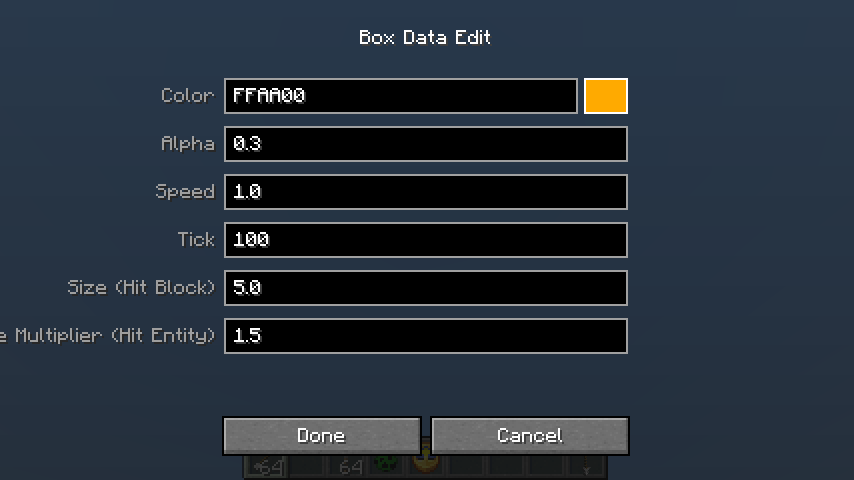
- Add Timebox Arrow for quick creation of TimeBox

### Bug fixes
#### Forge
- TimeBox data is out of sync on client
[4.4.5+forge] [Forge 1.20.1] v4.4.5
by Suel_ki on Oct 15, 2026
Download
## Version [v4.4.5] - 2026-04-25
### Features

### Bug fixes
#### Forge
### Features
- Add Timebox Arrow for quick creation of TimeBox

### Bug fixes
#### Forge
- TimeBox data is out of sync on client
[4.4.0+forge] [Forge 1.20.1] v4.4.0
by Suel_ki on Oct 15, 2026
Download
## Version [v4.4.0] - 2026-03-27
### Features
Example Script:
``
### Bug fixes
### Features
- Added the Time Anchor Amulet. Please note that it is currently hidden from the creative tabs due to missing textures. When equipped (via Curios or Trinkets), it grants the wearer immunity to time-stop effects
- Added KubeJS Compatibility: You can now use the timeclock.entityPause event to control time-stop logic.
Example Script:
``
timeclock.entityPause(event => {
    // Available methods:
    // event.allow(), event.deny()
    // event.setResult('allow'), event.setResult('deny')

    if (event.entity.type === 'minecraft:pig') {
        event.deny() // Immunity for pigs
    }
    if (event.entity.type === 'minecraft:creeper') {
        event.setResult('deny') // Immunity for creepers
    }
})
- Add this to any file in your kubejs/server_scripts/
### Bug fixes
[4.4.0+fabric] [Fabric 1.20.1] v4.4.0
by Suel_ki on Oct 15, 2026
Download
## Version [v4.4.0] - 2026-03-27
### Features
### Bug fixes
### Features
- Added the Time Anchor Amulet. Please note that it is currently hidden from the creative tabs due to missing textures. When equipped (via Curios or Trinkets), it grants the wearer immunity to time-stop effects
### Bug fixes
[4.3.5+forge] [Forge 1.20.1] v4.3.5
by Suel_ki on Oct 15, 2026
Download
## Version [v4.3.5] - 2026-03-14
### Bug fixes
### Bug fixes
- Weird Case With Origins [#10](https://github.com/Suel-ki/TimeStopClock/issues/10)
- Incompatible with Scorched Guns [#9](https://github.com/Suel-ki/TimeStopClock/issues/9)
- Dawn Era animations don't pause with timestop [#8](https://github.com/Suel-ki/TimeStopClock/issues/8)
[4.3.5+fabric] [Fabric 1.20.1] v4.3.5
by Suel_ki on Oct 15, 2026
Download
## Version [v4.3.5] - 2026-03-14
### Bug fixes
### Bug fixes
- Weird Case With Origins [#10](https://github.com/Suel-ki/TimeStopClock/issues/10)
- Incompatible with Scorched Guns [#9](https://github.com/Suel-ki/TimeStopClock/issues/9)
- Dawn Era animations don't pause with timestop [#8](https://github.com/Suel-ki/TimeStopClock/issues/8)
[4.2.0] [Forge 1.20.1] v4.2.0
by Suel_ki on Oct 15, 2026
Download
- Add
entity_ownership_bypassconfig - Allow entities (projectiles, summons, etc.) to bypass time stop if their owner is whitelisted or a time manipulator
[4.2.0] [Fabric 1.20.1] v4.2.0
by Suel_ki on Oct 15, 2026
Download
- Add
entity_ownership_bypassconfig - Allow entities (projectiles, summons, etc.) to bypass time stop if their owner is whitelisted or a time manipulator
[4.0.0] [Forge 1.20.1] v4.0.0
by Suel_ki on Oct 15, 2026
Download
- Fix client config not registered exception [#7](https://github.com/Suel-ki/TimeStopClock/issues/7)
- Add freeze entity commands:
/timeclock freeze list - View the freezelist/timeclock freeze list <true/false> - Same as above, but choose whether to output to the log
/timeclock freeze clear - Remove all entities in the freezelist/timeclock freeze remove <target> - Remove the target from the freezelist/timeclock freeze remove uuid <UUID> - Remove the UUID from the freezelist./timeclock freeze add <target> - Add the target to the freezelist.
[4.0.0] [Fabric 1.20.1] v4.0.0
by Suel_ki on Oct 15, 2026
Download
- Fix client config not registered exception [#7](https://github.com/Suel-ki/TimeStopClock/issues/7)
- Add freeze entity commands:
/timeclock freeze list - View the freezelist/timeclock freeze list <true/false> - Same as above, but choose whether to output to the log
/timeclock freeze clear - Remove all entities in the freezelist/timeclock freeze remove <target> - Remove the target from the freezelist/timeclock freeze remove uuid <UUID> - Remove the UUID from the freezelist./timeclock freeze add <target> - Add the target to the freezelist.
[4.0.0] [NeoForge 1.21.1] v4.0.0
by Suel_ki on Oct 15, 2026
Download
- Add freeze entity commands:
/timeclock freeze list - View the freezelist/timeclock freeze list <true/false> - Same as above, but choose whether to output to the log/timeclock freeze clear - Remove all entities in the freezelist/timeclock freeze remove <target> - Remove the target from the freezelist/timeclock freeze remove uuid <UUID> - Remove the UUID from the freezelist./timeclock freeze add <target> - Add the target to the freezelist.
[4.0.0] [Fabric 1.21.1] v4.0.0
by Suel_ki on Oct 15, 2026
Download
- Add freeze entity commands:
/timeclock freeze list - View the freezelist/timeclock freeze list <true/false> - Same as above, but choose whether to output to the log/timeclock freeze clear - Remove all entities in the freezelist/timeclock freeze remove <target> - Remove the target from the freezelist/timeclock freeze remove uuid <UUID> - Remove the UUID from the freezelist./timeclock freeze add <target> - Add the target to the freezelist.
[3.5.0] Forge-3.5.0
by Suel_ki on Oct 15, 2026
Download
- Fix [#2](https://github.com/Suel-ki/TimeStopClock/issues/2)
- Fix [#5(weather2 support)](https://github.com/Suel-ki/TimeStopClock/issues/5)
- Fix [#6](https://github.com/Suel-ki/TimeStopClock/issues/6)
- Add non-remote support for bypass_invulnerable_time
[3.5.0] Fabric-3.5.0
by Suel_ki on Oct 15, 2026
Download
- Fix [#2](https://github.com/Suel-ki/TimeStopClock/issues/2)
- Fix [#5(weather2 support)](https://github.com/Suel-ki/TimeStopClock/issues/5)
- Fix [#6](https://github.com/Suel-ki/TimeStopClock/issues/6)
- Add non-remote support for bypass_invulnerable_time
[3.0.0] Forge-3.0.0
by Suel_ki on Oct 15, 2026
Download
## Features
- Add projectile blacklist for "arrow", blacklisted items won't be shot
- Add timebox where time is frozen for blocks, entities and particles
- If the <id> is in the form of "modid:id", it must be enclosed in single quotes ''.If it is in the form of "id", no quotes are needed
- Add timebox creation commands:
/timeclock timebox add <id> <min> <max> <expandAfterCreation> <changeSpeed>/timeclock timebox add <id> <min> <max> <expandAfterCreation> <changeSpeed> <color>/timeclock timebox add <id> <min> <max> <expandAfterCreation> <changeSpeed> <color> <alpha>/timeclock timebox add <id> <min> <max> <expandAfterCreation> <changeSpeed> <color> <alpha> <tick>/timeclock timebox add <id> <min> <max> <expandAfterCreation> <changeSpeed> <color> <alpha> <tick> <removeAnimation>/timeclock timebox add <id> <min> <max> <expandAfterCreation> <changeSpeed> <color> <alpha> <tick> <removeAnimation> <startCenter>- Add timebox management commands:
/timeclock timebox remove <id>/timeclock timebox clear/timeclock timebox list <logging>/timeclock timebox modify <id>[<active/color/expandAfterCreation/changeSpeed>] <active/color/expandAfterCreation/speed>/timeclock timebox modify <id> [<color>] <color> <alpha>- Add [Ars Nouveau](https://modrinth.com/mod/ars-nouveau) integration with new glyphs:
- Time Freeze Glyph: Freeze the current world time, with a base time of 6 seconds
- Time Box Glyph:Create a time box, where time will be frozen (including particles, creatures, and blocks), with a base time of 6 seconds
- Subdivide config for better organization
- Fix data saving loss issue for WeaponProjectileEntity
[3.0.0] Fabric-3.0.0
by Suel_ki on Oct 15, 2026
Download
## Features
- Add projectile blacklist for "arrow", blacklisted items won't be shot
- Add timebox where time is frozen for blocks, entities and particles
- If the <id> is in the form of "modid:id", it must be enclosed in single quotes ''.If it is in the form of "id", no quotes are needed
- Add timebox creation commands:
/timeclock timebox add <id> <min> <max> <expandAfterCreation> <changeSpeed>/timeclock timebox add <id> <min> <max> <expandAfterCreation> <changeSpeed> <color>/timeclock timebox add <id> <min> <max> <expandAfterCreation> <changeSpeed> <color> <alpha>/timeclock timebox add <id> <min> <max> <expandAfterCreation> <changeSpeed> <color> <alpha> <tick>/timeclock timebox add <id> <min> <max> <expandAfterCreation> <changeSpeed> <color> <alpha> <tick> <removeAnimation>/timeclock timebox add <id> <min> <max> <expandAfterCreation> <changeSpeed> <color> <alpha> <tick> <removeAnimation> <startCenter>- Add timebox management commands:
/timeclock timebox remove <id>/timeclock timebox clear/timeclock timebox list <logging>/timeclock timebox modify <id>[<active/color/expandAfterCreation/changeSpeed>] <active/color/expandAfterCreation/speed>/timeclock timebox modify <id> [<color>] <color> <alpha>- Subdivide config for better organization
- Fix data saving loss issue for WeaponProjectileEntity
[2.1.0] Fabric-2.1.0
by Suel_ki on Oct 15, 2026
Download
- Fix commandblock not executing mod commands
- Fix [TaCZ](https://modrinth.com/mod/timeless-and-classics-zero) cannot fire during timestop
[2.1.0] Forge-2.1.0
by Suel_ki on Oct 15, 2026
Download
- Fix commandblock not executing mod commands
- Fix [TaCZ](https://modrinth.com/mod/timeless-and-classics-zero) cannot fire during timestop
- [Iron's Spells 'n Spellbooks](https://modrinth.com/mod/irons-spells-n-spellbooks) integrations
[2.0.0] Forge-2.0.0
by Suel_ki on Oct 15, 2026
Download
### Adjusted Content
Migrate to [Cloth Config API](https://modrinth.com/mod/cloth-config) from Previous Config System
Config screen changes
### Fixed Issues
Migrate to [Cloth Config API](https://modrinth.com/mod/cloth-config) from Previous Config System
Config screen changes
- Singleplayer
- Multiplayer
### Fixed Issues
- Glowing effect not working.
- Tickrate changes in other dimensions are not syncing to the server.
- Geckolib animation is stuttering during timestop
- "Arrow" are infinitely generating ammunition in survival mode.
- [Iron's Spells 'n Spellbooks](https://modrinth.com/mod/irons-spells-n-spellbooks) mod is failing to cast spells properly during timestop.(forge)
[2.0.0] Fabric-2.0.0
by Suel_ki on Oct 15, 2026
Download
### Adjusted Content
Migrate to [Cloth Config API](https://modrinth.com/mod/cloth-config) from Previous Config System
Config screen changes
### Fixed Issues
Migrate to [Cloth Config API](https://modrinth.com/mod/cloth-config) from Previous Config System
Config screen changes
- Singleplayer
- Multiplayer
### Fixed Issues
- Glowing effect not working.
- Tickrate changes in other dimensions are not syncing to the server.
- Geckolib animation is stuttering during timestop
- "Arrow" are infinitely generating ammunition in survival mode.


