
 VillagerInfo

This plugin aims to make accessing useful information that is stored in villagers brains, easier.
Accessing the information in villager's brains is useful, but /data get has much more information than is needed for most things.
Permissions
-
villagerinfo.reload- Default: OP only
- Description: Allows the Player to use
/villreloadto reload the VillagerInfo configurations. - Unlocks: Reloads the VillagerInfo configurations.
-
villagerinfo.output- Default: Enabled
- Description: Allows the player to see the information from a villager using crouch-interact.
- Unlocks: Ability to view information from a villager using crouch-interact.
-
villagerinfo.commands- Default: Enabled
- Description: Allows the player to use commands to adjust their preferences on how VillagerInfo will behave for them (
/villinfo). - Unlocks: Access to command-based adjustments for VillagerInfo behavior.
-
villagerinfo.commands.help- Default: Enabled
- Description: Allows the player to use the help command to see how the plugin functions.
- Unlocks: Access to the help command for understanding the plugin's functionality.
-
villagerinfo.commands.toggle- Default: Enabled
- Description: Allows the player to use commands to toggle certain behaviors in the VillagerInfo plugin (
/villinfo toggle). - Unlocks: Ability to toggle specific behaviors within the VillagerInfo plugin.
-
villagerinfo.commands.toggle.output- Default: Enabled
- Description: Allows the player to toggle whether they want VillagerInfo to output on crouch-interact or not (
/villinfo toggle output). - Unlocks: Toggles the output of VillagerInfo on crouch-interact.
-
villagerinfo.commands.toggle.highlight- Default: Enabled
- Description: Allows the player to toggle whether they want VillagerInfo to highlight a villager's workstation on crouch-interact or not (
/villinfo toggle highlight). - Unlocks: Toggles the highlighting of a villager's workstation on crouch-interact.
-
villagerinfo.commands.toggle.sound- Default: Enabled
- Description: Allows the player to toggle whether they want VillagerInfo to output sound on crouch-interact or not (
/villinfo toggle sound). - Unlocks: Toggles the sound output of VillagerInfo on crouch-interact.
Commands
-
villreload- Permission:
villagerinfo.reload - Description: Reloads the VillagerInfo configuration
- Aliases:
none
- Permission:
-
villagerinfo- Permission:
villagerinfo.commands - Description: Base command for VillagerInfo player commands
- Aliases:
vinfovillinfovi
- Permission:
-
villagerinfo help- Permission:
villagerinfo.commands.help - Description: Command that shows a player the help screen
- Permission:
-
villagerinfo toggle- Permission:
villagerinfo.commands.toggle - Description: Command that allows a player to toggle personal settings related to Villager Info functionality
- Permission:
-
villagerinfo toggle highlight- Permission:
villagerinfo.commands.toggle.highlight - Description: Command that allows a player to prevent a Villager's workstation from being highlighted when they crouch-interact with a villager
- Permission:
-
villagerinfo toggle output- Permission:
villagerinfo.commands.toggle.output - Description: Command that allows a player to prevent a Villager's information from being output when they crouch-interact with a villager
- Permission:
-
villagerinfo toggle sound- Permission:
villagerinfo.commands.toggle.sound - Description: Command that allows a player to prevent sound from playing when they crouch-interact with a villager
- Permission:
API
For the time being, the current way to import this project is through the modrinth maven Remember to check what the current version is - these may not be up to date
Javadocs
Maven Import
<repository>
  <id>modrinth-repo</id>
  <url>https://api.modrinth.com/maven/</url>
</repository>

<dependency>
  <groupId>maven.modrinth</groupId>
  <artifactId>villager-info</artifactId>
  <version>3.0.1</version>
  <scope>provided</scope>
</dependency>
Gradle Import
exclusiveContent {
    forRepository { maven { url = "https://api.modrinth.com/maven" } }
    filter { includeGroup "maven.modrinth" }
}

dependencies {
    compileOnly 'maven.modrinth:villager-info:3.0.1'
}
Todo:
- [x] Toggle for information output
- [x] Personal options for output(?)
- [ ] Add a command to clear all current highlights and reset all villager highlight PDC data
- [ ] Adjust the functionality of the workstation highlights so that if someone starts the highlight again, it's not strictly ignores, but starts the time over again
- [ ] Add different info modes
- [ ] Add more information like if the villager has been healed previously, and if so, by whom
- [ ] Use pages for the information so it's not all in one big list
- [ ] Use click events to trigger the block highlights
- [x] Highlight for bed location, Village center
How to Install VillagerInfo (Plugin)
VillagerInfo by Peashooter101 is verified for Paper, Purpur across Minecraft versions 1.18.2, 1.19, 1.19.1, 1.19.2, 1.19.3, 1.19.4, 1.20, 1.20.1 (latest release: 4.3.2, file size: 83 KB). Follow the steps below to install it safely from ModCraft.tv:
- Click the Download button above and select your Minecraft version (1.18.2, 1.19, 1.19.1, 1.19.2, 1.19.3, 1.19.4, 1.20, 1.20.1) and platform (Paper, Purpur).
- Make sure you have the compatible loader or environment installed for Paper, Purpur.
- Move the downloaded VillagerInfo file into your Minecraft
.minecraft/pluginsfolder and launch the game.
All Versions
+ Add Version| Name | Game version | Platforms | Published | Downloads | Actions |
|---|---|---|---|---|---|
| 2mo ago | 15 | ||||
| 2mo ago | 8 | ||||
| 2mo ago | 5 | ||||
| 2mo ago | 4 | ||||
| 2mo ago | 3 | ||||
| 2mo ago | 3 | ||||
| 2mo ago | 2 | ||||
| 2mo ago | 2 | ||||
| 2mo ago | 2 | ||||
| 2mo ago | 2 | ||||
| 2mo ago | 1 | ||||
| 2mo ago | 1 | ||||
| 2mo ago | 1 | ||||
| 2mo ago | 1 | ||||
| 2mo ago | 1 | ||||
| 2mo ago | 1 | ||||
| 2mo ago | 1 | ||||
| 2mo ago | 1 | ||||
| 2mo ago | 1 | ||||
| 2mo ago | 1 | ||||
| 2mo ago | 1 | ||||
| 2mo ago | 1 | ||||
| 2mo ago | 1 | ||||
| 2mo ago | 1 | ||||
|
R
2.0
|
2mo ago | 1 |


- Fixed**
- Workstation/Bed highlight outlines could get stuck permanantly if you teleported/unloaded the chunk before the highlight timer finished, this should no longer occur. Any stuck highlights from before this change will need to be manually deleted/killed by server admins, it is a block display entity, so you should be able to run
/kill @n[type=minecraft:block_display]while next to a stuck highlight to remove it - Parsing professions should no longer read out a broken message and should work as expected
- Villager and Zombie Villager health will now be shortened to one decimel place instead of a long running value
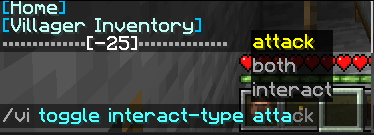
- Adds the ability to switch the action a user uses to trigger output
- Valid options are 'attack', 'both', and 'interact'
- Crouching is still required while doing the interaction
- Adds toggle command:
/vi toggle interact-type [attack|interact|both] - Adds permission
villagerinfo.commands.toggle.interact-type- default istrue
Tested on 1.21.5

- Villager's beds are now highlighted
## Locale Changes:
- New lines are no longer hard-coded into the component builder.** This means that you will either need to regenerate your locale, or add
\nto the beginning of thevillager-information-messagemessages.
## Config Changes:
- Added
highlight-bed-on-output,bed-highlight-color, anddefaultssection. highlight-bed-on-outputhighlights bed at the same time as workstationbed-highlight-color- color to highlight the beds in RR GG BB formatdefaults- default settings for the highlighted blocks
- Fixes the mappings so that paper will not remap it.
- No other changes
- Updated to 1.20.6
- No longer supports 1.19-1.20.4
- Updated NMS to support 1.20.4 (it worked but was giving an error about not being supported)
- no other changes
- Fixes an issue where the highlight toggle did not actually toggle highlighting
- Adds slight backwards compatibility (to 1.19)
- Versions before 1.19.4 will not be able to use colors for their displays, as the colors are made possible by Block Display Entities - a feature introduced in Minecraft 1.19.4
- These versions will be using the old way of highlighting the work stations - falling blocks
- If you are using this plugin on an earlier version, all displays will glow white, and may have a visual glitch of falling through the ground occasionally.
- Additionally if you are on a later version than the 'latest' that the plugin is on, it will manually calculate the player's reputation instead of taking directly from the game (NMS hook) - I believe my calculations are done correctly but it might be slightly off from what the actual numbers are, so just be aware of that
- Other differences should not show on a user end, there are a number more API methods for the pre-1.19.4 methods
<details><summary>
## Permissions
</summary>
villagerinfo.reload- Default: **OP only**
- Description: Allows the Player to use
/villreloadto reload the VillagerInfo configurations. - Unlocks: Reloads the VillagerInfo configurations.
villagerinfo.output- Default: **Enabled**
- Description: Allows the player to see the information from a villager using crouch-interact.
- Unlocks: Ability to view information from a villager using crouch-interact.
villagerinfo.commands- Default: **Enabled**
- Description: Allows the player to use commands to adjust their preferences on how VillagerInfo will behave for them (
/villinfo). - Unlocks: Access to command-based adjustments for VillagerInfo behavior.
villagerinfo.commands.help- Default: **Enabled**
- Description: Allows the player to use the help command to see how the plugin functions.
- Unlocks: Access to the help command for understanding the plugin's functionality.
villagerinfo.commands.toggle- Default: **Enabled**
- Description: Allows the player to use commands to toggle certain behaviors in the VillagerInfo plugin (
/villinfo toggle). - Unlocks: Ability to toggle specific behaviors within the VillagerInfo plugin.
villagerinfo.commands.toggle.output- Default: **Enabled**
- Description: Allows the player to toggle whether they want VillagerInfo to output on crouch-interact or not (
/villinfo toggle output). - Unlocks: Toggles the output of VillagerInfo on crouch-interact.
villagerinfo.commands.toggle.highlight- Default: **Enabled**
- Description: Allows the player to toggle whether they want VillagerInfo to highlight a villager's workstation on crouch-interact or not (
/villinfo toggle highlight). - Unlocks: Toggles the highlighting of a villager's workstation on crouch-interact.
villagerinfo.commands.toggle.sound- Default: **Enabled**
- Description: Allows the player to toggle whether they want VillagerInfo to output sound on crouch-interact or not (
/villinfo toggle sound). - Unlocks: Toggles the sound output of VillagerInfo on crouch-interact.
<details><summary>
## Commands
</summary>
villreload- Permission:
villagerinfo.reload - Description: Reloads the VillagerInfo configuration
- Aliases:
none
villagerinfo- Permission:
villagerinfo.commands - Description: Base command for VillagerInfo player commands
- Aliases:
vinfovillinfovi
villagerinfo help- Permission:
villagerinfo.commands.help - Description: Command that shows a player the help screen
villagerinfo toggle- Permission:
villagerinfo.commands.toggle - Description: Command that allows a player to toggle personal settings related to Villager Info functionality
villagerinfo toggle highlight- Permission:
villagerinfo.commands.toggle.highlight - Description: Command that allows a player to prevent a Vill
- Lots of code refactoring
- Rename package from
adhdmctosimplexity - Start adding javadocs
- Command logic has been changed for the final time. They are now arranged in subcommands.
/villagerinfo toggle highlightfor example. - Permissions have remained the same
- Commands should not autofill if the player does not have the permission
/villagerinfo helpcommand should not show commands the player does not have access to- All the javadocs have been cleared from the code currently - in the process of trying to make the code easier to understand
- Re-added the ability to use either the reputation bar or the reputation number (uses the
REPUTATION_TOTAL_FORMATlocale message) from @Aplini in https://github.com/Simplexity-Development/VillagerInfo/pull/25
> This is a beta version, if you come across issues please report them!
> <br>⚠️ Locale, config, commands, and permissions are liable to change dramatically until the plugin is out of beta ⚠️
/villinfocommand has been changed to/vill-toggle- This is likely to change again- There is now the ability to toggle
output,highlight, andsound- these are personal toggles - The plugin now uses the configured sound, pitch, and volume from the config
- All permissions that were previously
vill.info.are nowvillagerinfo.andcommandpermissions have been changed tocommandssovill.info.command.toggle.outputis nowvillagerinfo.commands.toggle.output - More locale messages
- Adds an info toggle event
- Adds an output-toggle command
- Removes the additional arguments from the reload command (decided it was unnecessary, reloading doesn't happen enough to warrant it)
- Adds SubCommand handling
## Plugin should now be about back to where the previous plugin was at, now adding new options - locale and config are not final


