
Web chat is a client only mod that gives you access to the Minecraft chat of your running game window. This allows you to chat with other players while having minecraft in the background. Great for things like semi-afk farming and similar things!
Features
- Access chat through any web browser.
- Chat history is stored and available when you are on a server and open chat in a browser.
- Tab completion of usernames.
- Tab icon notification for new messages when the browser isn't focused.
- Fully client side, works on any server.
- Ping support for your username & configurable keywords.
- Support for
/tell,/msg,/wand/mecommands. - Full support for Minecraft's text formatting (colors, bold, italic, translation, etc.)
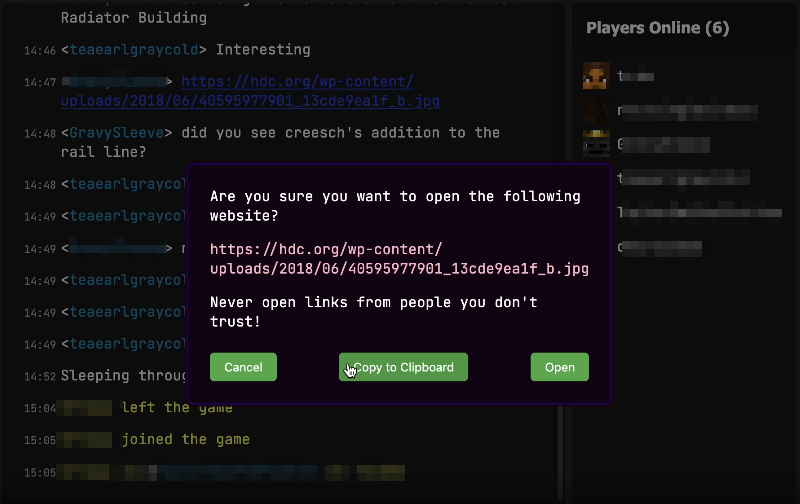
- Support for official click and hover interactions (opening URLs, achievement details, etc.)

Availability
- Minecraft version:
- 26.3 supported by Web Chat v1.10.0
- 26.2 supported by Web Chat v1.9.0-1.9.1
- 26.1 supported by Web Chat v1.7.0-v1.8.0
- 1.21.11 supported by Web Chat v1.5.0-v1.6.0
- 1.21.8 supported by Web Chat v1.4.0
- 1.21.1 - 1.21.4 are supported up to Web Chat v1.3.0 and not further.
- Mod loader: Fabric only
There are no plans to support other mod loaders.
Usage
Requirements
- Fabric API (required)
- YACL (required)
- Mod Menu (optional, needed for configuration)
Installation
- Install the mod from Modrinth or grab the latest release from GitHub.
- Start minecraft.
- Join a server.
- Go to
localhost:8080on the same computer, or use your computer's local IP address (like192.168.1.x:8080) from other devices on your network. - Start chatting.
Settings
Message settings
Ping on Username- This will ping the browser window any time a player's username appears in the chat.Extra Ping keywords- This will ping the browser window any time one of these words appear in the chat.
Network settings
HTTP Port- Port number used to serve the web interface.8080by default.Open Chat to LAN- Open the web chat to your local network so other devices (like your phone) can connect. Enabled by default. When disabled, the chat binds tolocalhostonly and is reachable from this computer alone. While enabled, a QR code button is shown in the player list that lets you quickly open the chat on your phone by scanning your computer's local network address.
Security & Privacy
This mod turns minecraft into a small web server on your computer that's only accessible (using localhost or your local IP) on your home network. This means that you can access Web Chat on a different device on your network, but not over the internet.
No data is sent over the internet beyond your normal Minecraft traffic.
Important: This mod is designed for local use only. Do not expose the web chat port to the internet. If you need remote access, setup a VPN (such as Tailscale).
How to Install Web Chat (Mod)
Web Chat by creesch is verified for Fabric across Minecraft versions 1.21.1, 1.21.11, 1.21.2, 1.21.3, 1.21.4, 1.21.8, 26.1, 26.1.1 (latest release: 1.10.0, file size: 16.6 MB). Follow the steps below to install it safely from ModCraft.tv:
- Click the Download button above and select your Minecraft version (1.21.1, 1.21.11, 1.21.2, 1.21.3, 1.21.4, 1.21.8, 26.1, 26.1.1) and platform (Fabric).
- Make sure you have the compatible loader or environment installed for Fabric.
- Move the downloaded Web Chat file into your Minecraft
.minecraft/modsfolder and launch the game.
All Versions
+ Add Version


- Support for 26.3
- Fixed a few gaps in support for text formatting
- Full Changelog**: https://github.com/Tildes-MC/minecraft-web-chat/compare/v1.9.1...v1.10.0
- Simplify shutdown and pinging fixing hang on minecraft shutdown by @creesch in https://github.com/Tildes-MC/minecraft-web-chat/pull/242
- Full Changelog**: https://github.com/Tildes-MC/minecraft-web-chat/compare/v1.9.0...v1.9.1
- Fix head image scaling on Safari by @danthedaniel in https://github.com/creesch/minecraft-web-chat/pull/229
- Security fixes by @danthedaniel in https://github.com/creesch/minecraft-web-chat/pull/230
- Handle abrupt websocket closure gracefully on shutdown by @danthedaniel in https://github.com/creesch/minecraft-web-chat/pull/231
- Add status favicons for connection status by @danthedaniel in https://github.com/creesch/minecraft-web-chat/pull/232
- Add QR code button to quickly open on your phone by @danthedaniel in https://github.com/creesch/minecraft-web-chat/pull/226
- Various dependency updates, see full changelog link.
- Small fixes to model and hover container styles by @danthedaniel in https://github.com/creesch/minecraft-web-chat/pull/172
- Fix "[object Object]" formatting bugs by @danthedaniel in https://github.com/creesch/minecraft-web-chat/pull/177
- Increase MAX_CHAT_DEPTH to handle messages from common plugins by @danthedaniel in https://github.com/creesch/minecraft-web-chat/pull/179
- Item hover formatting by @danthedaniel in https://github.com/creesch/minecraft-web-chat/pull/182
- Make all fields in show_item event components object optional by @danthedaniel in https://github.com/creesch/minecraft-web-chat/pull/183
- Mobile chrome fixes by @creesch in https://github.com/creesch/minecraft-web-chat/pull/185
- Add support for component shadow_color property by @danthedaniel in https://github.com/creesch/minecraft-web-chat/pull/186
- Show Steve head for player components by @danthedaniel in https://github.com/creesch/minecraft-web-chat/pull/187
- Fix ping pattern by @danthedaniel in https://github.com/creesch/minecraft-web-chat/pull/181
- Add support for translation fallback values by @danthedaniel in https://github.com/creesch/minecraft-web-chat/pull/188
- #135 Load history on scroll up by @danthedaniel in https://github.com/creesch/minecraft-web-chat/pull/191
- Various dependency updates, see full changelog link.
- Full Changelog**: https://github.com/creesch/minecraft-web-chat/compare/v1.5.0...v1.6.0
- Fix word-breaking by @danthedaniel in https://github.com/creesch/minecraft-web-chat/pull/141
- Hide links to web chat by @danthedaniel in https://github.com/creesch/minecraft-web-chat/pull/145
- Add support for displayName formatting by @danthedaniel in https://github.com/creesch/minecraft-web-chat/pull/144
- Update GitHub workflow to use setup-gradle@v4 by @talklittle in https://github.com/creesch/minecraft-web-chat/pull/153
- Refactor Text to Json parsing fixes #148 by @creesch in https://github.com/creesch/minecraft-web-chat/pull/163
- Maybe also remove unnused member by @creesch in https://github.com/creesch/minecraft-web-chat/pull/165
- Fix visible() description comment by @danthedaniel in https://github.com/creesch/minecraft-web-chat/pull/166
- Support for 1.21.11 by @creesch in https://github.com/creesch/minecraft-web-chat/pull/170
- Various dependency updates
## New Contributors
- @talklittle made their first contribution in https://github.com/creesch/minecraft-web-chat/pull/153
- Full Changelog**: https://github.com/creesch/minecraft-web-chat/compare/v1.4.0...v1.5.0
- 1.21.8 support by @creesch in https://github.com/creesch/minecraft-web-chat/pull/139
- Remove fallback translations by @danthedaniel in https://github.com/creesch/minecraft-web-chat/pull/113
- Ignore history when updating favicon 7
- Implement direct messaging
- Use an icon for the send button
- Minor cleanup in message_parsing.mjs
- Rework status UI / Connection state
# Technical improvements
- Workaround
Textinstances that can't be serialized to JSON - Rework error handling to be more graceful
- Simplify state updates for the player list
- Fix: In some instances server messages would cause a crash
- New**: When using web chat on a phone the player list sidebar is now accessible
- New**: The webpage will now reload if it receives messages from a newer version of the mod
- The behavior around clickable events has been refined.
- Fix: Clicking on username in tab complete
- Fix: Heads for legacy skins now render correctly.
- Fix: Hot reloading could cause a crash.
# Main
## New
- Translations are now retrieved per chat message from the game at run time and stored with the message. (#84) Meaning that mod messages will display, messages will show in the language you will have set and that the mod now officially supports **1.21.1 and up** as messages will always have the correct translation for that minecraft version.
- Support added for the
/tell,/msg,/wand/mecommands. (#82) Note: This mod is never going to support all commands as this easily can be used for abuse. - Click events are now supported (#86)
- Tab completion of usernames (#78)
- Use "Jetbrains Mono" font for chat message/input/player names making it look more like minecraft chat (#80)
- Support for legacy color/format codes and multi-space formatting (#69)
## Fixes/enhancements
- Make pingPatterns case insensitive (#63)
- Added aria labels and use semantic elements (#58)
- Hover text now renders similar to in game (#85) and supports color code (#87)
# Technical
- Restructured front-end code to not only be modules but classes (#59)
- Simplify player heads rendering (#70)
- A variety of dependencies has been updated.
# Various other
For a complete overview see the [commit history](https://github.com/creesch/minecraft-web-chat/commits/main/)
# Screenshots
!
# Main
- Players on the server are now visible on the right side including their head texture (#45)
- Ping support for both player names, player display names and configurable keywords (#40) Thanks @teaearlgraycold!
- Chat history is now stored on the client side per server. When you join a server the chat history will be loaded in the browser. (#41)
- Minecraft chat message parsing has been improved considerably. (#24) Thanks @teaearlgraycold!
# Technical
- Setup editorconfig and gitattributes (#39)
- Normalize multiple spaces from chat input to one (#37)
- Support raw numbers for component values (#35)
- Add structured message format for WebSocket traffic (#32)
- Vitest (#31)
- Rewrite web interface replacing NanoHTTPD in favor of Javalin (#10)
- Use javascript modules (#11)
- Add types using @ts-check (#8)
# Various other
For a complete overview see the [commit history](https://github.com/creesch/minecraft-web-chat/commits/main/)
- Message parsing has been extensively reworked to support the majority of styling for messages. This includes hover text and obfuscated text.
- Text input is now a text area which helps with spellcheck.
- Filter out illegal characters to prevent crashing the game.
- Cut up messages that are too long.


